

What Is Code Smell and How Do You Fix It
You’ve probably heard the term “code smell” thrown around, but what does it actually mean? Think of it less like a hard-and-fast rule and more like a gut feeling from an experienced developer.
A code smell is a hint in your source code that signals a deeper design problem might be lurking under the surface. It’s not a bug—it won’t crash your app right now. Instead, it’s a symptom of structural weakness that makes your code a nightmare to maintain, understand, and build upon.
Decoding the Language of Your Codebase
Here's an analogy. Imagine you walk into a house. The lights turn on, the water runs, and the structure is solid. Nothing is obviously broken. But you notice a faint, musty odor in the air. That smell is a warning. It suggests a hidden problem, like a slow leak behind a wall that could lead to mold and rot if you ignore it.
That’s exactly what a code smell is. The code works, but that funky smell is telling you something’s off. It might be a function that’s grown way too long, a class trying to do three different jobs at once, or the same block of code copied and pasted all over the project. These smells create friction, slowing down future work and making bugs more likely.
Code Smells vs. Bugs vs. Technical Debt
To really get a handle on code smells, it helps to see how they differ from two other terms you hear all the time: bugs and technical debt. They’re all related and often show up together, but they are not the same thing. Confusing them leads to bad priorities and messy team communication.
A code smell is a hint that something might be wrong, not a certainty. It's a call to investigate, a warning sign from your codebase that a deeper architectural problem may be lurking beneath the surface.
Let’s quickly break down the key differences to make this crystal clear.
Code Smells vs Bugs vs Technical Debt at a Glance
This table gives a quick rundown of how these three concepts stack up against each other.
| Concept | Definition | Immediate Impact | Long-Term Consequence |
|---|---|---|---|
| Bug | A flaw that causes incorrect or unexpected behavior. | The application doesn't work as intended for the user. | User frustration, data corruption, system crashes. |
| Code Smell | A surface-level indicator of a deeper design problem. | None. The code functions correctly for now. | Code becomes hard to maintain, understand, and modify. |
| Technical Debt | The implied cost of rework from choosing an easy (limited) solution. | Faster initial delivery, but with known compromises. | Slower development velocity, increased bug rates, higher costs. |
So, what's the takeaway?
- A bug is a broken window. It’s an obvious defect, like a button that doesn’t submit a form or a calculation that’s just plain wrong. It needs to be fixed, now.
- A code smell is that musty odor. It doesn't stop the house from being livable today, but it’s a red flag for future problems.
- Technical debt is the consequence of leaving that smell unaddressed. Every time a developer has to work around a smelly piece of code, they pay an interest payment in the form of extra time, effort, and mental energy. Code smells are a primary driver of technical debt.
Why Code Smells Hurt Your Business
You can’t just ignore a code smell. It’s not some minor technical issue—it's a direct threat to your team's speed and your company's bottom line. Sure, these issues won't crash your app today, but they act like a silent tax on every single feature you try to build from now on. They slowly drain productivity and drive up costs.
This isn't a new idea. The term code smell was coined by Kent Beck way back in the late 1990s and made famous by Martin Fowler. Even then, the problem was obvious. By 2000, surveys revealed that over 70% of code in large systems was plagued with smells like long methods or duplicated logic. This mess was responsible for maintenance costs eating up a staggering 80% of the total software budget.
This financial drain is insidious. It compounds with every new feature. When developers run into smelly code, they first have to waste time just trying to understand its confusing structure before they can even think about writing anything new. That friction slows everything down.
The True Cost of Bad Code
A few innocent-looking code smells create a ripple effect that spreads far beyond the engineering team. What starts as a "small" inconvenience in the codebase quickly morphs into a major business roadblock.
- Slower Time to Market: Every hour a developer spends fighting convoluted code is an hour they’re not building new features. A smelly codebase is a direct drag on development velocity, delaying product launches and handing your competitors an easy win.
- More Bugs, More Problems: Code that’s complex and hard to follow is a breeding ground for defects. When making a simple change feels like defusing a bomb, the risk of introducing new bugs goes through the roof. This means more time spent firefighting and less time building.
- Higher Developer Turnover: Good developers want to build great products, not wrestle with a messy codebase all day. Constant frustration is a direct path to burnout and turnover, and replacing talent is expensive—think recruiting, hiring, and months of onboarding.
From Technical Flaw to Financial Liability
At the end of the day, a code smell is just a symptom of a much bigger problem: accumulating technical debt. Each smell is like taking out a small loan against the future health of your codebase. You might get a short-term speed boost, but the interest payments show up as lost productivity and endless maintenance. Want to get ahead of it? Check out our guide on how to strategically reduce tech debt before it sinks your projects.
A codebase riddled with smells is like trying to build a skyscraper on a shaky foundation. You can add a few floors, but each new level becomes progressively slower, more expensive, and riskier to build than the last. Eventually, progress grinds to a halt.
This is why dealing with code smells is a critical business conversation, not just a technical one. Investing in clean code isn’t about chasing perfection. It’s about making sure your software remains a flexible asset that can actually adapt to what the market needs. By finding and fixing these smells, you lower the total cost of ownership and free your team to deliver real value, faster.
A Practical Field Guide to Common Code Smells
Knowing code smells exist is one thing; spotting them in your own codebase is another skill entirely. Think of this section as your field guide for identifying these common issues out in the wild. We’ll group them into a few intuitive categories to help you build a mental catalog of what to look for.
Just like a seasoned naturalist can spot an animal by its tracks, an experienced developer learns to recognize these patterns almost by instinct. This guide will help you train that intuition. We're moving past the theory and into concrete examples that show you not just what is wrong, but why it's a problem and how you can fix it.
This flowchart really drives home how a seemingly small code smell can cascade into significant business problems, ultimately grinding feature delivery to a halt.
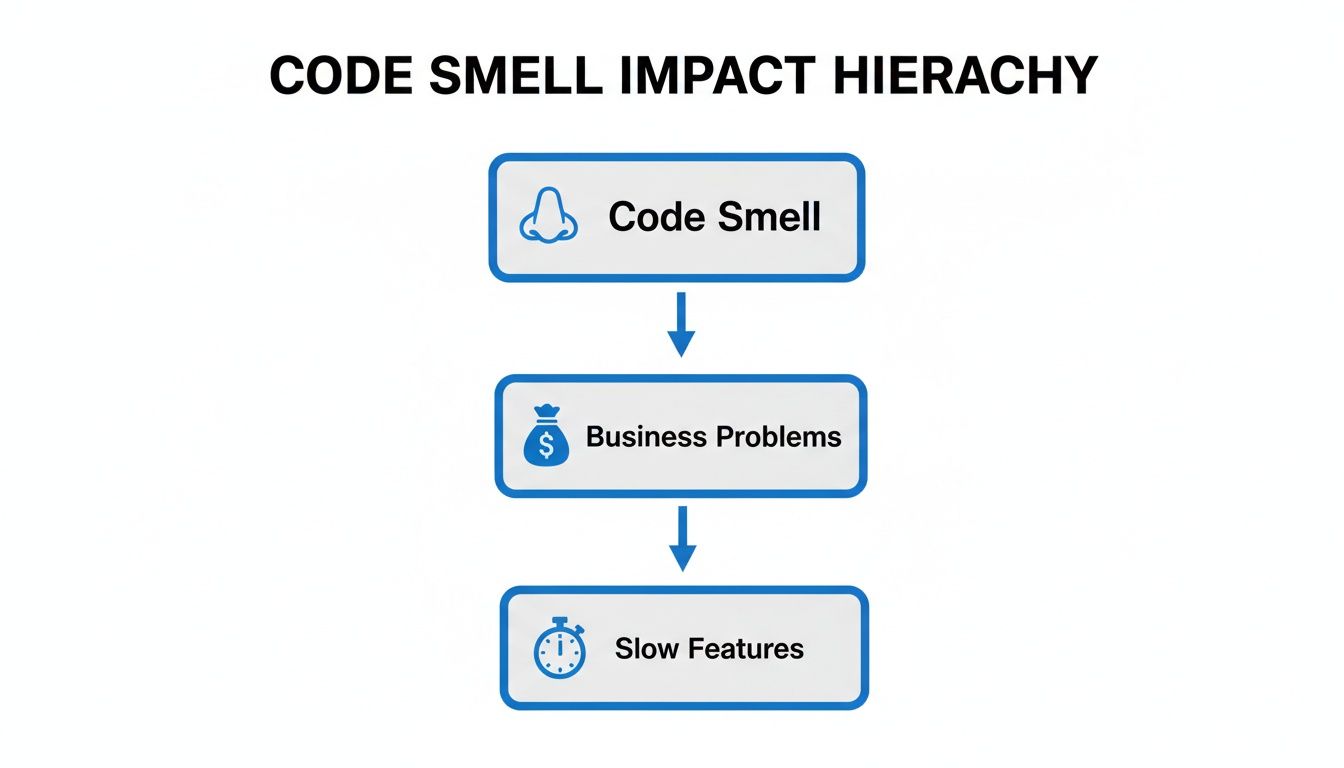
It’s a clear visual reminder that technical issues are never just technical issues. They create a direct path from poor code quality to negative financial outcomes and a slower pace of innovation.
Category 1: Bloaters
Bloaters are chunks of code—classes, methods, or functions—that have ballooned to a point where they can't do their job effectively anymore. They become magnets for complexity, making them a nightmare to understand, test, and maintain.
Long Method This is one of the most classic code smells out there. A long method is a clear sign that a single function is trying to do way too many things at once. The logic becomes a tangled mess of conditionals and loops that's nearly impossible to follow.
- The Problem: When one method juggles multiple responsibilities, changing one part often has unintended side effects on another. They are also notoriously difficult to unit test properly.
- The Fix: Your go-to solution is the Extract Method refactoring technique. You find cohesive blocks of logic inside the long method and pull them out into their own smaller, well-named functions. Each new function should do just one thing.
Large Class Much like a long method, a large class has simply accumulated too many responsibilities over time. It often has a massive number of instance variables and methods, trying to be a "god object" that knows and does everything.
- The Problem: Large classes shred the Single Responsibility Principle. They’re hard to reuse, and their tight coupling of different functionalities makes them brittle and prone to bugs.
- The Fix: Use the Extract Class technique. Split the class into smaller, more focused classes by grouping related variables and methods together and moving them into a new class with a clear, singular purpose.
Category 2: Dispensables
Dispensables are parts of your code that are completely unnecessary, adding more clutter than value. Getting rid of them makes the codebase cleaner, smaller, and easier to navigate. They are the low-hanging fruit of any refactoring effort.
A key principle of clean code is that it should be as simple as possible, but no simpler. Dispensable code smells are what happens when the "no simpler" part goes wrong—they represent complexity without purpose.
Duplicate Code This is arguably the most common and costly code smell. It happens when you have identical or nearly identical blocks of code scattered across your application, violating the Don't Repeat Yourself (DRY) principle.
Duplicate code is shockingly pervasive, affecting up to 15-20% of lines in some enterprise codebases. A study of 500,000 commits found that those containing duplicate code were 35% more likely to introduce defects within six months.
Dead Code This refers to any variable, parameter, method, or class that is completely unused. It often gets left behind after a refactoring or a change in requirements.
- The Problem: While it doesn't cause functional errors, dead code is noise. It makes developers waste mental energy trying to figure out its purpose, only to realize it has none. It bloats the codebase and can mislead anyone trying to maintain it later.
- The Fix: The solution is simple: Delete it. Modern version control like Git is your safety net. If you discover you needed that code after all, you can always get it back from your history. Be bold and remove the clutter.
Category 3: Couplers
Couplers are smells that point to excessive or inappropriate connections between different parts of your system. When modules are too tightly coupled, a change in one area forces a cascade of changes everywhere else, making the system rigid and fragile.
Feature Envy This smell happens when a method in one class seems more interested in the data of another class than its own. You'll spot this when a method makes a bunch of calls to get data from another object just to perform a calculation.
- The Problem: Feature Envy is a strong hint that the method is in the wrong place. It breaks the fundamental object-oriented principle of keeping data and the operations on that data together.
- The Fix: The answer is to use the Move Method refactoring. Just relocate the envious method to the class it's so "envious" of. This immediately improves encapsulation and keeps related logic and data in one cohesive unit.
When it comes to implementation, especially for identifying and fixing these issues in a large codebase, sometimes you need an outside perspective. For those working with Ruby, professional Ruby on Rails consulting services can offer the expertise to quickly diagnose and remediate deep-rooted code quality problems.
To wrap things up, here’s a quick-reference table summarizing the common smells we've discussed, their symptoms, and the typical refactoring solutions.
Common Code Smells and Their Solutions
| Code Smell | Primary Symptom | Common Refactoring Solution |
|---|---|---|
| Long Method | A single function contains too many lines of code and handles multiple, distinct tasks. | Extract Method: Break down the method into smaller, single-purpose functions. |
| Large Class | A class has too many instance variables and methods, violating the Single Responsibility Principle. | Extract Class: Split the class into smaller, more cohesive classes, each with a single responsibility. |
| Duplicate Code | Identical or very similar code blocks appear in multiple places in the codebase. | Extract Method/Class: Consolidate the duplicated logic into a single, reusable component. |
| Dead Code | Variables, methods, or classes are declared but never used by any part of the application. | Safe Delete: Remove the unused code. Version control provides a safety net if it's needed later. |
| Feature Envy | A method in one class excessively uses the methods and data of another class. | Move Method: Relocate the method to the class it is "envious" of to improve encapsulation. |
Keep this guide handy as you work. The more you train your eye to spot these patterns, the more second-nature it will become to write clean, maintainable, and resilient code from the start.
How to Find and Prioritize Code Smells
Alright, so you know what code smells are and why they matter. That's step one. But how do you actually go about hunting them down in a massive, sprawling codebase?
Finding these hidden problems is part art, part science. It takes a combination of human intuition and powerful automation to build a solid defense against technical debt.
The search always starts with people. Practices like manual code reviews and pair programming are your first line of defense. These sessions are about more than just catching bugs; they create a shared understanding of the code and build a team culture that actually cares about quality. A fresh set of eyes can instantly spot convoluted logic or a bloated method that you’ve stared at for so long you've gone blind to it.
Automating Your Code Quality Safety Net
While manual reviews are fantastic, they just don't scale. You can't possibly catch every little issue across a huge project by hand. This is where automated tools become your best friend, working tirelessly in the background to enforce your standards.
These tools generally come in two flavors:
- Linters: Think of tools like ESLint for JavaScript or Pylint for Python as your lightweight style guides. They're great at catching formatting inconsistencies, stylistic mistakes, and some of the more obvious code smells. Their main job is to keep everyone’s code looking and feeling consistent.
- Static Analysis Platforms: These are the heavy hitters. They dig deep into your code's structure, logic, and complexity without ever running it. They can uncover complex smells like crazy high cyclomatic complexity or deep coupling issues that a simple linter would completely miss. If you want to go deeper on this, check out our guide on tools like the Sonar static code analyzer.
The real magic happens when you plug these tools directly into your CI/CD pipeline. This setup ensures every single commit gets scanned automatically, acting as a quality gate that stops new smells from ever making it into your main branch.
Creating a Prioritization Framework
Once you start finding smells, you’ll hit a critical realization pretty quickly: not all code smells are created equal. If you try to fix every single one, you'll end up in "refactoring paralysis," where the team is constantly cleaning up minor issues that have almost no real-world impact. You have to be smart about it.
The goal isn't a codebase with zero smells—it's a codebase where the most painful and costly smells are systematically eliminated. Prioritization transforms refactoring from a chore into a high-impact strategic activity.
To figure out what to fix now and what can wait, you need to weigh three key factors:
- Business Impact: How critical is the part of the app that's affected? A smelly function in your core payment processing logic is a five-alarm fire. The same smell in a rarely-used admin report? Not so much.
- Code Churn: How often does this code get changed? You want to focus your energy on the "hotspots"—the parts of the code that developers are constantly touching. Fixing smells here delivers the biggest bang for your buck, making all future work faster and safer.
- Severity of the Smell: Let’s be honest, some smells are just worse than others. A long method might be annoying, but a smell like Divergent Change—where making one simple conceptual change forces you to edit a dozen different files—can bring development to a screeching halt. In fact, this one smell impacts an estimated 30% of classes in legacy systems, and its presence can crush a team’s development velocity.
The Future of Code Quality with AI Assistants
While manual reviews and static analysis are essential, a new chapter in code quality has begun, and it's being written by artificial intelligence. AI assistants are completely changing how developers find and fix code smells. The whole process is shifting from a delayed, after-the-fact cleanup job to a proactive, real-time partnership.
Traditional static analysis tools have always worked off a fixed set of rules. They’re great at spotting specific, known patterns but often lack any real understanding of the code's purpose. This leads to a problem every developer knows well: "alert fatigue." You get flooded with so many noisy, low-context warnings that it becomes impossible to tell what’s critical and what’s just a minor style suggestion. Pretty soon, you just start ignoring the alerts, which defeats the entire purpose.
The Shift to Context-Aware AI Feedback
This is where modern AI platforms are a massive leap forward. Instead of just matching patterns, these intelligent assistants analyze code with a genuine understanding of its context, the developer's intent, and how it fits into the rest of the codebase. The feedback they provide is far more relevant and, more importantly, actionable.
Imagine an assistant that works right inside your IDE, giving you feedback not in minutes or hours, but in seconds. That's the whole point of in-IDE AI platforms like kluster.ai. They don't wait for a pull request or a CI/CD pipeline to run; they analyze your code as you write it, offering insights on the spot.
This real-time loop has some huge benefits:
- Proactive Prevention: It helps developers stop creating code smells in the first place by flagging potential issues the moment they appear.
- Intelligent Refactoring: An AI assistant won't just tell you about a "Long Method" smell; it can suggest a logical way to break it down and even generate the refactored code for you to review.
- Reduced Cognitive Load: Developers can stay focused on the actual business problem they're trying to solve, trusting their AI partner to handle the background chore of maintaining code quality.
From Detection to Automated Enforcement
But the real magic happens when this technology moves beyond just spotting problems to intelligently enforcing standards and fixing the code. An AI-powered system can be configured with your team’s specific coding standards, security policies, and architectural patterns. It then acts as an automated guardian, making sure every line of code lines up with those established rules.
By integrating AI directly into the developer's workflow, we shift the focus from reactive code cleanup to proactive code craftsmanship. The goal is no longer just to find smells, but to create an environment where they are far less likely to occur.
This creates a powerful, consistent standard across the entire organization. For example, if your team decides to deprecate a certain library or enforce a new naming convention, the AI assistant can automatically flag and even fix non-compliant code in real-time. This cuts out the endless back-and-forth in PR comments and ensures quality standards are actually met without slowing anyone down. As AI tools get more woven into the fabric of development, their use cases are expanding to areas like leveraging LLMs in coding interviews.
Building Healthier Code from Day One
At the end of the day, AI assistants are helping teams build healthier, more maintainable software from the very beginning. They act as a constant, patient mentor, offering guidance and catching mistakes before they get baked into the codebase and morph into costly technical debt.
This proactive approach doesn't just improve the final product; it makes life better for developers. It frees engineers from the tedious parts of code review and quality checks, letting them pour their creative energy into innovation and building features that actually deliver business value. The future of managing code smells isn't just about better tools—it's about a smarter, more collaborative way of writing code.
Fighting Code Smells Isn't About Tools, It's About Culture
Let's be real: you can have the best linters and static analysis tools in the world, but they won't fix a broken culture. Tools are allies, but they can't force a team to care about code quality. The only lasting solution to code smells is a cultural one—getting your team to fundamentally change how they think and talk about the code they write every single day.
It's about shifting from a "gatekeeper" mentality, where quality is someone else's problem at the end of the line, to a mindset of continuous craftsmanship. It means everyone, from the junior dev to the tech lead, shares the belief that clean, maintainable code is their personal responsibility. A culture that beats code smells doesn't reward clever, unreadable code; it rewards clarity and sustainability over short-term hacks.
Make Quality a Habit, Not a Project
To make this change stick, you have to bake good habits directly into your team's daily workflow. This isn't about adding more meetings or red tape. It’s about creating small, consistent practices that build a powerful feedback loop.
Three habits will give you the biggest bang for your buck right away:
- Create a Single Source of Truth for "Good Code." Your team needs a clear, documented set of coding standards. Define your conventions for naming, structure, and patterns, then use automated linters to do the nagging for you.
- Schedule Time for Refactoring. Don't wait for technical debt to become a five-alarm fire. A great way to do this is to live by the Boy Scout Rule: "Always leave the code cleaner than you found it." This encourages tiny, incremental improvements that add up fast.
- Make Code Reviews About Mentoring, Not Just Bug Hunting. Shift the focus of your pull requests from simply catching errors to sharing knowledge. Use them as a chance to discuss design trade-offs, teach better patterns, and level up the entire team.
A healthy engineering culture doesn’t see refactoring as a special project. It’s just part of the job, like writing tests or shipping features.
When you create this kind of environment, the team stops reacting to problems and starts preventing them. This cultural foundation is what makes your efforts sustainable. It’s not a one-time push for quality; it's a long-term commitment that pays off in faster development, more stable systems, and happier, more engaged developers.
Got Questions About Code Smells?
Even when you know what to look for, practical questions always pop up when you start digging through your own codebase. Let's tackle some of the most common ones developers run into.
Do I Really Have to Fix Every Single Code Smell?
Nope. And you shouldn't try. The decision to refactor has to be strategic, not just a knee-jerk reaction. Context is king.
If you find a code smell in a critical, high-traffic part of your app—like the payment processing flow or user login—that’s a five-alarm fire. Fixing it will immediately pay you back in stability and easier future updates.
But what about that smelly code in a legacy module that hasn’t been touched in three years? The risk and effort to refactor it probably outweigh any real benefit. It’s a simple cost-benefit analysis: always prioritize based on business impact and how much friction it’s causing your team right now.
Can Clean Code Turn Smelly?
Absolutely. "Clean code" isn't a trophy you win once; it's a standard you have to constantly maintain. Code that was pristine on day one can start to degrade as new features, bug fixes, and last-minute requirements get tacked on.
Think of it like a perfectly organized workshop. It starts out clean, but after a few projects, tools get left out and clutter builds up. That’s why continuous refactoring isn’t just a nice-to-have, it’s a core discipline for keeping a codebase healthy for the long haul.
How Do I Get My Manager to Care About This?
You have to speak their language. Managers don't care about technical purity; they care about speed, stability, and money. Frame the conversation around business results.
Don’t say: “This class is violating the Single Responsibility Principle.”
Instead, try: “If we refactor this module, we can cut the time it takes to add new payment options in half and slash the bug rate for that feature.”
Bring data to the table. Show them exactly how specific code smells are slowing down development, causing more bugs, or making it a nightmare to onboard new hires. Explain that investing a little time in refactoring now is a strategic move that saves a lot of money and headaches later.
Ready to stop code smells before they ever get committed? kluster.ai integrates directly into your IDE, providing real-time, AI-powered feedback that catches issues and enforces your team’s standards as you code. Start your free trial and ship healthier code faster.