

Sonar Static Code Analyzer A Developer's Guide
Think of a Sonar static code analyzer as an expert proofreader who meticulously checks every line of your application's code for bugs, security holes, and "code smells" before you even try to run it. It’s a proactive set of eyes that catches subtle errors and potential disasters early in the game, helping your team stick to high standards for code quality and security right from the very first commit.
Understanding Sonar Static Code Analysis
At its core, static analysis is like having a building inspector review the architectural blueprints for a skyscraper. The inspector doesn't need to see the finished building to spot a fundamental design flaw, a structural weakness, or a safety violation. They can see it right there on the paper.
A sonar static code analyzer does the same thing, but for your software. It examines the raw source code itself—not the running application—to identify issues that could lead to crashes, security breaches, or massive maintenance headaches down the road.
This whole "shift-left" approach is a game-changer because finding and fixing a bug during development is exponentially cheaper than dealing with it after your product is in the hands of users. By catching problems early, Sonar helps you stop technical debt from piling up, which keeps the codebase clean, understandable, and secure. This isn't just a nice-to-have anymore; it's standard practice in modern software development.
The Sonar Ecosystem
Sonar isn't just one single product. It’s a whole ecosystem of tools designed to work together across the entire development lifecycle.
- SonarLint: This is an IDE extension that gives you real-time feedback right as you're typing. Think of it as your first line of defense, catching simple mistakes on the fly before they ever become a problem.
- SonarQube: This is the self-hosted mothership. It’s a central server that analyzes entire projects, tracks code quality over time, enforces quality gates to block bad code, and gives your team detailed dashboards to see what's going on.
- SonarCloud: The cloud-based version of SonarQube, delivered as a SaaS solution. You get all the same powerful analysis without having to manage your own server infrastructure.
As software gets more and more complex, tools like these are becoming absolutely essential. In fact, the global market for static code analysis tools is projected to hit around $1.06 billion by 2025, a clear sign that organizations are getting serious about code security and reliability. You can dig into more data on the static code analysis market to see just how fast the industry is growing.
The SonarQube dashboard gives you that high-level, 30,000-foot view of a project's health, flagging bugs, vulnerabilities, and those dreaded code smells. This centralized view lets teams quickly gauge the overall quality and security posture of their applications, making it way easier to prioritize fixes and keep standards high.
How Sonar Improves Your Code Quality
Think of a static code analyzer like Sonar as an expert mechanic for your codebase. It doesn't just check if the engine runs; it meticulously inspects every part for hidden problems that could lead to a breakdown later. It organizes its findings into three core pillars that, together, paint a clear picture of your software's health.
Getting a handle on these categories is the first step to turning those analysis reports into real, meaningful improvements.
The Three Pillars of Code Health
Sonar classifies issues into three main buckets:
- Bugs: These are the real deal—actual errors in your code that will almost certainly cause crashes or incorrect behavior at runtime. A bug is a ticking time bomb just waiting to go off.
- Vulnerabilities: These are security flaws. Think of them as unlocked doors in your application that malicious actors could exploit. This covers everything from common attack vectors like SQL injection to accidentally leaving sensitive data exposed.
- Code Smells: These aren't bugs, but they're signs of trouble. A "code smell" is a pattern in your code that's confusing, inefficient, or just plain hard to maintain. It’s a symptom of a deeper problem that makes your software fragile and ripe for future bugs.
Let's quickly break down these issue types with some simple examples.
Sonar Issue Types Explained
| Issue Type | Description | Simple Example |
|---|---|---|
| Bug | A clear error in the code that will lead to incorrect behavior. | Using == to compare strings in Java instead of .equals(), which checks for object reference, not value. |
| Vulnerability | A security weakness that can be exploited by an attacker. | Building a database query by directly adding user input, opening the door for a SQL injection attack. |
| Code Smell | A sign of a deeper design problem that makes code hard to maintain. | A single function that has ballooned to 500 lines with dozens of nested if-else blocks. |
Each of these issues tells you something different about your code, from immediate dangers (bugs) to long-term risks (code smells).
Setting the Standard with Quality Gates and Profiles
Sonar doesn't just point out problems; it gives you the tools to enforce your team's quality standards automatically. This is where Quality Profiles and Quality Gates come into play, and they're game-changers.
- Quality Profile: This is basically your team's customized rulebook. It's where you define which specific rules Sonar should check for, like "avoid deeply nested loops" or "disallow hardcoded passwords." You can turn rules on or off to perfectly match your project's needs and coding style.
- Quality Gate: This is the pass/fail checkpoint for your code. A Quality Gate is a set of conditions your code must meet to pass inspection. For example, you can set a gate that requires "No new critical bugs" or "Code coverage on new code must be > 80%."
A Quality Gate acts as an automated bouncer for your CI/CD pipeline. If new code doesn't meet the standards you've set, the gate fails, preventing that low-quality code from ever getting merged or deployed.
This combination is a powerful way to manage technical debt—the hidden cost of choosing a quick and easy solution now instead of a better, more sustainable one. Sonar helps you spot and fix the very issues that create this debt. By setting clear standards, Sonar fosters a culture where code quality becomes a shared, measurable responsibility.
If you're looking to dive deeper into this topic, there are some great general strategies to reduce technical debt that complement Sonar's automated approach.
Integrating Sonar Into Your Workflow
A powerful static analyzer is most valuable when it’s not a separate, manual chore, but an invisible, automated part of your daily coding routine. The real magic happens when you weave a sonar static code analyzer directly into your development process, creating a tight feedback loop that helps your team ship cleaner, safer code without slowing down. This is the whole idea behind the "shift-left" movement—catching problems early, before they become expensive headaches.
The goal is to automate quality and security checks at every single stage, from the moment a developer types a line of code to the second it’s merged into the main branch. This creates a powerful, preventative workflow.
This diagram breaks down the typical analysis flow, showing how Sonar neatly categorizes issues into bugs, code smells, and vulnerabilities.
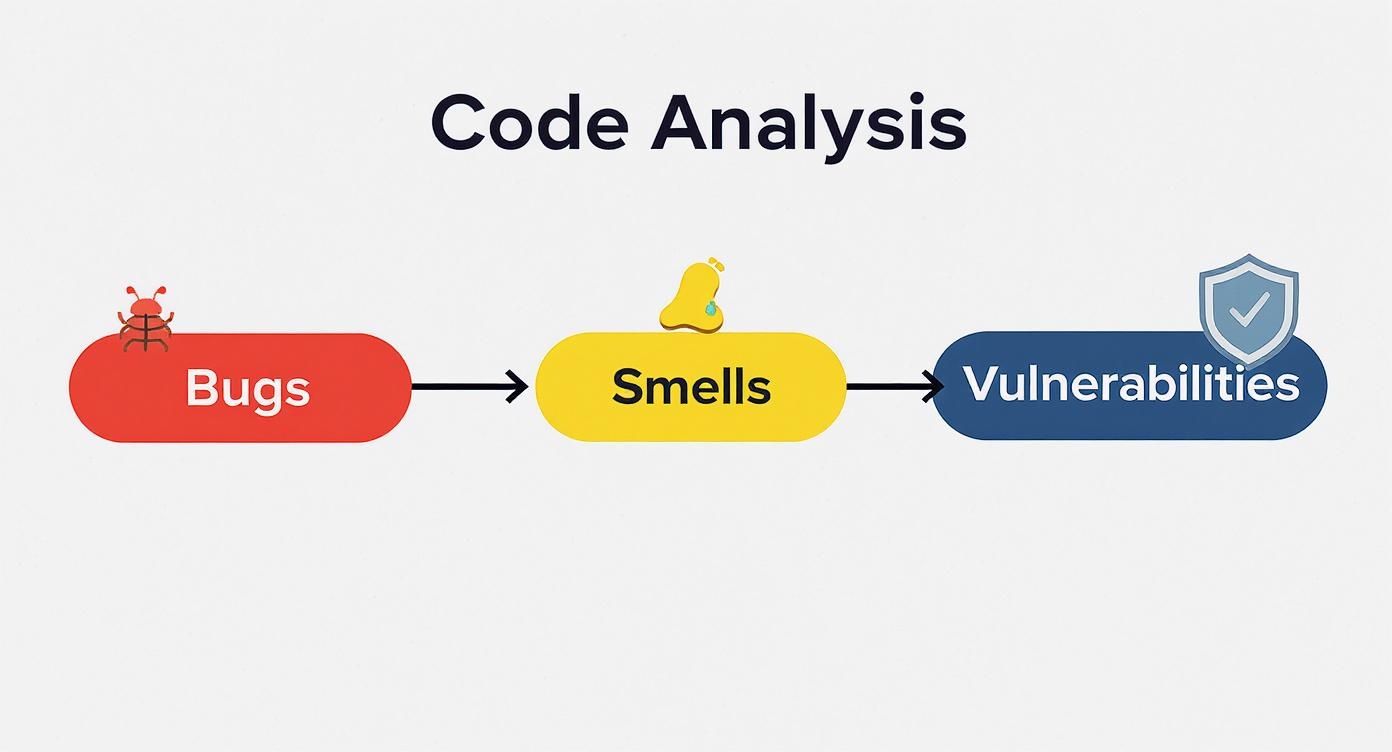
As you can see, Sonar's analysis gives you a holistic view. It tackles immediate errors, long-term maintainability risks, and critical security gaps all in one unified process.
Integrating at Every Level
A truly effective setup doesn't just run Sonar in one place; it integrates it at multiple points in your development lifecycle. Think of it as creating layers of defense against bad code.
-
In the IDE with SonarLint: This is your first line of defense. SonarLint acts like a spellchecker for your code, giving you real-time feedback right inside editors like VS Code or IntelliJ. It catches simple bugs and code smells as you type, stopping them from ever getting committed in the first place.
-
In the CI/CD Pipeline with SonarQube or SonarCloud: This is the gatekeeper. By plugging Sonar into your Continuous Integration (CI) pipeline—whether you use Jenkins, GitLab CI, or GitHub Actions—you can automatically scan every single pull request. This is where Quality Gates become absolutely critical, failing the build if new code doesn't meet the standards you've set.
This CI/CD integration is where the "shift-left" concept really pays off. Instead of a developer finding a critical security flaw weeks after it was introduced, the pipeline simply blocks the problematic code from ever being merged. It’s a game-changer.
This kind of automated, early detection is a cornerstone of modern software development. It's no surprise that SonarSource reports its platform is used by over 7 million developers across more than 400,000 organizations. A huge reason for that is how dramatically CI/CD integration cuts the cost of fixing defects.
Connecting to Your Tools
Getting the most out of Sonar means connecting it to the tools your team already uses, especially your version control system. For example, great GitHub integrations can completely automate these workflows.
When these checks run automatically, every single code change is scrutinized against your team's standards. This is one of the most fundamental best practices for code review. The result is a consistent, high-quality codebase where developers are empowered to fix issues immediately, creating a virtuous cycle of continuous improvement.
Making Sense of Sonar Analysis Reports
A report from a sonar static code analyzer can feel like drinking from a firehose. It's packed with data, but raw data alone doesn't fix anything. The real skill is turning those insights into actual code improvements. When you first pop open a SonarQube or SonarCloud dashboard, you get a clean, high-level look at your project’s health, usually boiled down to simple letter grades.
Think of these grades—from ‘A’ to ‘E’—as your project's report card. They give you an immediate gut check on how your code stacks up. An 'A' means you’re in great shape, while an 'E' is a blaring alarm signaling critical issues that need your attention now. It’s a beautifully simple system for cutting through the noise and prioritizing your work.

Interpreting the Core Metrics
So where do those grades come from? They’re calculated from three core pillars, each representing a different dimension of your codebase's health. Getting a handle on these is the first step to making sense of any report.
- Reliability (Bugs): This is all about stability. Your reliability grade reflects the number and severity of bugs Sonar found. A low grade here (think 'D' or 'E') is a strong hint that your application is probably crashing or behaving in ways you didn't intend.
- Security (Vulnerabilities): This metric measures your code’s exposure to potential attacks. It flags well-known weaknesses like SQL injection, cross-site scripting, and other nasty surprises. A bad grade means you've left doors open for attackers.
- Maintainability (Code Smells): This one is all about technical debt. A code smell isn't a bug, but it’s a sign that your code is overly complex, confusing, or just plain hard to work with. A low grade means future development will be slow and painful.
The great thing is that each metric gives you a direct path to investigate. You can click into any of these pillars to get a detailed list of every issue Sonar flagged, complete with the exact file, line number, and often a suggestion for how to fix it.
The Clean as You Code Philosophy
Staring at a report for a legacy project with thousands of issues can be demoralizing. Trying to fix everything at once is a recipe for burnout. This is exactly why Sonar champions its "Clean as You Code" philosophy.
The core idea is simple but powerful: stop the bleeding. Focus all your energy on ensuring that new code is clean and free of issues from day one.
Instead of trying to boil the ocean by fixing years of accumulated cruft, your team makes small, consistent improvements. The Quality Gate is set up to fail a build only if new or changed code introduces a problem. Old code is left alone for now.
This shifts your team’s mindset away from massive, infrequent cleanup sprints and toward a daily habit of maintaining quality. It's a pragmatic strategy. Over time, as old code gets refactored or replaced during normal development, the overall health of the entire project improves naturally. It makes high-quality code an achievable, sustainable goal instead of some far-off, impossible dream.
Using Sonar for Security and Compliance
Sonar isn't just for cleaning up code style or fixing annoying bugs. It’s a powerful first line of defense for your application's security, acting as a foundational DevSecOps tool that weaves security scanning right into your daily development workflow. This shifts security from being a last-minute gatekeeper to a shared, proactive responsibility.
How does it pull this off? Through its powerful SAST (Static Application Security Testing) engine. Think of SAST as an automated security expert that inspects your code’s DNA for common weaknesses. It meticulously scans for known vulnerabilities without ever needing to run the application, catching potential threats at the earliest possible stage.
This "shift-left" approach is incredibly effective at spotting the kinds of security risks that developers can accidentally introduce while they're focused on building features.
Uncovering Critical Vulnerabilities
Sonar's SAST engine is trained to find some of the most common and dangerous security flaws out there. This isn't just about theory; it finds real-world problems that could easily lead to data breaches or system takeovers if left unchecked.
Here are a few of the heavy hitters Sonar targets:
- SQL Injection: Prevents attackers from hijacking your database queries through shady user input.
- Cross-Site Scripting (XSS): Stops malicious scripts from getting injected into your web pages and running in your users' browsers.
- Insecure Secrets: Flags things like hardcoded passwords, API keys, or other credentials that were accidentally left exposed in the source code.
- Insecure Deserialization: Catches unsafe handling of object data, which can open the door to remote code execution.
By automatically flagging these issues, Sonar acts as a vigilant guardian for your codebase. It makes sure security isn’t an afterthought, but a continuous, automated part of how you build software.
Aligning with Industry Standards
For a lot of companies, meeting security and compliance standards isn't optional—it's a requirement. Sonar makes this whole process much easier by mapping its findings directly to well-known industry benchmarks. Its rule sets are built to align with standards like the OWASP Top 10 and the Common Weakness Enumeration (CWE).
This direct mapping is a lifesaver for teams that need to prove they comply with regulations like GDPR or HIPAA. When an auditor asks how you're preventing specific types of attacks, you can point directly to your Sonar reports and Quality Gates as concrete proof of your security posture.
This growing focus on compliance is a huge driver in the industry. In fact, the market for static analysis tools is projected to hit $1.33 billion by 2029, largely fueled by these security and regulatory demands. You can read more about the growth of the static analysis market to see just how important this has become.
Common Questions About Sonar Analyzers
As teams start using a sonar static code analyzer, the same few questions always pop up. It's a powerful tool, no doubt, but really getting the most out of it means understanding its specific role, how its different parts work together, and where it fits in the bigger picture.
Let's clear up some of the most common points of confusion. Getting this right from the start helps you integrate Sonar smoothly and avoid any mix-ups about what it does—and what it doesn't.
What Is the Difference Between SonarQube, SonarCloud, and SonarLint?
The easiest way to think about these three is as a perfectly coordinated team, where each player has a specific job.
-
SonarLint: This is the coach whispering in your ear. It’s a free plugin that lives right inside your IDE (like VS Code or IntelliJ) and gives you instant feedback as you’re typing. It’s your first line of defense, catching simple mistakes before you even hit save.
-
SonarQube: This is the self-hosted team headquarters. It’s a central server you run on your own infrastructure where your project's entire code quality history, dashboards, and reports live. Think of it as the ultimate source of truth for your team's quality standards.
-
SonarCloud: This is the same headquarters, but hosted in the cloud by SonarSource. You get the exact same powerful analysis as SonarQube, but it's delivered as a SaaS solution. This frees you from the headache of managing and maintaining servers.
So, you'd use SonarLint for immediate, in-the-moment checks, and then connect it to SonarQube or SonarCloud to make sure everyone follows the same rules and to get that big-picture project overview in your CI/CD pipeline.
Does Sonar Replace Dynamic Security Testing Tools?
Nope, it works alongside them. This is a really important distinction to make. Sonar is all about Static Application Security Testing (SAST). You can think of SAST like an architect meticulously checking a building's blueprints for structural flaws before a single brick is laid. It analyzes the raw source code for potential vulnerabilities.
Dynamic Application Security Testing (DAST), on the other hand, is like hiring a security team to actively try and break into the finished building. DAST tools poke and prod a running application from the outside, looking for vulnerabilities that only show up when the code is actually executing.
A solid security strategy needs both. SAST finds issues early and cheaply right in the code, while DAST uncovers runtime problems that SAST simply can't see. Using Sonar doesn't let you skip dynamic testing; it just means you'll have fewer, less critical issues to find later on.
How Does Sonar Compare to AI Code Review Tools?
They solve different, though related, problems. Sonar is a deterministic, rules-based expert. It's like a strict compliance officer who meticulously enforces a predefined set of standards for code quality and security. Its findings are consistent and predictable, making it perfect for establishing a baseline quality bar and meeting compliance requirements.
Modern AI code review tools are a different beast. They act more like a senior developer mentoring you. They can offer contextual advice on tricky logic, suggest better implementation strategies, and even understand the intent behind the code. They nail the "human" parts of a code review that go beyond a simple rulebook. Our guide on automated code review tools digs into these differences in much more detail.
Ultimately, you'd use Sonar to automate the baseline quality checks and an AI tool to bring more nuance and intelligence to your code reviews.
Can Sonar Analyze Any Programming Language?
Sonar supports an impressive list of languages—over 30 in total—covering nearly every popular one you can think of: Java, Python, C#, JavaScript, and TypeScript are all on the list. The free Community Edition of SonarQube offers fantastic coverage for many of these mainstream languages, which makes it super accessible.
However, support for more specialized or legacy languages like COBOL, PL/SQL, or Apex (for Salesforce) is generally reserved for the paid commercial editions (Developer, Enterprise, or Data Center). Before you go all-in, it's always smart to double-check the official SonarSource documentation to make sure your specific tech stack is fully supported by the version you're looking at. That way, you know you're getting the comprehensive analysis you need for every part of your application.
At kluster.ai, we believe in catching issues right where they happen—inside the IDE. Our real-time AI code review platform provides instant feedback on AI-generated code, verifying it against your team's standards, security policies, and the original developer intent. See how you can cut review times in half and merge with confidence. Start free or book a demo.