

A Practical Guide to Static Java Code Analysis
Static Java code analysis is all about checking your source code for problems before you even try to run it. Think of it like an architect reviewing a building's blueprints. They can spot design flaws, structural weaknesses, and safety issues long before a single brick is laid, saving a ton of time and money down the road.
Understanding Your Code Before It Runs
Imagine trying to proofread a novel just by listening to someone read it aloud. You might catch some awkward phrasing, but you'd completely miss spelling errors, grammatical mistakes, and sloppy sentence structure. Dynamic analysis, which tests code while it's running, is like listening to the story.
Static Java code analysis, on the other hand, is like meticulously reading the manuscript page by page. It gives you a complete, structural view of your code, letting you see how all the pieces fit together—or where they don't. This "blueprint review" is a cornerstone of modern software development and a key part of any solid DevSecOps practice. It systematically scans your code for all sorts of issues that could turn into major headaches later.
Key Benefits of Early Analysis
Catching problems before the code is even compiled gives you some massive advantages:
- Slash Costs: Fixing a bug in production can be up to 100 times more expensive than fixing it during development. Static analysis finds these issues at the cheapest possible stage—right in the IDE.
- Boost Code Quality: It acts like an automated senior developer, enforcing consistent coding standards and best practices across the entire team. This leads to code that's easier to read, maintain, and build on.
- Lock Down Security: It's your first line of defense against common security vulnerabilities. This proactive security check, often called Static Application Security Testing (SAST), finds flaws before they can ever be exploited in the wild.
The industry gets it. The market for static code analysis tools was valued at USD 1,520.75 million and is expected to explode to USD 3,805.60 million by 2032. Why the surge? Skyrocketing cybersecurity threats are a huge driver, as these tools are incredibly effective at identifying 70-80% of common vulnerabilities like SQL injection and buffer overflows before they ever hit a server. You can dig into more of this market trend on the Future Market Report.
Static analysis isn't just about finding bugs; it's about building a disciplined engineering culture. It automates the enforcement of quality and security standards, freeing up developers to focus on solving bigger problems.
Static vs. Dynamic Code Analysis
To really get what static analysis does, it helps to compare it with its counterpart, dynamic analysis. They aren't rivals; they're two sides of the same coin, each designed to find different kinds of problems. Dynamic analysis tests the application while it's running to uncover runtime errors, performance bottlenecks, and memory leaks that you can only see when the code is in motion.
Static analysis looks at the code's structure, while dynamic analysis looks at its behavior.
Here’s a quick table to make the difference crystal clear.
Static vs Dynamic Code Analysis at a Glance
This quick comparison highlights the fundamental differences between static and dynamic analysis, giving you immediate context for where each one fits into your development lifecycle.
| Aspect | Static Analysis (SAST) | Dynamic Analysis (DAST) |
|---|---|---|
| When It Runs | Before code compilation and execution | During application runtime |
| What It Needs | Only the source code is required | A running, executable application |
| Primary Goal | Finds bugs, security flaws, and style issues in the code's structure | Finds runtime errors, performance issues, and memory leaks |
| Analogy | Reviewing a building’s blueprint | Stress-testing a completed building |
Ultimately, a mature development process uses both. Static analysis ensures the blueprint is solid, and dynamic analysis makes sure the finished building can withstand an earthquake. You really need both to build truly robust software.
How Static Analysis Works Under the Hood
To really get why static Java code analysis is so powerful, you have to peek behind the curtain. These tools aren't just running simple checks; they’re using some seriously sophisticated techniques to deconstruct and interpret your code with surgical precision. Think of it like a master detective examining a crime scene—every single piece of evidence gets scrutinized to build a complete picture.
At the very core of this process is something called an Abstract Syntax Tree (AST). This isn't as scary as it sounds. An AST is just a tree-like representation of your code's structure. Instead of seeing a flat text file, the analyzer sees a hierarchical map that details how every variable, method, and class relates to one another. It's the grammatical blueprint of your application, letting the tool navigate your code’s logic just like you would, but way faster and more systematically.
This visualization compares that blueprint-based approach with the dynamic, runtime-based method of code analysis.
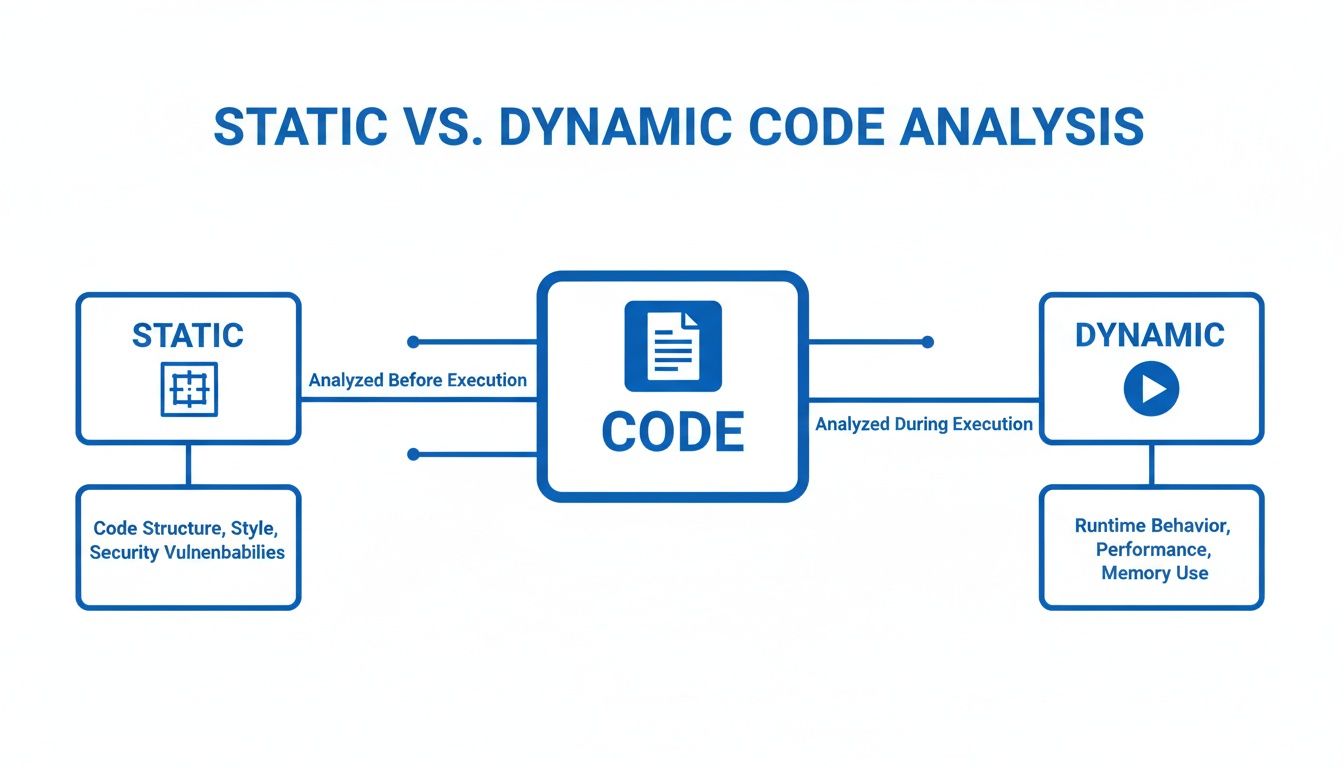
As you can see, static analysis focuses on the code itself (the blueprint), while dynamic analysis observes the running application (the live system). They’re two sides of the same quality coin.
Following the Data Trail
Once the analyzer has its AST blueprint, it can start doing the really cool stuff. One of the most critical techniques is data-flow analysis. Imagine your data is a package moving through a massive logistics network. Data-flow analysis acts like a high-tech tracking system, following that package from its origin all the way to its final destination.
This is absolutely essential for security. For instance, it can trace user input from a web form (a potentially "tainted" source) right through to a database query. If it sees that untrusted data being used directly in a SQL statement without proper sanitization, it immediately flags a potential SQL injection vulnerability. This is a classic example of what Static Application Security Testing (SAST) is built to find. While this technique is incredibly powerful, you might be interested in how a dynamic code analyzer complements it by testing the application in a live environment.
Enforcing the Rules of the Road
Another fundamental technique is type analysis. In Java’s strongly-typed world, every variable and expression has a specific type, like String, Integer, or a custom object you created. Type analysis is simply the process of verifying that you're using these types correctly everywhere.
It's like ensuring you can’t plug a toaster into a headphone jack. The analyzer checks every connection and operation to make sure the types are compatible, preventing an entire category of runtime errors before they ever happen.
This process catches all sorts of common mistakes, like trying to assign a String to an Integer variable or calling a method that doesn't exist on an object. It's a foundational check that guarantees a basic level of code integrity.
Searching for Known Bad Patterns
Finally, a ton of what static analysis tools do comes down to pattern-based checking. Over the years, we developers have identified thousands of common coding mistakes, anti-patterns, and "code smells"—those little things that aren't technically bugs but often lead to them.
A pattern-based checker works like a detective with a book of known criminal methods. It scans your code for signatures that match these well-known problematic patterns.
- Null Pointer Risks: It looks for situations where a variable could be
nullright before it’s used, preventing the dreadedNullPointerException. - Resource Leaks: It verifies that resources like file streams or database connections are always closed, typically inside a
finallyblock. - Inefficient Code: It can spot things like creating unnecessary objects inside a tight loop, which can quietly kill your application's performance.
By combining all these techniques—building an AST, tracking data flow, verifying types, and matching known bad patterns—static analysis tools give you a deep, multi-layered examination of your Java code. The result is an application that's more robust, more secure, and a whole lot easier to maintain.
Choosing the Right Static Analysis Tool for Java
Picking a static analysis tool for Java feels like walking into a massive hardware store for a single screwdriver. You’re hit with a wall of options, each designed for a very specific job. The trick isn't finding the "best" tool, but finding the right one for your project.
It all boils down to what you’re trying to accomplish. Are you trying to get a large team to write code that looks the same? Or are you hunting down those nasty, performance-killing bugs hiding in your bytecode? Maybe you just need a high-level dashboard to see the health of your whole codebase. Each goal points to a different tool.
Defining Your Core Need
Before you start comparing features, you have to know what problem you're trying to solve. Most needs fall into one of three buckets. Figure out which one is yours, and the list of options gets a lot shorter.
- Code Style and Consistency: The goal here is simple: make the code readable and maintainable. These tools act like a strict editor, making sure every developer follows the same formatting rules, naming conventions, and code structure.
- Bug Detection: This is all about finding mistakes that could blow up at runtime or cause your app to behave unpredictably. These tools look past the style and analyze your code’s logic for common screw-ups and known bug patterns.
- Comprehensive Quality Management: This is the 30,000-foot view. It’s not just about style or bugs, but also security holes, code complexity, and technical debt. These tools are central platforms for watching and improving code quality over the long haul.

A Tour of the Top Java Tools
Let’s run through the big names in the Java world. We'll look at what they’re good at and where they shine, so you can map your needs to the right solution.
Comparison of Top Java Static Analysis Tools
To make sense of the landscape, here's a quick breakdown of the most popular static analysis tools for Java, comparing what they focus on, their ideal use case, and how they integrate into your workflow.
| Tool | Primary Focus | Best For | Integration |
|---|---|---|---|
| Checkstyle | Code Style & Formatting | Enforcing team-wide coding standards and a consistent, readable codebase. | Build tools (Maven, Gradle), IDEs |
| PMD | Bug Detection & "Code Smells" | Finding suboptimal code, unused variables, and potential logic errors. | Build tools (Maven, Gradle), IDEs |
| SpotBugs | Deep Bug Detection | Hunting for tricky bugs in compiled bytecode, especially concurrency issues. | Build tools (Maven, Gradle), IDEs |
| Error Prone | Compile-Time Bug Checks | Catching common programming mistakes as compilation errors. | Compiler Plugin (javac) |
| SonarQube | Comprehensive Code Quality | Providing a central dashboard for quality, security, and technical debt. | CI/CD servers, build tools, IDEs |
Each tool has its place. You'll often see teams using a combination—like Checkstyle for formatting and SpotBugs for deep analysis—to cover all their bases before feeding everything into a platform like SonarQube for a complete overview.
A Deeper Look at Each Tool
Checkstyle: The Guardian of Your Coding Standards
Think of Checkstyle as the enforcer for your team’s style guide. Its one and only job is to make sure your code follows a specific set of rules. It’s incredibly configurable, letting you dictate everything from where the curly braces go to how long a line can be.
You’ll want Checkstyle when your main goal is a clean, consistent codebase that everyone can read. It’s lightweight and perfect for failing a build in your CI/CD pipeline if someone doesn’t follow the rules.
PMD: The Code Smell Detective
While Checkstyle cares about how your code looks, PMD cares about what your code does. It's a beast at finding potential problems like empty try/catch blocks, unused variables, and methods that are way too complex.
PMD is your go-to when you want to sniff out bad practices that could turn into real bugs later. It even comes with a Copy/Paste Detector (CPD) to hunt down duplicated code—a classic source of maintenance headaches.
SpotBugs: The Bytecode Investigator
SpotBugs (the spiritual successor to FindBugs) comes at the problem from a totally different angle. Instead of reading your source code, it analyzes the compiled Java bytecode. This lets it find a whole other class of bugs you'd never see in the source, like misusing object monitors in concurrent code.
Pick SpotBugs when you need to hunt for those really tricky, hard-to-find bugs, especially anything related to resource leaks or multithreading. Analyzing the bytecode gives you a perspective that source-level tools just can't match.
SonarQube: The Command Center for Code Quality
SonarQube isn't just a tool; it's a full-blown platform for continuously inspecting code quality. It pulls in findings from other tools (along with its own powerful analyzers) and puts them all on a single, clean dashboard. You get metrics on bugs, vulnerabilities, code smells, test coverage, and technical debt, all in one spot. We cover this in much more detail in our guide to the Sonar static code analyzer.
This platform is what you need when you want a central command center for code quality across your entire company. It’s perfect for setting up "quality gates" that stop bad code from ever making it to production. For teams that are growing fast, the machine learning-based analysis in tools like SonarQube has been shown to slash false positives by 30%, making automated reviews far more trustworthy.
Integrating Static Analysis into Your Workflow

Static analysis tools are at their best when you forget they're even there—when they're just an automatic part of how you build software, not another chore to remember. The real goal is to make quality and security checks a seamless habit. This happens when you weave them into the two most critical points in your workflow.
First, you wire them directly into your Integrated Development Environment (IDE). Second, you set them up as an automated gatekeeper in your Continuous Integration/Continuous Deployment (CI/CD) pipeline. Let's break down how to make static Java code analysis a natural extension of the way you already work.
Real-Time Feedback in Your IDE
The cheapest and fastest place to fix a bug is the exact moment it's created. When you integrate static analysis tools directly into your IDE, like IntelliJ IDEA or VS Code, you get exactly that: an immediate feedback loop.
As you type, these tools hum quietly in the background, underlining problematic code just like a spell-checker flags a typo. This real-time feedback stops simple mistakes from ever polluting a commit.
IDE integration transforms static analysis from a periodic, formal check into a constant companion. It’s like having an expert pair programmer watching over your shoulder, catching errors and offering suggestions before they can cause any real trouble.
This immediate feedback is incredibly powerful. Some studies show that IDE-integrated tools can catch up to 75% of common errors like null pointer risks, silly syntax mistakes, and concurrency issues on the fly. You're not just fixing bugs; you're preventing them from being born in the first place.
Building Automated Quality Gates in CI/CD
While your IDE protects you, the individual developer, CI/CD integration protects the entire team. By adding a static analysis step to your pipeline in Jenkins, GitLab CI, or GitHub Actions, you create an automated quality gate.
Think of this gate as your team's tireless guardian. If a commit introduces code that violates your team's quality or security rules, the build automatically fails. This physically stops bad code from ever being merged into your main branch. It's a non-negotiable backstop.
Setting up a quality gate means defining clear rules and thresholds. For example, you might configure your pipeline to fail if:
- Any new high-severity security vulnerabilities are detected.
- The cyclomatic complexity of a method goes over a certain limit.
- The new code doesn't meet minimum test coverage requirements.
This automated enforcement ensures every single commit is held to the same high standard, systematically improving the health of your codebase over time.
Tuning the Rules to Build Trust
One of the biggest reasons static analysis fails is noise. If a tool spits out hundreds of false positives or whines about trivial style issues, developers will learn to ignore it faster than a pop-up ad. Building trust in the tool is everything.
The key is to start small and tune the rules collaboratively. Don't turn on every rule at once. Instead, begin with just the most critical checks—things like major security vulnerabilities and well-known bug patterns. Once the team sees the value and trusts the alerts, you can gradually introduce more style-related or best-practice checks.
This iterative approach ensures every finding is meaningful and actionable. When developers know an alert is genuine, they'll start to see static Java code analysis not as a nuisance, but as an invaluable partner in writing cleaner, safer, and more maintainable code.
The Next Frontier of Code Review with AI
Traditional static analysis is a powerhouse. Think of it as a seasoned security guard with a detailed checklist; it's fantastic at spotting known bugs and security flaws like unlocked doors or broken windows before they ever hit production. But the game is changing, fast. The rise of AI coding assistants has introduced a whole new class of errors that these classic tools just weren't built to see.
AI-generated code can look perfect on the surface but hide subtle logic flaws, performance regressions, or what we call "hallucinations"—code that runs but completely misses the developer's actual intent. These aren't syntax errors or known bad patterns. They're about context and purpose. A standard static analyzer, with its fixed rulebook, simply can't ask, "Is this what the developer meant to do?"
Beyond Patterns: AI-Powered Verification
This is precisely the gap where a new generation of AI-powered code review platforms comes in. Instead of just checking code against a list of rules, these tools act as an intelligent verification layer, running in real-time right inside your IDE. They operate with a much deeper, more contextual understanding of what's happening.
These platforms get the full picture by looking at a few key sources of information:
- Developer Intent: They analyze the original prompt or instructions given to the AI assistant to grasp the desired outcome.
- Repository Context: The tool scans existing code in the project to make sure new additions fit with established patterns and conventions.
- Project Documentation: By understanding the project's goals and requirements, the AI can flag code that, while functional, might violate architectural principles.
This approach lets AI review platforms catch the tricky stuff that static Java code analysis traditionally can't. For instance, it might spot a newly generated function that's way less efficient than an existing utility method already in the codebase. Or it might catch a logical error that only becomes obvious when you consider the developer's initial request.
AI-powered review doesn't replace static analysis; it completes the picture. Static analysis secures the foundation by catching known vulnerabilities and style errors, while AI review ensures the architectural and logical integrity of the code actually aligns with human intent.
The Rise of Intent-Driven Analysis
The impact here is huge, especially as AI assistants become a daily part of our workflows. Static analysis has long been a cybersecurity pillar, capable of finding up to 85% of security flaws in Java code. But with AI assistants now generating 30-50% of new code, we need a new verification step.
Platforms with a dedicated intent engine can check AI outputs against the original prompts, slashing hallucinations and enforcing compliance on the fly. It's no surprise that enterprises using these advanced review systems are reporting 90% fewer vulnerabilities making it to production.
This screenshot from kluster.ai shows exactly how this works in practice, offering real-time, context-aware feedback right in the developer's IDE.
You can see the AI-powered system catching a potential logic error in AI-generated code. It doesn't just flag it; it suggests a fix that aligns with the project's existing patterns, all without forcing the developer to leave their editor.
Creating a Comprehensive Safety Net
By combining the strengths of both static analysis and AI review, development teams can build a robust, multi-layered defense against quality issues. Traditional static analysis acts as the first line, enforcing standards and catching the usual suspects. The AI review layer then scrutinizes the logic, performance, and alignment with the developer's true goals. For teams looking to formalize this strategy, a comprehensive code review checklist can tie it all together.
This dual strategy creates a powerful safety net for modern, AI-assisted development. It ensures the speed and productivity we gain from AI tools don't come at the cost of code quality, security, or maintainability. The future of code review isn't just about checking for what's explicitly wrong—it's about understanding and verifying what is contextually right.
Measuring the ROI of Your Static Analysis Efforts
Let's be honest: adopting any new tool needs a business case. Static Java code analysis is no different. While the technical perks seem obvious to us engineers, managers and team leads need to see the return on investment (ROI) in black and white.
The good news is that static analysis isn't a cost center. It's an engine for efficiency and stability, and its impact is absolutely measurable.
The conversation should be all about cost avoidance and shipping faster. The real value comes from catching bugs early in the development cycle, which is exponentially cheaper than fixing them in production. A critical bug that makes it to release can cost up to 100 times more to fix than one caught during development, once you factor in emergency patches, damage control, and late-night QA sessions.
Key Performance Indicators to Track
To make your case, you need hard numbers. Focus on concrete metrics that draw a straight line from static analysis to better team performance and a healthier product. These KPIs give you the data to show clear, positive trends over time.
- Fewer Production Bugs: This is the big one. Track the number of bugs reported by users, especially those a static analyzer could have flagged (think null pointers, resource leaks, security flaws). A steady drop in these tickets is your strongest proof of ROI.
- Faster Code Review Cycles: When bots handle the tedious style checks and common bug patterns, your team can focus on what matters: the logic and architecture. Measure the average time a pull request stays open. If that number goes down, your development velocity is going up.
- Better Code Maintainability Score: Tools like SonarQube give you a "maintainability" or "technical debt" rating. Watching this score improve sprint-over-sprint proves you're actively fighting complexity, which makes all future development faster and cheaper.
Visualizing Progress and Long-Term Value
Dashboards are your best friend here. A SonarQube dashboard, for example, can show a visual timeline of declining technical debt, fewer "code smells," and the elimination of critical security issues over a few quarters. It’s an at-a-glance summary that makes the value instantly clear to stakeholders.
Static analysis flips quality control from a reactive, expensive firefight into a proactive, cost-effective habit. It’s not about adding a step; it’s about making the entire development lifecycle more predictable and efficient.
By finding and fixing problems early, static analysis is a massive contributor to long-term savings in software development. This proactive approach stops the "interest" on technical debt from compounding, preventing small issues from snowballing into huge, expensive refactoring projects down the road.
Ultimately, the ROI of static analysis isn't just in the bugs you find. It's in the costly production failures and painful development slowdowns you manage to avoid completely.
Frequently Asked Questions
Alright, let's tackle some of the common questions that pop up when teams start digging into static Java code analysis. Here are the straight-up answers to a few things you might be wondering about.
Can Static Analysis Replace Manual Code Reviews?
Nope, not a chance. But it makes them a whole lot better.
Think of it this way: static analysis tools are brilliant at the repetitive, checklist-style work. They’ll catch known bug patterns, style screw-ups, and common security holes with machine-like consistency. This frees up your human reviewers to stop nitpicking syntax and focus on what really matters—the stuff a machine can’t see.
Is the architecture sound? Does the business logic actually solve the right problem? Is this design going to be a nightmare to maintain in six months? That's where human expertise comes in. The tool handles the grunt work, letting your team provide the high-level strategic oversight. It’s a partnership that makes reviews faster and way more effective.
How Do I Handle a High Number of False Positives?
Getting spammed with false positives is the quickest way to make your team completely ignore a new tool. The trick is to be surgical with your ruleset. Don't just flip on every single rule on day one—that’s a recipe for disaster.
Start small. Pick a handful of high-impact rules that target critical security vulnerabilities or blatant bug patterns. Once your team sees the value and starts to trust the feedback, you can gradually layer in more checks for style and best practices. Customizing the rules to your project's reality is everything.
A well-tuned static analysis tool should feel like a helpful signal, not overwhelming noise. Start small, get buy-in from your team, and iterate on your ruleset over time.
Is Static Analysis Only for Finding Bugs?
Finding bugs is a huge part of it, but it's not the whole story. One of the biggest wins from static analysis is enforcing consistent coding standards and keeping the codebase maintainable.
These tools are great at flagging overly complex methods, duplicated code, and style drift. That consistency makes it so much easier for new developers to get up to speed and for everyone to navigate the code without hitting cognitive roadblocks.
And let’s not forget security. A whole branch of static analysis, known as Static Application Security Testing (SAST), is built specifically to hunt down security vulnerabilities before your code ever ships. It’s a non-negotiable for building applications that are secure from the ground up.
Ready to move beyond traditional checks and catch the complex logic errors static analysis can miss? kluster.ai offers real-time, AI-powered code review right in your IDE. By analyzing developer intent, it verifies AI-generated code against your project's context, catching hallucinations and regressions before they ever become a problem. Start free or book a demo at https://kluster.ai to bring instant verification to your workflow.