

Your Guide to Software Static Testing and Code Quality
Think of software static testing like a mechanic inspecting a car while it's still on the assembly line. Before the engine is ever turned on, they're checking every bolt, wire, and connection for flaws. In the same way, static testing analyzes your code for bugs, vulnerabilities, and quality issues without ever running it, catching problems at the absolute earliest stage.
Unpacking the Value of Software Static Testing
Static testing is a fundamental quality check where your code is examined and reviewed before it's even compiled, let alone executed. It's like an architect pouring over blueprints to spot structural flaws before a single brick is laid. Instead of waiting for a wall to collapse (a runtime error), they find the weakness on paper. That’s the entire philosophy behind static testing: find and fix issues while they are still just lines in a text file.
This proactive "shift-left" approach is non-negotiable for modern development teams. By embedding analysis right at the beginning of the Software Development Lifecycle (SDLC), you stop simple mistakes from snowballing into complex, expensive nightmares down the road. It’s always easier to erase a line on a blueprint than to tear down a faulty foundation.
The Core Goals of Static Analysis
The main objective is to bake quality and security into the code from the very start. This isn't just one thing; it's a few key goals working together:
- Early Bug Detection: This is about catching the low-hanging fruit—common programming errors, null pointer exceptions, and resource leaks—before they waste a QA engineer's time.
- Security Vulnerability Identification: Actively scanning for well-known weaknesses like SQL injection, cross-site scripting (XSS), and buffer overflows that hackers love to exploit.
- Coding Standards Enforcement: Think of it as an automated style guide. It ensures the entire codebase follows team-wide best practices, keeping everything consistent and readable.
- Reduced Development Costs: A bug fixed during the coding phase is exponentially cheaper than one discovered in production. We’re talking orders of magnitude.
By identifying defects early, static analysis can reduce the cost of fixing them by a factor of 10 to 100. It transforms quality assurance from a final checkpoint into a continuous, everyday part of writing code.
Why Static Testing Is More Important Than Ever
In an age of rapid-fire deployments and AI-assisted coding, having an automated overseer is no longer a luxury—it's a necessity. AI coding assistants are incredible at churning out functional code, but they can just as easily introduce subtle, hard-to-spot flaws. Static testing acts as a critical safety net, verifying that all code, whether written by a seasoned developer or an AI, meets your quality and security standards.
The massive industry-wide focus on security has also pushed specialized static testing tools into the spotlight. Just look at the market for Static Application Security Testing (SAST) software, a key part of the static testing ecosystem. The market is projected to hit over USD 2,805 million by 2026, a figure that screams one thing loud and clear: businesses now see early security scanning as a non-negotiable cost of doing business. This isn't just a trend; it's a fundamental shift in how reliable software gets built, making software static testing an indispensable part of any mature development workflow.
Exploring the Core Techniques of Static Testing
Static testing isn't just one thing; it's more like a detective's toolkit. You wouldn't use a fingerprint kit to break down a door, right? In the same way, a solid static testing strategy mixes different techniques to catch a wider range of issues, combining sharp human intuition with the raw power of automation.
These techniques generally fall into two buckets: manual reviews and automated analysis. They both aim to improve code quality without actually running the program, but their methods couldn't be more different. Getting good at both is the real secret to building a quality process that actually works.
This map gives you a bird's-eye view of how all the pieces of software static testing fit together, from its purpose to how it stacks up against dynamic testing.
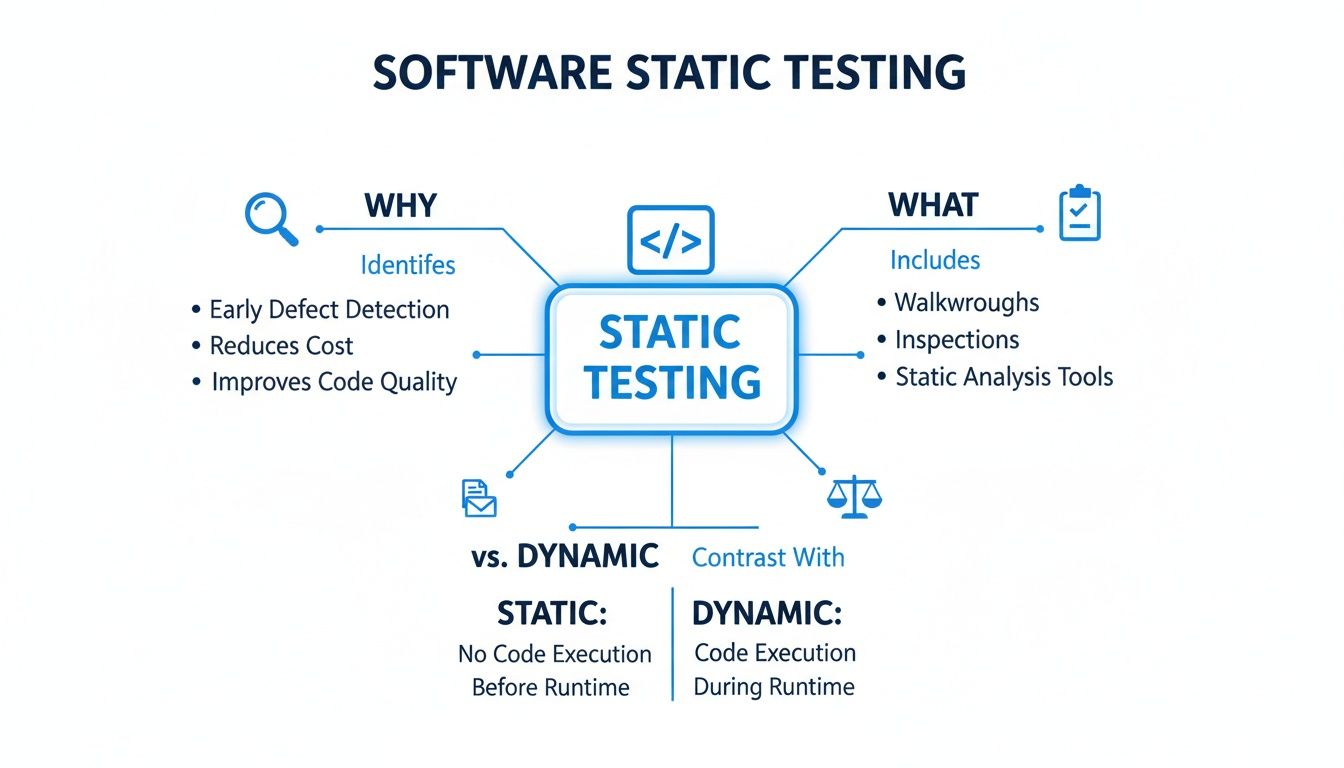
As you can see, it’s a multi-layered defense against bugs, blending human oversight with automated tools to protect your codebase.
The Human Element: Manual Reviews
Long before automated scanners existed, there were manual reviews—a practice that's still critical today for spotting problems that tools just can't see. These are all about developers getting together to examine each other's work to find logic errors, make the code more readable, and share knowledge.
Manual reviews are uniquely good at figuring out the "why" behind the code. A tool can flag a function for being too complex, but only another person can tell you if the entire approach is flawed or doesn't line up with what the business actually needs.
Here are a few ways teams typically handle manual reviews:
- Code Reviews: This is the most common one. Developers formally review each other's code changes, usually inside a pull request. It’s fantastic for enforcing team standards and catching those subtle logic bugs that can slip through the cracks.
- Walkthroughs: A more informal session where the code's author guides the team through their work, explaining the logic and getting feedback on the fly. This is a great way to spread knowledge around and get new team members up to speed.
- Inspections: This is the most formal and structured type of review, complete with trained moderators and specific roles for each participant. Inspections follow a very strict process to find defects against a predefined checklist.
The Power of Automation: Static Code Analysis
While having another set of eyes on your code is priceless, it doesn't scale. You can't realistically ask your team to check every line of a massive codebase against thousands of known bug patterns and security flaws. That's where automated static code analysis tools come in—they're like a tireless expert reviewer that can scan millions of lines of code in minutes.
These tools work by parsing the source code and checking it against a huge database of rules, allowing them to systematically find potential issues a human might easily overlook. If you want to go deeper on this, we have a detailed guide on how static Java code analysis works under the hood.
Automated static analysis is the ultimate safety net. It institutionalizes best practices and ensures that no matter who wrote the code, it's checked against the same high standards for security, performance, and reliability.
A crucial part of this automated approach is Static Application Security Testing (SAST). These tools are specifically built to find vulnerabilities, directly supporting security best practices for web applications. They’re designed to hunt for common security weaknesses like:
- SQL Injection: Flaws that could let an attacker mess with your database.
- Cross-Site Scripting (XSS): Vulnerabilities that allow attackers to inject malicious scripts into your site for other users to see.
- Insecure Deserialization: A nasty flaw that can lead to an attacker running their own code on your server.
In the end, the best software static testing strategies don't make you choose between manual and automated methods—they weave them together. Manual reviews provide the high-level context and catch design flaws, while automated analysis enforces coding standards and security policies at scale. Together, they create a powerful, layered defense that makes sure your code isn't just working, but is also clean, secure, and maintainable from day one.
Integrating Static Testing into Your Daily Workflow
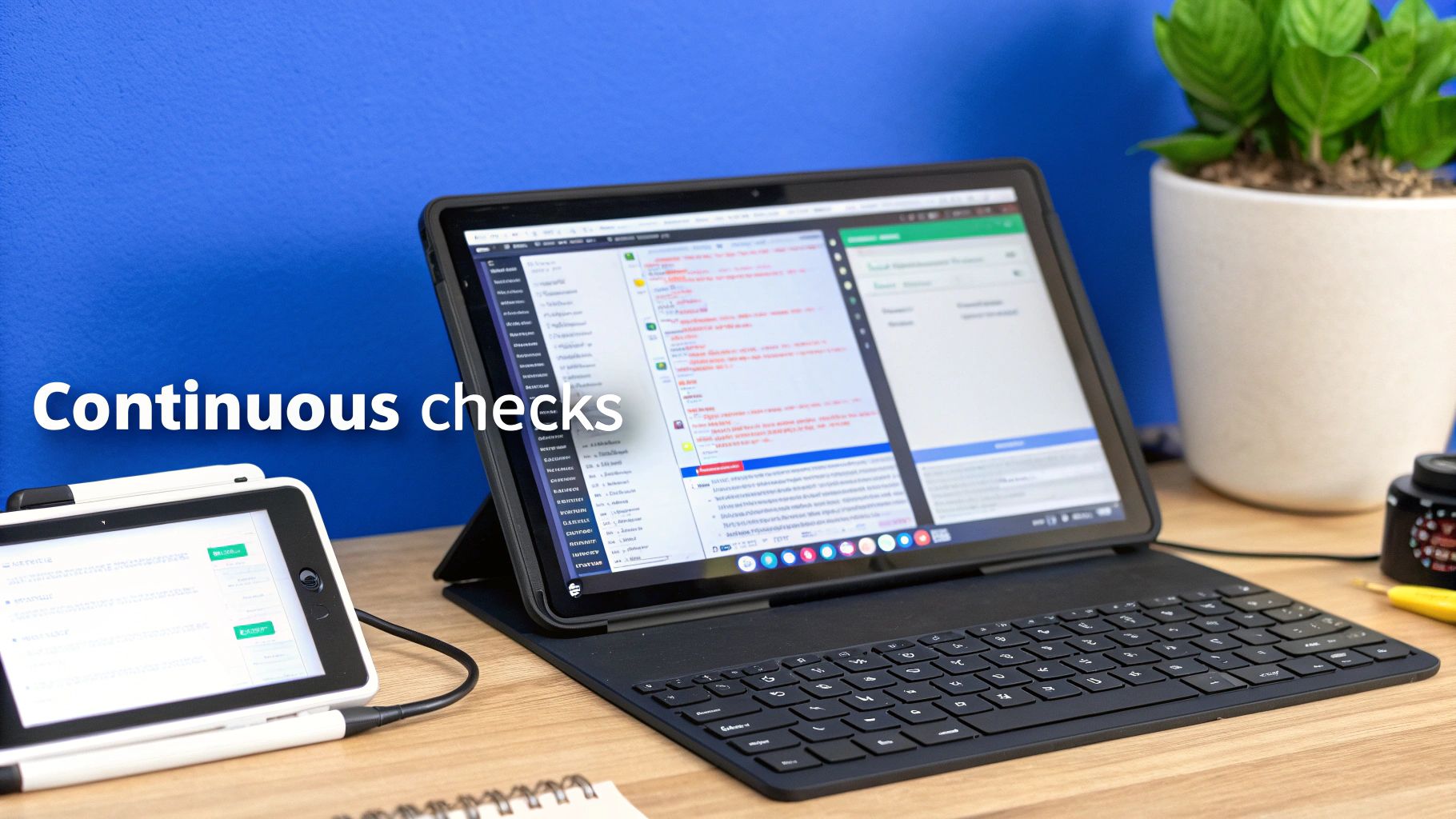
Real-world software static testing isn’t some stressful, last-minute gate you have to pass before a release. When done right, it's a continuous, automated habit that’s just part of your team's natural rhythm.
Think of it like the spellchecker in your word processor. It’s most helpful when it catches typos the moment you make them, not after you've already finished the entire novel.
To make static analysis feel less like a nagging chore and more like a helpful teammate, you have to weave it into the key moments of the development process. By setting up a few layers of automated checks, you build a safety net that catches problems early, keeps the codebase clean, and makes quality something everyone owns, every single day.
Let's break down the three most critical places to plug in static testing to make it an indispensable part of your workflow.
Immediate Feedback in the IDE
The absolute best time to catch a mistake is the second it’s written. Integrating static analysis tools directly into a developer’s Integrated Development Environment (IDE)—like VS Code or IntelliJ—is the ultimate "shift-left" move. It provides feedback in real-time.
As a developer types, the tool just highlights potential bugs, security flaws, or style issues with that familiar squiggly underline. This immediate feedback loop is incredibly powerful. It corrects mistakes while the context is still fresh in the developer’s mind, turning what could have been a painful bug hunt later into a simple, on-the-spot fix.
This approach pays off in a few huge ways:
- It’s educational: Developers learn better coding habits organically because they see the direct consequences of their choices as they type.
- It kills rework: Bad code is stopped before it’s ever even committed, which slashes the time wasted fixing things found in pull requests.
- It’s frictionless: There’s no context switching or waiting around. The feedback is right there, inside the tool they’re already using.
Gatekeeping with Pre-Commit Hooks
While IDE integration is fantastic for the individual, it relies on everyone having the right plugins installed and turned on. The next layer of your safety net, the pre-commit hook, makes static analysis a mandatory checkpoint for the entire team.
A pre-commit hook is just a simple script that runs automatically every time a developer tries to commit code. This script kicks off a static analysis scan on only the files that have changed. If the scan finds any critical issues, the commit is blocked. The developer is forced to fix the problems before their code can be shared.
This automated checkpoint acts as a quality gate, ensuring that no known vulnerabilities or major standard violations ever make it into your shared codebase. It's the last line of defense on the developer's machine.
Quality Assurance in the CI/CD Pipeline
The final, most comprehensive check happens inside your Continuous Integration/Continuous Deployment (CI/CD) pipeline. When a developer pushes code, a CI server like Jenkins, GitHub Actions, or GitLab CI automatically builds and tests the entire application. This is the perfect spot to run a full, deep-scan static analysis across the whole codebase.
This pipeline scan does two critical things:
- It catches systemic issues that might be missed when you're only looking at small, individual changes.
- It creates an official record of code quality for every single build, letting you track trends over time.
You can configure the pipeline to completely fail the build if the scan finds issues that cross a certain severity threshold. This makes quality non-negotiable and provides one last, crucial safety net before any code gets deployed to actual users.
By combining checks in the IDE, in pre-commit hooks, and in the CI/CD pipeline, you create a robust, multi-layered defense that truly embeds software static testing into every stage of development.
Using Static Testing to Verify AI-Generated Code
AI coding assistants are incredible. They can spit out functional code in seconds, turning a simple prompt into a working feature. But that speed comes with a hidden risk. AI models are trained on mountains of public code, making them brilliant at generating stuff that works, but they have zero awareness of your team's specific architecture, security rules, or coding standards.
This is where software static testing becomes your non-negotiable safety net. Think of your AI assistant as a super-fast, super-smart junior developer—tons of output, but no seasoned judgment. A static analysis tool is the senior architect on the team, automatically reviewing every single AI suggestion to make sure it aligns with how your team builds software. It’s not about slowing down AI; it’s about making it safe to go fast.
Why AI-Generated Code Needs Human-Defined Guardrails
An AI assistant might generate a database query that works perfectly but is also wide open to SQL injection. Or it might create a new function that seems fine in isolation but introduces a nasty performance bottleneck or violates your company's strict data handling policies.
These are the subtle, context-specific problems that AI is notoriously bad at catching.
Automated static analysis provides the guardrails you need. It instantly checks AI-generated code against your rules, flagging problems long before they ever get committed to the codebase.
- Security Vulnerabilities: It catches the common weaknesses that an AI might accidentally bake into the code.
- Compliance Violations: It enforces industry standards like GDPR or HIPAA that an AI wouldn't know about.
- Team-Specific Conventions: It ensures consistency with your team's unique naming conventions, formatting, and design patterns.
- Performance Issues: It flags inefficient code, like functions with dangerously high cyclomatic complexity.
This automated oversight guarantees that every piece of code, whether written by a human or an AI, is held to the same high standard.
Integrating Static Analysis for AI-Driven Workflows
For this to work in an AI-driven world, static testing has to be fast and frictionless. When you’re using an AI assistant, you need feedback in seconds, not minutes. This means integrating static analysis directly into the IDE is no longer a "nice-to-have"—it's an absolute must.
By running checks in real-time as code is generated, static analysis tools can provide immediate validation. This lets developers accept, reject, or refine AI suggestions with total confidence, knowing a safety net is always in place.
The market is exploding because everyone recognizes this need. The global software testing market, valued at USD 57.73 billion in 2026, is projected to blow past USD 99.79 billion by 2035. This growth shows just how critical automated testing has become, especially as teams adopt tools like those from kluster.ai, where in-IDE verification is built into the core workflow. You can dig into the numbers yourself by reading detailed software testing market research.
At the end of the day, software static testing doesn't get in the way of AI innovation—it makes it possible. By providing an automated, reliable, and instant review process, it gives development teams the confidence to embrace the speed of AI without sacrificing the quality, security, and sanity of their codebase. You can learn more about the specific challenges that arise with AI-generated code and how to solve them. This partnership between AI speed and automated verification isn't just a trend; it's the future of building solid, production-ready software.
Adopting Best Practices for Effective Implementation

Rolling out a software static testing strategy isn't about just flipping a switch on a new tool. If you want it to actually stick, you need a thoughtful plan that blends the right tech with the right team culture. The goal is to turn what could feel like nagging into a genuinely helpful process that makes quality everyone's job.
This means you need a clear plan that empowers your developers instead of burying them in alerts. When developers see static analysis as a helpful copilot that helps them learn and improve, adoption happens on its own. Without that buy-in, even the most powerful tools just end up gathering digital dust.
Start Small and Customize Your Rules
One of the quickest ways to kill a static testing initiative is to turn on every single rule your new tool offers. This is a classic mistake. It immediately floods developers with hundreds of notifications, most of which are low-priority or just plain irrelevant. The result? Instant "alert fatigue," and the tool gets ignored forever.
A much better approach is to start small with a curated set of high-impact rules. Focus on the stuff that really matters first:
- Security Vulnerabilities: Prioritize rules that sniff out common, dangerous flaws like SQL injection or cross-site scripting. These are the showstoppers.
- Major Bug Patterns: Target the rules that catch the frequent flyers of production failures, like the infamous null pointer exception.
- Critical Performance Issues: Include checks for things like runaway loops or memory leaks that can grind an application to a halt.
Once you’ve got that baseline running smoothly and developers are on board, you can start to gradually introduce more rules. It's also critical to tailor the ruleset to your project's specific coding standards and context. A rule that's perfect for a public API might be totally useless for an internal data script. Following Secure Application Development Best Practices is a continuous process of refinement, not a one-time setup.
Position Static Analysis as a Supportive Tool
How you frame static testing makes all the difference. If you introduce it as a system for catching mistakes, developers will see it as a threat and push back. Frame it instead as a tool for learning and growth—an automated mentor that helps everyone write better, safer code.
This cultural shift is the real secret to long-term success. The feedback from a static analysis tool should feel like helpful guidance, not a slap on the wrist.
Treat static analysis findings as learning opportunities. When a tool flags a new type of vulnerability, use it as a chance for a team-wide discussion on why it’s a risk and how to avoid it in the future.
This simple change turns the process from a robotic "fix this error" command into a collaborative effort to raise the entire team's skill level. It helps build a culture where quality is a shared responsibility.
Establish Clear Feedback Loops for Improvement
A static testing strategy should never be static itself. It has to evolve with your team, your codebase, and the ever-changing tech landscape. That means you need to build in clear, continuous feedback loops.
Take the time to regularly review how well your rules are working. Are certain rules generating a ton of false positives and wasting time? Are bugs still slipping into production that your current ruleset is missing? Use that data to fine-tune your configuration.
This ongoing refinement is exactly where the market is headed. The rapid growth of Testing-as-a-Service (TaaS), projected to expand at a 15.09% CAGR through 2031, highlights a major shift toward more adaptive quality assurance. For teams using AI to write code, this trend makes platforms like kluster.ai invaluable by providing instant, smart code review right inside the IDE.
By putting these best practices into motion, you'll build a sustainable culture of quality where software static testing becomes a core part of your team's success.
Static Testing Implementation Checklist
Getting started can feel overwhelming, so we've put together a simple checklist to guide you through setting up or refining your static testing process. Think of it as a roadmap to move from initial setup to a mature, effective system.
| Phase | Action Item | Key Consideration |
|---|---|---|
| 1. Foundation | Define clear quality goals. | What are you trying to achieve? Fewer bugs, better security, or consistent code style? |
| 1. Foundation | Select the right tool for your stack. | Does it support your programming languages and integrate with your existing workflow? |
| 2. Rollout | Start with a small, high-impact rule set. | Focus on critical security flaws and major bug patterns first to avoid overwhelming the team. |
| 2. Rollout | Integrate into the CI/CD pipeline early. | Make feedback immediate and automatic. Don't let it be an afterthought. |
| 3. Culture | Train the team on the "why," not just the "how." | Explain how static testing helps them, not just the company. Position it as a supportive tool. |
| 3. Culture | Establish a process for handling findings. | Who is responsible for reviewing alerts? How do you handle false positives or exceptions? |
| 4. Optimization | Schedule regular rule set reviews. | Is the current configuration catching what matters? Are there noisy rules to disable? |
| 4. Optimization | Track metrics and share progress. | Show the team how their efforts are reducing bug counts or improving security posture. |
Following these steps will help ensure your static testing program delivers real value instead of just becoming another source of noise.
Answering Common Questions About Software Static Testing
As teams start digging into software static testing, it's natural for questions—and a healthy bit of skepticism—to pop up. Moving from theory to practice always uncovers real-world concerns about workflow, effectiveness, and whether it’s all worth the effort.
This section tackles the most common questions we hear from developers and managers. We’ll cut through the noise and give you straight answers to help you get this right.
Can Static Testing Replace All Other Testing Types?
Absolutely not, and it was never meant to. This is probably the biggest misconception out there. Think of static testing as an expert proofreader checking a book for spelling and grammar before it goes to print. They are essential for catching fundamental mistakes on the page.
But that proofreader can’t tell you if the plot has a massive hole that only appears in the final chapter, or if a reader will find the story engaging. For that, you need beta readers and stress tests—the equivalents of dynamic testing.
Dynamic testing is critical for finding issues that only show up when the code is actually running.
- Runtime Errors: Problems that pop up when different modules or services start talking to each other.
- Performance Bottlenecks: How the app holds up under a real-world user load.
- User Interface Glitches: Flaws in how the application actually responds to a click or a swipe.
Static testing is your first line of defense, not your only defense. It works with dynamic testing by making sure the code is structurally solid before you spend time and resources running it. A solid QA strategy uses both to cover all your bases.
How Should Our Team Handle False Positives?
Dealing with the "noise" of false positives is just part of the game when you roll out a static analysis tool. The goal isn't to get to zero false positives—that's usually impossible—but to manage them smartly so they don't drown out the real alerts. A noisy, untuned tool leads to alert fatigue, where developers start ignoring everything, including the critical stuff.
The best way to handle this is with a slow, iterative approach. Start with a tiny, high-confidence set of rules focused on undeniable problems, like critical security flaws. Once the team gets used to that, you can gradually add more rules over time.
Most modern tools also give you the knobs and dials to tune this process:
- Rule Customization: Turn off rules that just don't apply to your project or coding standards.
- Issue Suppression: Mark a specific finding as a known risk or a false positive, usually with a comment explaining why. This is a lifesaver for legacy code you can't refactor right away.
- Severity Thresholds: Set up your CI/CD pipeline to only fail builds for high-severity issues. Medium or low-priority findings can just be logged for later review.
Your aim should be to tune the tool until its output is over 90% actionable. This builds trust. When the tool raises a flag, developers know it's worth looking at.
What Is the Difference Between a Linter and a SAST Tool?
Great question. People mix these up all the time, but they serve very different functions. While both are types of static analysis, they operate at completely different depths.
A linter is basically a style and syntax checker. It’s like a grammar tool for your code, focused on keeping everything clean, consistent, and free of simple trip-ups. A linter is great at enforcing team-wide conventions like:
- Consistent indentation and formatting.
- Proper variable naming patterns.
- Flagging unused variables or imports.
A Static Application Security Testing (SAST) tool, on the other hand, is a deep-diving security auditor. It goes way beyond style to analyze your application's logic and data flow, hunting for complex security vulnerabilities. A SAST tool can trace how a piece of user input travels across multiple files to see if it could lead to an SQL injection attack—something a linter would never even look for.
In short: a linter cleans your code, a SAST tool secures it. Most mature teams use both. A linter provides instant feedback in the IDE for code hygiene, while a heavy-duty SAST tool runs in the CI/CD pipeline as a dedicated security gate.
How Can We Measure the ROI of Static Testing?
Measuring the return on investment (ROI) for software static testing comes down to tracking a few key numbers over time. The biggest and most direct financial win is the simple fact that it’s drastically cheaper to fix bugs early.
A defect caught by a developer in their IDE costs almost nothing to fix. A bug that makes it to production can cost thousands in emergency patches, customer support calls, and damage to your brand.
To build a clear ROI case, start tracking these metrics:
- Reduced Bug Counts: Watch the number of bugs reported by QA and customers before and after you implement static testing. A steady drop is a clear win.
- Vulnerability Prevention: Track how many critical or high-severity security vulnerabilities the tool catches before code gets merged. Each one of those is a potential data breach you just avoided.
- Decreased Review Time: Measure how much time developers spend in code reviews. When automated checks handle the easy stuff, human reviewers can focus on the tricky logic.
- Faster Development Cycles: By catching issues sooner, you cut down on the back-and-forth between dev and QA, leading to more predictable release schedules.
Don't forget the qualitative benefits, either. Better code consistency makes it easier to onboard new developers, and the in-IDE feedback helps make everyone on the team a better coder over time.
At kluster.ai, we believe instant feedback is the key to leveraging AI's speed without sacrificing code quality. Our platform provides real-time, in-IDE code review for AI-generated code, ensuring every line is verified against your team’s standards for security, performance, and correctness before it ever leaves the editor. Stop chasing bugs and start shipping with confidence by visiting https://kluster.ai to start for free or book a demo.