

Software Security Review: A Practical Guide to Secure Code
Let's be honest: the traditional, end-of-cycle security review is completely broken. In a world of AI coding assistants and sprawling software supply chains, vulnerabilities pile up way faster than any team can fix them. The result is a mountain of security debt that puts the entire business at risk.
Why Old-School Security Reviews Just Can't Keep Up
The classic software security review model feels like a relic from another era because, well, it is. It was built for a slower, more predictable development world—a world that doesn't exist anymore. Today's rapid release cycles and the explosion of third-party code mean that a single, big review right before deployment is like trying to stop a flood with a paper cup.

This old process creates a painful cycle. Developers write code, push it, and then... wait. Sometimes for days. Eventually, the security team flags a bunch of issues, creating friction, killing momentum, and casting security as a roadblock instead of a shared goal.
The Growing Mountain of Security Debt
When vulnerabilities are found late in the game, they get thrown onto a backlog we call security debt. This isn't just some abstract term; it's a real liability that accrues interest over time. Every unresolved flaw is a potential door for an attacker, a compliance nightmare waiting to happen, or a future fire drill that will pull your best people away from building cool stuff.
And the problem is getting worse, not better. The numbers paint a pretty grim picture of just how swamped development teams are. The 2025 State of Software Security report from Veracode found that since 2020, the average time to fix security flaws has shot up by a staggering 47%. Even more alarming, half of all organizations are now carrying critical security debt—high-risk vulnerabilities that have been sitting in their codebases for years, basically ticking time bombs.
This isn't just about finding more bugs; it’s a symptom of a fundamentally broken process. When the time-to-fix is growing, it means the feedback loop between security and development is failing. Teams are drowning in alerts and lack the context to deal with them effectively.
This delay has serious consequences. A flaw that would take a developer a few minutes to fix in their IDE can morph into an hours-long ordeal once it’s merged and deployed. By then, the original developer has moved on, the context is gone, and the whole remediation process becomes a painful scavenger hunt.
Why Modern Development Demands a New Approach
Software today isn't built in a neat little box. It's a complex ecosystem of tools, open-source libraries, and APIs that introduce all sorts of new, often invisible, risks.
The old review model simply crumbles under the weight of modern development challenges:
- AI-Generated Code: Tools like GitHub Copilot can spit out code in seconds, but they can also quietly introduce subtle security flaws, hardcoded secrets, or logic errors that a developer might not even notice.
- Complex Supply Chains: Your app is only as secure as its weakest link, and that link is often a vulnerable open-source library buried deep in your dependency tree.
- Microservices Architecture: When you have hundreds of interconnected services, the attack surface expands exponentially. It's physically impossible for a manual review to cover all that ground.
This perfect storm of speed and complexity means security can no longer be a toll gate at the end of the road. It has to be an integral, real-time part of the development workflow itself—living right where developers work, inside their editor. It's the only way to conduct a meaningful software security review at the pace modern business demands.
The Essential Security Testing Techniques Explained
A solid security review isn’t about finding one magic bullet. It’s a layered strategy. To build a truly resilient defense, you have to get familiar with the core testing methodologies, know what they’re good at, and understand where their blind spots are.
Think of it like securing a high-rise building. You need guards watching the security cameras (that's your static analysis), patrols checking the doors and windows (dynamic analysis), and an expert architect who can spot a fatal design flaw in the building's blueprints (manual review).
Each technique gives you a completely different angle on your application's security. When you combine them, you get a much clearer, more honest picture of your actual risk, which lets you find and squash bugs way more effectively. The trick is knowing which tool to grab for which job.
White-Box Testing With SAST
SAST, or Static Application Security Testing, is all about analyzing your source code, bytecode, or binary code for vulnerabilities without actually running the app. It’s a "white-box" approach because it sees everything—the entire internal structure of your code. Picture a spellchecker, but for security flaws. It scans your code line by line, hunting for known bad patterns.
This is a fantastic way to catch common coding mistakes super early in the development lifecycle. For instance, a SAST tool will likely flag:
- SQL Injection Flaws: It's great at spotting where user input gets slapped directly into a database query without being properly sanitized.
- Hardcoded Secrets: It can easily identify API keys, passwords, or other credentials that someone accidentally left sitting in the source code.
- Insecure Library Usage: It will catch when you’re using third-party dependencies that are outdated or have known vulnerabilities.
Because SAST runs before your code is even compiled, it gives developers instant feedback right inside their IDE. This makes it an absolute cornerstone of any "shift-left" security strategy. To see this in action, you can dig into how a Sonar static code analyzer plugs into the daily development workflow.
Black-Box Testing With DAST
Dynamic Application Security Testing (DAST) flips the script completely. It’s a "black-box" technique that pokes and prods a running application from the outside, just like a real attacker would. A DAST scanner couldn't care less about your source code; it only interacts with what’s exposed to the world, like your web pages and APIs.
DAST really shines at finding runtime and environmental issues that SAST is blind to. For example, it can uncover:
- Cross-Site Scripting (XSS): It actively injects malicious scripts into input fields to see if the browser will execute them.
- Server Misconfigurations: It can find things like exposed server directories or overly chatty error messages that leak sensitive info.
- Authentication and Session Management Flaws: It tests whether session tokens are predictable or if the logout function actually invalidates the session.
DAST is also critical for validating things like strong authentication. Making sure your app follows the latest best practices for password security is a perfect job for this kind of tool. Since it needs a running application, you'll typically see DAST used later in the development cycle, often in a staging or QA environment.
Here’s the bottom line: SAST finds flaws in how your code is built. DAST finds flaws in how your running application behaves. You absolutely need both for decent coverage.
The Hybrid Approach of IAST
Interactive Application Security Testing, or IAST, tries to give you the best of both worlds. It works by placing an agent inside the running application, allowing it to observe behavior from the inside out. This "gray-box" approach marries the internal context of SAST with the real-world attack perspective of DAST.
When you run a DAST scan against an app with an IAST agent, that agent can see precisely which lines of code are executed during an attack. This lets it pinpoint the root cause of a vulnerability with incredible accuracy, which dramatically cuts down on the false positives that can plague other tools.
The Irreplaceable Role of Manual Code Review
Automated tools are powerful, no doubt. But they aren't perfect. They’re excellent at finding known, predictable patterns but often fall flat when it comes to business logic flaws—the unique, creative ways your specific application could be abused. This is where a skilled human reviewer is still absolutely essential.
A person can ask questions that a tool would never think of:
- "Could a regular user get to this admin-only endpoint just by tweaking the URL?"
- "What happens if someone tries to add a negative number of items to their shopping cart?"
- "Is this multi-step checkout process vulnerable to a race condition if you hit 'submit' twice?"
No automated scanner can fully grasp the intent behind your application's features. A seasoned security engineer performing a manual review can spot these complex, context-specific vulnerabilities that often pose the biggest threat to a business.
Choosing the Right Security Testing Technique
Deciding which testing method to use depends entirely on what you're trying to achieve, your available resources, and where you are in the development lifecycle. There's no single "best" option; the strongest security posture comes from a smart mix of techniques.
| Technique | Best For | Key Strength | Common Limitation |
|---|---|---|---|
| SAST | Early bug detection (shifting left); finding common coding errors. | Fast feedback for developers right in the IDE; scans entire codebase. | Can't find runtime or configuration issues; prone to false positives. |
| DAST | Finding runtime vulnerabilities in a live application; testing configuration. | Simulates real-world attacks; language and framework agnostic. | Requires a running app; can't pinpoint the exact line of vulnerable code. |
| IAST | Gaining deep visibility in test environments; reducing false positives. | Combines code-level insight with runtime context for high accuracy. | Can add performance overhead; may not cover all parts of the application. |
| Manual Review | Discovering business logic flaws, design issues, and complex vulnerabilities. | Uncovers context-specific issues that automated tools miss. | Time-consuming and expensive; depends heavily on reviewer expertise. |
Ultimately, layering these approaches gives you the most comprehensive view of your security posture. You use SAST to catch bugs as they're written, DAST to validate the running system, and manual review to find the subtle, tricky flaws that only a human can.
Building Your Security Review Playbook
A good software security review isn't an accident. It’s a deliberate, repeatable process. If you’re just winging it, you’re definitely letting critical vulnerabilities slip through the cracks. To really lock down your applications, you need a playbook—a clear, structured approach your team can follow every single time.
This isn't just about a checklist, either. It's a strategic framework that starts way before you ever look at a line of code. It all begins with understanding what you're trying to protect and then putting on an attacker's hat to figure out where the weak points might be. That shift in mindset turns a reactive bug hunt into a strategic defense.
First, Define Your Scope and Model Threats
Before you can dive into the code, you have to define the battlefield. What are the actual boundaries of this security review? Are you looking at a single microservice, a new API endpoint, or a whole user-facing feature? Without a clear scope, you'll just be spinning your wheels, wasting time on areas that don't matter.
Once you’ve got your scope nailed down, it's time for threat modeling. This is where you really start thinking like an attacker, identifying potential threats and vulnerabilities from their perspective. It forces you to ask the hard questions:
- What are we actually building? Get the key components, data flows, and trust boundaries down on paper.
- What could go wrong here? Brainstorm every potential attack vector you can think of for each component.
- What are we doing about it? Take stock of your existing controls and pinpoint where you need to beef things up.
A fantastic framework for this is STRIDE, a mnemonic that Microsoft developed to cover the most common threat categories. It’s a simple way to guide your thinking and make sure you don't miss anything obvious:
- Spoofing Identity
- Tampering with Data
- Repudiation
- Information Disclosure
- Denial of Service
- Elevation of Privilege
When you walk through the STRIDE model for each piece of your application, you build a "threat inventory." This becomes your roadmap, pointing you directly to the highest-risk areas of the codebase.
Executing a Multi-Layered Review
With your threats mapped out, it's time to get your hands dirty. The best strategy is always a mix of automated scanning and focused, manual analysis. If you rely on just one, you're leaving huge gaps. Automated tools are fast but dumb—they lack context. Manual reviews are insightful but slow. Combine them, and you get both speed and depth.
This diagram shows a pretty standard three-pronged approach for a modern security testing workflow.
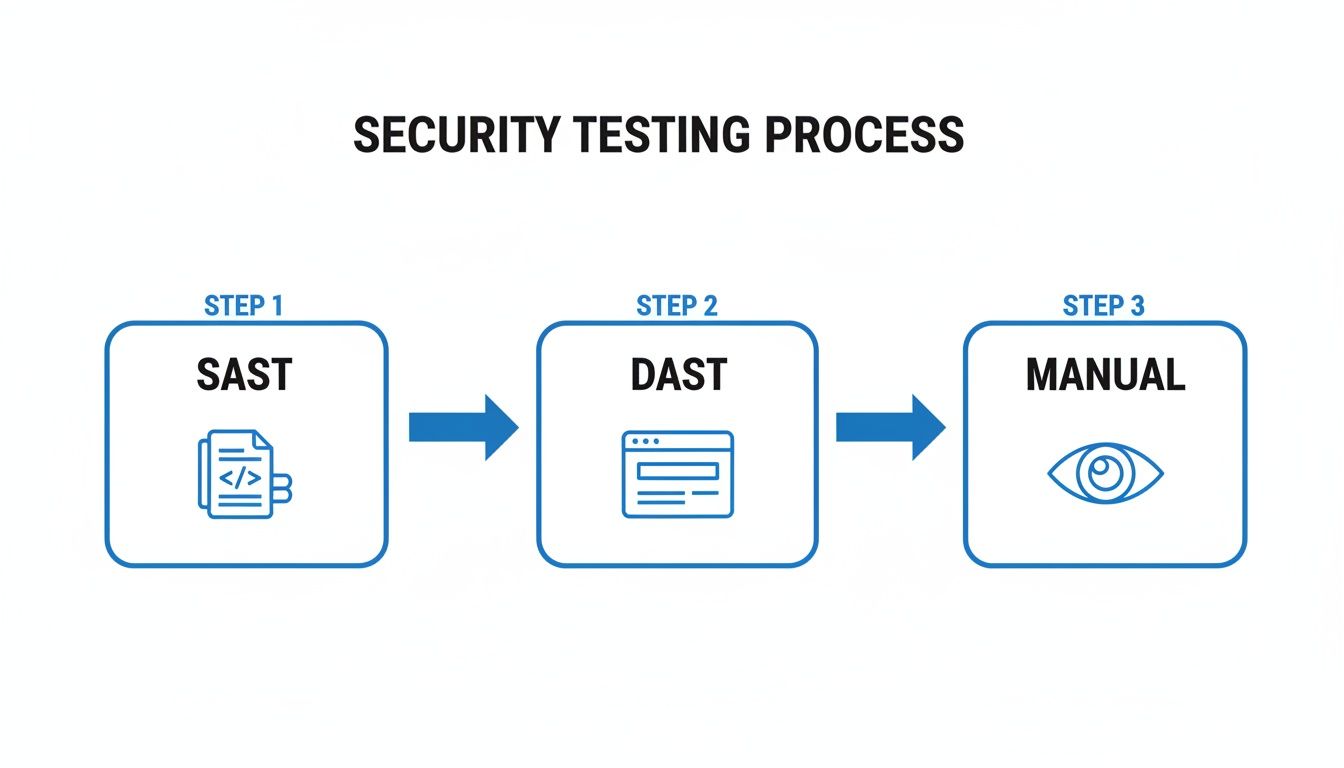
This layered process is key because it catches different kinds of vulnerabilities at different stages, from static code flaws all the way to runtime misconfigurations.
Your game plan should weave these techniques together logically. Kick things off with broad, automated SAST scans to catch the low-hanging fruit early. Follow that up with DAST scans in a test environment to uncover runtime issues. Finally, use the intel from your threat model and the automated scans to guide a laser-focused manual code review on the parts that matter most.
Your Actionable Reviewer Checklist
A manual code review without a checklist is a recipe for inconsistency. You'll forget to check for common issues. While every app is different, a solid baseline checklist should always hit the most frequent and high-impact vulnerability classes. Here’s a practical list to get you started.
Authentication and Session Management
Bad authentication is a VIP pass for attackers. During your review, you need to verify these things, no exceptions:
- Password Policies Are Actually Enforced: Make sure password complexity, history, and length requirements are enforced on the server. Don't trust the client-side JavaScript.
- Session Tokens Are Secure: Session IDs must come from a cryptographically secure random number generator. And they absolutely must be invalidated on the server during logout, not just wiped from the client.
- Brute-Force Protection Is Live: Confirm there’s an account lockout mechanism or captcha in place after a certain number of failed login attempts.
Access Control and Authorization
Once someone’s logged in, you have to be sure they can only access what they're supposed to. Authorization flaws are a blind spot for most automated tools, so this is where human review is critical.
- Hunt for Insecure Direct Object References (IDOR): Can a user see someone else's data just by tweaking an ID in the URL (e.g.,
/user/123to/user/124)? Test it. - Verify Function-Level Access Control: Don't assume that just because a link to an admin function is hidden, it's secure. An attacker can easily guess API endpoints like
/api/admin/deleteUser. Make sure non-admin users can't call them directly.
Injection Flaws and Data Handling
Injection is still one of the top dogs of the vulnerability world. It happens whenever untrusted user input isn't properly cleaned up before it's passed to an interpreter, like a database or an OS command shell.
- Validate All User Input: Every single piece of data from a user—whether it’s from a form, a URL parameter, or an API call—is hostile until proven otherwise.
- Use Parameterized Queries: For database calls, always use prepared statements. Never, ever concatenate user input directly into SQL strings. It's just asking for trouble.
- Sanitize Data for Display: To kill Cross-Site Scripting (XSS), ensure all user-supplied content is properly HTML-encoded before it ever gets rendered on a page.
This playbook gives you a solid starting point for a structured and effective software security review. By defining your scope, modeling your threats, and using a multi-layered process with a solid checklist, you can systematically find and squash vulnerabilities before they ever make it to production.
How to Triage and Remediate Security Findings
Finding vulnerabilities during a software security review is a great start, but it's only half the battle. The real work begins now. A long list of security findings that never gets actioned is just noise; what actually strengthens your defenses is a rock-solid triage and remediation process.
Without a structured workflow, important fixes get lost in crowded backlogs, nobody knows who owns what, and critical vulnerabilities can linger for weeks or even months. This isn't just a hypothetical problem—it happens all the time.
The numbers are pretty grim. Hard-hitting data from Edgescan's 2025 Vulnerability Statistics Report shows that, on average, it takes 54.8 days to fix high or critical severity issues in applications. For infrastructure flaws, that number jumps to a staggering 74.3 days. With nearly a third of all vulnerabilities falling into the high or critical buckets, this delay creates a massive window of opportunity for attackers.
Using CVSS for Smart Prioritization
Your first job is to bring some order to the chaos. Not all vulnerabilities are created equal, and trying to fix everything at once is a recipe for burnout. This is where the Common Vulnerability Scoring System (CVSS) becomes your best friend. It gives you a standardized, objective way to rate how bad a finding really is.
CVSS isn't just one number. It’s a composite score that looks at a few different angles to define a vulnerability's true risk.
- Base Metrics: These are the intrinsic qualities of the flaw—things like the attack vector (how it’s exploited), how complex the attack is, and the impact on confidentiality, integrity, and availability.
- Temporal Metrics: These metrics account for things that change over time, like whether there’s a public exploit kit available or if an official patch has been released.
- Environmental Metrics: This is where you can tailor the score to your specific setup, factoring in any mitigating controls you already have in place.
This CVSS calculator from FIRST.org is a great tool for seeing how all these different metrics come together to produce a final severity score.
By plugging in details like the Attack Vector and Privileges Required, you can generate a consistent score that lets you make apples-to-apples comparisons across all your findings. This framework helps you quickly sort vulnerabilities into buckets—Critical, High, Medium, Low—and point your team’s energy where it matters most. A critical remote code execution flaw that’s trivial to exploit should obviously jump to the front of the line, way ahead of a low-impact bug that requires local access.
Building an Effective Remediation Workflow
Once you have a prioritized list, you need a clear, repeatable process to track every single issue from discovery all the way to closure. A good workflow turns a list of problems into a series of actionable, trackable tasks.
A solid remediation workflow really boils down to a few key stages:
- Ticket Creation: For every validated finding, cut a detailed ticket in your project management tool (like Jira or Azure DevOps). A good ticket should be self-contained and give a developer everything they need to understand and fix the problem.
- Assignment: Assign a clear owner to each ticket. This creates accountability and makes sure the task doesn't fall through the cracks.
- Fix and Verification: The developer ships a fix. But you're not done yet. The fix absolutely must be verified—either by the security team or through an automated re-scan—to confirm the vulnerability is actually gone.
- Closure: Only after a successful verification should the ticket be closed. This final step is crucial for accurate tracking and proving that you're actually reducing risk over time.
Pro Tip: Don't just dump a vulnerability report on a developer and walk away. A great security ticket includes a clear title, a description of the risk, the exact location of the flaw (file and line number), a step-by-step guide to reproduce it, and a concrete suggestion for how to fix it. This dramatically cuts down on the back-and-forth and helps developers ship a fix way faster.
This kind of structured process ensures every finding gets properly addressed, transforming your security reviews from a one-off audit into a continuous cycle of improvement.
Shifting Left With Instant Security Reviews
Let's be honest, the traditional software security review process is broken. It happens days, sometimes weeks, after the code is actually written, creating a painful back-and-forth between security and development teams that grinds everything to a halt.
What if you could shrink that entire feedback loop from days down to about five seconds? What if that check happened before the code was even committed?

That’s the whole idea behind "shifting left"—embedding security right into the developer's IDE. When security becomes an instant, automated part of the coding process, you spot flaws the moment they’re created. That's when they are cheapest and fastest to fix.
This isn't just about speed; it's about flow. This real-time approach eliminates the constant context switching and delays that kill productivity. Security stops being a gatekeeper and starts acting like a helpful collaborator, offering immediate advice.
The New Threats From AI-Generated Code
This need for instant feedback has become urgent with the explosion of AI coding assistants. These tools are fantastic for getting code written quickly, but they can also introduce subtle and dangerous vulnerabilities that even a seasoned developer might overlook.
An AI model doesn't understand your company's security policies or the specific business logic you're building. It just sees patterns. This can lead to all sorts of trouble:
- Logic Flaws: The AI might write code that seems to work but has a critical logic error, like forgetting to check a user's permissions before letting them delete a file.
- Performance Nightmares: It could suggest a clever-looking algorithm that flies through a small test case but completely seizes up under real-world traffic.
- Leaked Secrets: This is a big one. AI tools trained on mountains of public code can easily suggest snippets that include hardcoded API keys, passwords, or other credentials they've seen elsewhere.
This isn't just theory. We're seeing attackers adapt their methods to exploit exactly these kinds of new, subtle weaknesses. The 2025 Software Supply Chain Security Report found that while obvious attacks like malicious packages are down, leaked developer secrets jumped by 12% in the last year. These aren't the kind of things traditional scanners are good at catching, and they open a direct path for attackers.
Shifting security left isn't just a best practice anymore. It’s a mandatory defense against the unique risks of AI-generated code. Instant analysis is the only way to keep up.
How Instant In-IDE Reviews Actually Work
Modern tools that plug directly into the IDE are changing the game entirely. Platforms like kluster.ai go way beyond a simple static scan. They use a much deeper, context-aware approach to give feedback that's actually helpful, not just more noise.
These tools don't just look at the code; they analyze it against its original intent. By understanding the developer's prompt, the repository's history, and your existing security policies, they can suggest fixes that align with what you were trying to build in the first place. That's a massive leap from old-school linters that just yell about syntax.
Imagine a developer asks an AI assistant to generate a function for uploading a file. A proper in-IDE security tool would instantly check a few things:
- Vulnerabilities: Does the code properly sanitize the filename to prevent path traversal attacks?
- Intent: Did the developer ask for user-specific storage, and does the code actually enforce that boundary?
- Company Policies: Does the function follow the company's rules for naming conventions or handling user data under GDPR?
This immediate feedback loop closes the gap between generating code and making sure it's safe. The result is trusted, production-ready code from the get-go. By providing this kind of intelligent, automatic code review, teams can finally kill the painful cycle of PR ping-pong and merge code minutes after it's written, not days.
Your Burning Questions About Security Reviews
Shifting to a modern security review process always kicks up a few questions. How do you bolt on new tools without grinding development to a halt? How do you convince developers this isn't just more bureaucracy? Let's tackle the hurdles I see teams hit all the time when they start taking security seriously.
Getting these answers straight clears up the confusion and builds trust. The whole point is to make security a natural part of shipping great software, not some scary, separate thing that happens at the end.
How Do We Get Developers to Actually Care About This?
The quickest way to make developers hate security is to make it slow, painful, and something that happens completely outside their normal workflow. If you want buy-in, you need two things: integration and empathy. You have to frame security as a shared goal—building a solid product—not as a gatekeeping team that only knows how to say "no."
Here’s how you make that happen:
- Meet Them Where They Are: The tools have to live in the IDE and the Git workflow. Getting instant feedback while you’re coding is a world away from getting a giant, soul-crushing PDF report a week later.
- Give Feedback That Helps, Not Just Criticizes: Don't just flag a vulnerability and walk away. Explain why it’s a risk, give them the context, and even better, offer a concrete code snippet to fix it.
- Celebrate the Wins: When a developer proactively finds and fixes a security bug, make a big deal out of it. It reinforces that security is a valuable, positive contribution.
The best security programs I've ever seen are the ones developers barely notice. When security guidance is just part of the flow of writing and committing code, it becomes muscle memory.
We're Just Starting. What Should We Look For First?
It's easy to get buried in a mountain of potential issues. When you're just starting, anchor yourself to the OWASP Top 10. It's a list curated by experts that represents the most common and dangerous web application risks out there.
Pour your initial energy into these big-ticket items:
- Broken Access Control: This shot up to the #1 risk for a reason. It’s when a user can see or do things they shouldn't, like peeking at another user's data or hitting an admin endpoint. Automated scanners are notoriously bad at finding these flaws.
- Cryptographic Failures: Think sensitive data exposure. This is everything from storing passwords in plaintext to using weak, ancient encryption algorithms that can be cracked in minutes.
- Injection Flaws: The classics are still classics. SQL injection and Cross-Site Scripting (XSS) aren't going away. They happen anytime you trust user input without properly cleaning it up first.
Nail these three, and you'll slash a huge chunk of your risk right off the bat. A good security review is all about prioritizing impact.
With All These Automated Tools, Do We Still Need Manual Code Reviews?
Yes. 100%. Automated tools are fantastic for catching common, known patterns at scale. They're fast, and they're essential. But they are absolutely no replacement for a skilled human reviewer with a bit of healthy paranoia. Scanners are great at finding what they're programmed to find, but they have zero understanding of your business.
A manual review is the only way you'll catch:
- Complex Business Logic Flaws: Can a user manipulate a multi-step checkout process to get a 99% discount? An automated tool has no idea what a "checkout process" even is.
- Subtle Authorization Bugs: An automated tool might see that a user is authenticated, but it can't tell you if that specific user should have access to that specific record. That requires human context.
- Architectural Weaknesses: Sometimes the vulnerability isn't in a single line of code, but in the way a feature was designed from the ground up.
I like to think of it like this: automated tools are your metal detectors, great for finding known threats. A manual review is your seasoned detective, the one who can walk into a room and just sense that something is off.
A modern security review process requires a new generation of tools. kluster.ai delivers instant security feedback directly in the IDE, catching vulnerabilities and logic errors in AI-generated code before they're ever committed. By understanding developer intent and enforcing your company's policies in real-time, you can eliminate PR back-and-forth and ship secure code faster. Start free or book a demo with kluster.ai to see it in action.