

Shift: shift left security testing for developers
For decades, security was an afterthought.For decades, security was an afterthought. We’d build an entire application, get it ready for launch, and then—right at the finish line—toss it over the wall to the security team for a final check. They’d inevitably find problems, sending everyone scrambling and delaying the release.
This old way of doing things is slow, expensive, and just plain broken. That’s why the industry has moved on to a smarter approach: shift left security testing. It’s the simple but powerful idea of embedding security checks into the entire development lifecycle, from the very first line of code.
Instead of a final hurdle, security becomes a continuous, automated process. It’s a shared responsibility, not just a problem for the security team to solve at the end.
What Is Shift Left Security Testing Anyway?

Think about building a house. The old-school approach is like waiting until the entire house is built, then calling in an inspector. If they find a crack in the foundation, you’re in for a world of pain. We’re talking about tearing down walls, jacking up the structure, and spending a fortune to fix a problem that was buried deep inside. It’s a nightmare.
Shift left is like having that inspector on-site from day one. They review the blueprints, test the foundation concrete as it's poured, and check the electrical wiring before the drywall goes up. Problems get caught when they are small, obvious, and cheap to fix.
That’s the core of shift left security testing. You move security from a final, expensive inspection to an ongoing, integrated part of the building process.
The Mindset Shift: From Gatekeeper to Enabler
Traditionally, security teams were the gatekeepers. They stood at the end of the development cycle, a final checkpoint before release. This "shift right" approach was reactive, created bottlenecks, and frankly, made developers see security as an obstacle.
By identifying and addressing vulnerabilities early—think during planning, design, and coding—organizations can prevent disastrous security issues from emerging later in the process.
The shift left philosophy completely flips this dynamic. Security is no longer an isolated job; it’s a collective responsibility baked into the way you build software. This cultural change is all about empowering developers with the tools and knowledge to write secure code from the start.
This isn’t just a trend; it’s the new standard. A recent study shows that 71.5% of teams now include quality assurance in their sprint planning. And 89.1% of organizations have adopted CI/CD pipelines to support this model of continuous validation.
Key Principles of Shifting Left
At its heart, shifting left is built on a few core ideas that make it so much more effective than the old way of doing things.
Here's what makes it work:
- Early and Continuous Testing: Security isn’t a one-time event. It’s a series of automated checks that run constantly with every single code change, right from a developer’s local machine through the CI/CD pipeline.
- Developer Empowerment: Developers get immediate feedback on potential security issues directly inside their IDE. This lets them fix problems on the spot without losing context, turning a potential mistake into a learning opportunity.
- Automation is Everything: Manual security reviews can’t possibly keep up with the pace of modern software development. Automated tools for static analysis (SAST), dynamic analysis (DAST), and dependency scanning (SCA) are absolutely critical.
- Shared Responsibility: Security becomes a team sport. Developers, QA engineers, and security experts all work together, breaking down the silos that used to create friction and delays. You can learn more about this in our guide to shift left testing.
Let's break down the difference between the old way and the new way. The table below shows just how much has changed.
Traditional Security vs Shift Left Security
| Aspect | Traditional Security (Shift Right) | Shift Left Security |
|---|---|---|
| Timing | Late in the lifecycle (pre-release) | Early and continuous (from day one) |
| Responsibility | Siloed security team's problem | Shared responsibility (devs, QA, security) |
| Cost to Fix | Extremely high (up to 100x more) | Very low; fixed immediately as code is written |
| Process | Manual, slow, and creates bottlenecks | Automated, fast, and integrated into workflows |
| Developer Impact | Disruptive context switching and delays | Immediate feedback, faster learning, no delays |
| Outcome | Reactive; finds bugs before they hit users | Proactive; prevents bugs from being written |
This comparison makes it pretty clear. The traditional model is a recipe for delays and high costs, while shifting left builds a more resilient, efficient, and collaborative engineering culture.
Why Shifting Left Is a Competitive Advantage

Treating security as an afterthought is a recipe for disaster. But when you get it right, shifting security left stops being a technical chore and becomes a powerful business driver. It’s the difference between seeing security as a cost center and turning it into a genuine competitive advantage that speeds up delivery, slashes financial risk, and builds a rock-solid brand.
The real magic happens when you completely change the economics of fixing vulnerabilities. When security is left until the final hour, every bug you find is a ticking time bomb of cost and complexity.
The Exponential Cost of Delay
Think of fixing a security flaw like pulling a weed. Catch it as a tiny sprout during the design phase, and it’s a non-issue. But wait until it’s a massive weed with roots tangled all through your deployed system, and you risk breaking everything just to get it out.
The data backs this up. A bug found and fixed during the initial coding stage is up to 100 times cheaper to deal with than the same bug discovered after your product is already in the wild.
Fixing a defect during design costs up to 100x less than fixing it after release. This dramatic cost difference highlights the immense financial incentive to find and address security issues as early as possible.
This isn’t just about a developer’s time, either. That massive cost multiplier includes the ripple effect of emergency patches, potential downtime, customer support fires, and the brutal reputational damage from a public breach. Shifting left tackles this head-on by finding and fixing problems when they’re cheap and easy—right at the source.
Accelerating Development and Innovation
It sounds backward, but embedding security earlier actually makes development teams faster. We’ve all been there: the traditional, end-of-cycle security review that grinds everything to a halt. A last-minute audit can block a release for weeks, forcing developers to drop what they’re doing, dig through old code, and untangle problems they wrote a month ago.
Shift left gets rid of those roadblocks. By giving developers instant feedback and automated checks right inside their workflow, security becomes a natural part of the process, not a final gatekeeper.
This approach gives you a few key speed boosts:
- Eliminates Rework: Catching flaws early prevents the painful, time-consuming rework needed to fix deeply embedded vulnerabilities.
- Reduces Bottlenecks: Continuous, automated security checks replace those painfully slow manual reviews, keeping the CI/CD pipeline flowing.
- Improves Code Quality: When developers have security tools at their fingertips, they learn secure coding practices as they go, leading to better, more resilient code from the start.
Organizations that get this right see huge gains. One 2023 report found that teams shifting left improved their delivery times by 64% simply because they weren't dealing with constant late-stage surprises.
Building Trust and Protecting Your Brand
In today's market, trust is everything. A single high-profile security breach can wipe out years of brand-building and send your customers running to the competition. Security isn't just another feature anymore; it's a basic expectation.
When you take a proactive stance on security, you're sending a clear message to your customers: we take protecting your data seriously. That commitment becomes a powerful market differentiator.
Building security into your product from day one shows a mature, responsible engineering culture. That reputation for reliability doesn't just keep your current customers happy—it attracts new ones who put a premium on safety. Shifting left isn’t just an internal process tweak; it’s a public statement about quality and a critical investment in your company's future.
How to Actually Implement Shift Left Security
Okay, let's get real. Moving from talking about "shift left" to actually doing it is where things get interesting. This isn't about buying some magical new tool; it's about changing how your team builds software by weaving security into the very fabric of your development process.
The goal is simple: make writing secure code the easiest, most natural thing for a developer to do. Instead of forcing them to stop, switch gears, and use some clunky external scanner, you bring security feedback directly to them, right where they live all day.
Start with the Developer Experience
The absolute best place to start is inside the Integrated Development Environment (IDE). This is a developer's home base. Putting security tools here creates the fastest possible feedback loop, flagging potential issues the very moment code is written.
By integrating security scanners directly into the IDE, you kill the friction that makes security feel like a roadblock. Developers get real-time alerts on potential vulnerabilities just like they would for a syntax error. This lets them learn and fix issues on the spot, preventing insecure code from ever even being committed.
When figuring out the best way to do this, some organizations find it helpful to work with a specialized cyber security firm to pick and integrate the right developer-first tools. This approach transforms security from a frustrating gatekeeper into a helpful guide that genuinely improves code quality from the ground up.
Automate Security in Your CI/CD Pipeline
While the IDE is your first line of defense, the Continuous Integration/Continuous Deployment (CI/CD) pipeline is your automated safety net. This is where you set up non-negotiable security gates to ensure nothing vulnerable slips through to production.
Integrating automated security testing into your pipeline means every single code commit automatically kicks off a security scan. It’s a consistent, repeatable process that doesn't depend on someone remembering to run a test.
You’ll want to automate a few key types of tools here:
- Static Application Security Testing (SAST): These tools are like a spell-checker for security. They scan your source code for well-known vulnerability patterns—think SQL injection or cross-site scripting—before the app is even built.
- Software Composition Analysis (SCA): Let's face it, modern apps are mostly assembled from open-source libraries. SCA tools scan these dependencies for known vulnerabilities, which is critical since over 75% of codebases are built with open-source components.
- Dynamic Application Security Testing (DAST): Unlike SAST, DAST tools test your running application. They poke and prod it from the outside, just like an attacker would, to find vulnerabilities. This is usually done in a staging environment before a release.
Below is a quick look at the kinds of tools that form a solid shift-left toolkit.
Your Shift Left Security Toolkit
A robust security posture relies on a combination of tools working together across the development lifecycle. Here’s a breakdown of the essential categories.
| Tool Type | What It Does | When to Use It | Example Tools |
|---|---|---|---|
| SAST | Scans static source code for known vulnerability patterns and coding errors. | In the IDE, on every commit, during the CI build process. | SonarQube, Checkmarx, Veracode |
| SCA | Identifies open-source components and checks them against a database of known vulnerabilities. | On every build, especially when new dependencies are added. | Snyk, OWASP Dependency-Check, JFrog Xray |
| DAST | Tests a running application by simulating external attacks to find vulnerabilities. | In staging or QA environments as part of the CI/CD pipeline before deployment. | OWASP ZAP, Burp Suite, Invicti |
| IaC Scanning | Analyzes Infrastructure as Code (e.g., Terraform, CloudFormation) for misconfigurations. | In the developer's IDE and in the CI pipeline before infrastructure is provisioned. | Checkov, Terrascan, tfsec |
By automating these different checks, you create a powerful, multi-layered defense that keeps up with the fast pace of modern development.
The most mature shift left security programs don't just use one tool; they combine SAST, DAST, and SCA to create comprehensive coverage across the entire software development lifecycle, from code creation to deployment.
Weave Security into Team Practices
Tools are only half the battle. A true shift left culture requires tweaking your team's daily habits to include security from the very start—long before anyone writes a single line of code.
This means making security a standard part of your agile ceremonies. For instance, when you're planning a sprint, you can add security-focused user stories or "abuse cases" that force the team to think about how a feature might be attacked.
Another incredibly powerful practice is lightweight threat modeling. This doesn't have to be some complex, week-long affair. It can be a simple 30-minute whiteboard session where the team asks three basic questions:
- What are we building?
- What could go wrong with it from a security angle?
- What are we going to do to stop that from happening?
This simple exercise helps teams anticipate risks and build defenses right into the application's architecture. By making these small adjustments to your existing workflow, security stops being a separate, siloed task and becomes a shared responsibility for everyone on the team.
How AI Is Reshaping Security at the Source
The rise of AI coding assistants has created a fascinating paradox. On one hand, they crank out code at an incredible pace. On the other, they can quietly introduce complex, subtle bugs that old-school security scanners just can't see. This new reality demands a security response that’s just as fast and just as smart.
AI isn't just changing how we write code; it’s completely changing how we secure it. The latest AI-powered security tools are the next logical step for shift left security testing, going way beyond basic pattern-matching. They offer a much deeper, context-aware analysis that actually understands the intent behind the code.
This new wave of security analysis can spot novel threats, follow complex data flows, and cut through the false positive noise that drives developers crazy. As engineers rely more on AI to build faster, having equally intelligent security validation isn't just nice to have—it's non-negotiable.
The Challenge of AI-Generated Code
AI code assistants are incredible allies, but they learn from massive datasets of public code—and that includes code with hidden flaws. An AI might spit out a perfectly functional snippet that unfortunately carries a legacy vulnerability, like a tricky SQL injection or an error handling routine that accidentally leaks sensitive data.
This is a massive headache for security teams. The sheer volume and speed of AI-generated code makes manual review totally impossible. And traditional automated scanners, which just look for known vulnerability signatures, often miss these nuanced, context-specific problems.
As developers use AI to create code, the security tools protecting that code must also be powered by AI. This is the only way validation can happen at the same speed as creation, keeping modern development workflows moving.
This is where embedding security into every stage of the development lifecycle becomes critical.
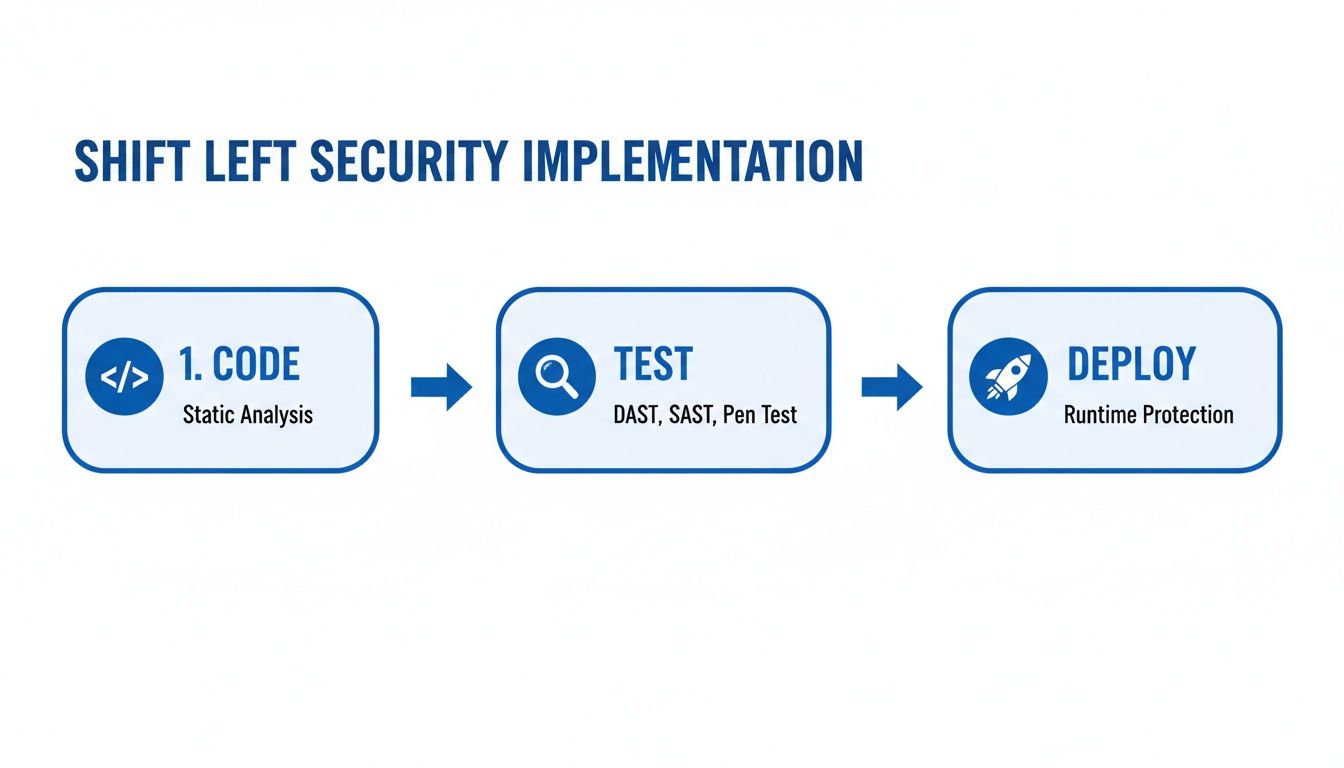
The flowchart makes it clear: security testing isn't a one-time gate. It's a continuous process woven into every single step, from the first line of code to final deployment.
AI as the Ultimate Security Ally
Luckily, the very thing creating the problem is also the solution. Next-gen security tools use AI to act as an intelligent co-pilot for developers, embedding security analysis right into the moment of creation. This is the ultimate "shift left"—bringing security feedback directly into the developer's IDE for instant results.
These tools are changing the game in a few key ways:
- Context-Aware Analysis: Instead of just flagging generic patterns, these tools understand the surrounding code, the developer's goals, and the specific business logic to deliver incredibly accurate findings.
- Predictive Threat Identification: AI can identify new and emerging vulnerability patterns that haven't been seen before, helping you get ahead of threats instead of just reacting to them.
- Automated, Actionable Fixes: Rather than just pointing out a problem, AI-powered tools can often suggest the exact code change needed to fix it, slashing the time it takes to remediate issues.
This is especially important as more companies build AI-powered features themselves. Research shows that a whopping 77% of teams building apps with LLM components need specialized shift-left security to manage the unique risks involved. You can get more details on this trend from these recent AppSec predictions.
By integrating these smart capabilities directly into the development workflow, AI turns security from a periodic chore into a real-time, continuous conversation. To see other ways it's helping, check out our guide on how AI is being used to improve code quality. This immediate feedback loop empowers developers to write more secure code from the start, making the whole process faster, safer, and way more efficient.
Embedding Real-Time Security with Kluster AI
True shift left security testing isn't just about running a scan a little earlier. It’s about closing the gap between writing a line of code and knowing if it's safe. The real goal is to give developers instant, useful feedback right where they work, turning security from a chore into a simple quality check. This is where tools built for the modern developer workflow really change the game.
Kluster AI pushes security analysis as far left as it can possibly go: right inside the developer's Integrated Development Environment (IDE). It works like an intelligent coding partner, reviewing every snippet of code—including the AI-generated parts—the second it’s written. This hyper-local feedback loop is the key to stopping vulnerabilities before they're ever committed.
From Hours to Seconds: The IDE Feedback Loop
Traditional security tools don’t give you feedback until your code is already in the CI pipeline. That could be minutes or even hours after you've committed your work and moved on. By that point, you’ve completely lost context. You have to stop what you're doing, check out the old branch, figure out the problem, and then fix it. That constant context switching just kills productivity.
Kluster AI fixes this by living inside the IDE. Its specialized agents check code against your company's security policies and best practices in real time. Picture a developer using an AI assistant to write a function that queries a database.
The best security feedback is instant, in-context, and comes with a clear solution. When developers get that guidance right in their editor, security stops being a roadblock and starts being a natural part of writing great code.
Instead of waiting for a pipeline build to fail, Kluster can immediately flag a potential SQL injection vulnerability. More importantly, it explains why it's a risk and suggests the safer, parameterized query. This transforms a potential security crisis into a five-second learning moment, reinforcing good habits without breaking a developer's flow.
Enforcing Security Policies Before a Single Commit
One of the toughest parts of shift left security testing is making sure everyone follows the rules. How do you guarantee every developer on every team sticks to the same security standards? Kluster tackles this by letting you create and automatically enforce custom security guardrails.
These guardrails can cover all sorts of security headaches:
- Vulnerability Detection: Automatically flagging common problems like cross-site scripting (XSS), insecure deserialization, and broken access control.
- Secrets Management: Stopping developers from accidentally committing API keys, passwords, or other secrets directly into the code.
- Dependency Validation: Making sure any new open-source libraries don’t have known critical vulnerabilities.
- Secure AI Usage: Checking that code generated by AI assistants follows secure patterns and doesn’t introduce subtle flaws.
By automating this enforcement inside the IDE, security becomes a proactive, preventative habit. It ensures that the code getting pushed to the repository has already passed a crucial security check, which massively cuts down on issues found later in the pipeline. This doesn't just make your company more secure; it also speeds up development by getting rid of the endless back-and-forth between developers and security teams. It makes the dream of a seamless, secure workflow an actual reality.
Measuring Your Success and Avoiding Common Pitfalls
Let's be honest. Buying a new security tool is the easy part. The real work—and the real payoff—comes from changing how your team thinks about security. A true shift left security testing initiative isn't about running another scanner; it's about weaving security into your development fabric.
To get there, you need two things: clear proof that it's working and a game plan for the inevitable pushback. Without those, even the most promising security program will fizzle out.
Are We Actually Getting Better? Key Metrics to Track
You can't just tell management, "It feels more secure." You need data. But forget vanity metrics like "vulnerabilities found." The right KPIs tell a story of efficiency, risk reduction, and developers taking ownership.
Here are the numbers that actually matter:
- Mean Time to Remediate (MTTR): How long does it take to fix a security bug once it’s found? When you shift left, this number should plummet. Developers find issues in their IDE with full context, fixing them in minutes instead of weeks after a painful handoff from the security team. A falling MTTR is your strongest signal of success.
- Vulnerability Density: This is your bug-to-code ratio—think "vulnerabilities per 1,000 lines of code." As developers learn and your tools provide better feedback, this number should consistently drop. It’s hard proof that your team isn't just fixing bugs faster, they're writing more secure code from the start.
- Pre-Commit Discovery Rate: What percentage of security flaws are you catching before the code ever hits the main branch? This is the ultimate shift-left metric. A high pre-commit discovery rate means security is happening where it should be: on the developer's machine, not in a late-stage panic.
The goal of shift left security testing isn't just finding bugs earlier. It's to build a culture where fewer security bugs get written in the first place.
Tracking these metrics gives you the ammunition to prove ROI, justify your budget, and build unstoppable momentum.
Overcoming the Inevitable Roadblocks
Even with perfect tools and clear goals, you’re going to hit turbulence. Shifting left is a culture shock. Anticipating the common hurdles is the best way to keep your initiative on track.
Challenge 1: "Not Another Tool!" – Developer Resistance
Developers are already buried under tight deadlines and a mountain of tools. If you drop another slow, noisy scanner on them that spits out cryptic alerts, they will ignore it. And honestly, can you blame them? The tool will become shelfware, and your program is dead on arrival.
- How to fix it: Obsess over the developer experience. Choose tools that live inside the IDE and feel like a helpful pair programmer, not a nagging critic. The feedback must be fast, accurate, and actionable. Tune out the noise—ruthlessly filter out false positives and focus on what actually matters in your codebase.
Challenge 2: The False Positive Nightmare
Automated tools are powerful, but they’re not perfect. They cry wolf. Every false positive eats up developer time and, worse, destroys their trust in the tooling. When security staff spend an average of 32 minutes chasing down each bogus alert, that trust erodes fast.
- How to fix it: Have a clear, simple process for triaging alerts. Use tools that let you easily customize rules, mark known false positives, and suppress irrelevant warnings. The goal is to make every alert a "must-fix" issue, so developers know their time is being respected.
Challenge 3: "I'm Not a Security Expert"
You can't just hand a developer a security scanner and expect them to become a pen tester overnight. That’s like giving someone a scalpel and calling them a surgeon. It's a recipe for frustration and failure.
- How to fix it: Don't try to make everyone a security guru. Instead, create a Security Champions program. Find those developers who are genuinely curious about security and empower them. Give them the training and support to become the go-to security advocates on their teams. Start with a small pilot group, get some early wins, and let their success become the blueprint for everyone else.
Got Questions About Shifting Left?
Even with the best intentions, diving into a new development philosophy always brings up a few questions. Let's tackle some of the most common ones we hear from teams making the move to shift left security testing.
Does Shift Left Security Mean We Can Scrap Pen Testing?
Not at all—think of it as a powerful partner, not a replacement. Shifting left is all about catching and squashing bugs early, right inside the developer's workflow. It dramatically slashes the number of vulnerabilities that even make it to the later stages of the pipeline.
But penetration testing still plays a vital role. It’s your final, real-world stress test in a production-like environment. Shifting left builds a much stronger foundation from the start, while pen testing confirms the entire structure is rock-solid before you go live.
How Do We Get Our Developers to Actually Care About This?
This is the big one. The secret is to make security feel like a superpower, not a punishment. If security becomes just another annoying roadblock, developers will rightfully push back. The tools have to fit directly into their world.
The goal is to empower developers, not police them. When security feedback is fast, accurate, and helpful, it becomes an integral part of writing high-quality code.
Give them tools that offer instant, actionable feedback right in the IDE. Ditch the slow, noisy scanners that spit out a million false positives. Pair the right tools with practical training and a culture that celebrates finding and fixing security issues. It has to be a shared mission.
What’s the Best First Step to Get Started?
Jumping straight into a full-blown AppSec program can be overwhelming. A fantastic place to start is by plugging a Software Composition Analysis (SCA) tool into your CI/CD pipeline. SCA tools scan your open-source dependencies for known vulnerabilities, which is where a huge chunk of modern application risk comes from.
It’s a high-impact move that’s relatively easy to implement and delivers value almost immediately. It’s the perfect way to show your team the power of automated security and build momentum for adding more shift left security testing practices down the line.
Ready to make security an instant, seamless part of your development workflow? kluster.ai integrates directly into the IDE, giving developers real-time feedback on every line of code. Stop vulnerabilities before they start and accelerate your release cycles. Start your free trial or book a demo with kluster.ai today.