

Github Review Code: A Guide to 'github review code' Best Practices
Let's be honest, the classic GitHub code review process is starting to feel like a serious bottleneck. AI assistants are pumping out massive amounts of code, and our manual review workflows just can't keep up. This isn't just frustrating; it's slowing down entire teams and creating a backlog of commits that feels impossible to clear.
It’s time for a smarter, faster, more automated approach.
Why Your GitHub Review Process Is Broken
The old way of reviewing code on GitHub is cracking under the pressure. What used to be a straightforward task—checking a teammate’s logic—has turned into a high-stakes effort to validate code that might have been written by an AI in seconds. This new reality brings a whole set of challenges that manual processes were never built to handle.
The explosion of AI coding assistants has completely changed the game. Think about it: GitHub Copilot now generates an average of 46% of all code, and developers are accepting 88% of its suggestions. This tells us that a huge chunk of AI-generated code is going straight into production. While this code often looks perfect on the surface, it can hide subtle bugs, security gaps, or performance drains that are incredibly difficult for a human reviewer to spot.
The Manual Review Model Is Failing
Traditional code reviews are great for looking at the big picture—high-level logic, architectural choices, and overall design. But they are notoriously bad at catching the kind of nuanced, machine-level errors common in AI-generated code.
This mismatch creates some critical problems:
- Review Bottlenecks: Manual reviews become the single biggest chokepoint, delaying merges and grinding the development cycle to a halt.
- Hidden Risks: Human reviewers can easily miss sophisticated security flaws or performance issues buried deep within syntactically correct AI code.
- Developer Frustration: Waiting days for a review to be completed forces developers to constantly switch context. It kills productivity and, frankly, it’s just a miserable experience.
The core issue here is that we're asking humans to perform machine-level scrutiny. The goal isn't just catching typos anymore. It's about building a resilient workflow that verifies every single commit—whether it was written by a human or an AI—against unflinching standards for quality and security.
To really supercharge your team's output, you need a complete overhaul. For a broader look at this, check out these practical tips to improve developer productivity. It’s time to ditch the old methods and adopt a system that actually accelerates development without sacrificing an ounce of integrity.
Building a Bulletproof Pull Request Workflow
A great code review process starts long before the first comment is ever left. It begins with a rock-solid Pull Request (PR) workflow. Without one, you get chaos. Teams waste hours just trying to figure out what a PR even does, let alone if the code is any good.
When your workflow is a mess, developers spend more time debating formatting or chasing down context than they do on the actual logic. A well-defined process fixes this by turning every PR from a random code dump into a clear, comprehensive package that’s ready for an expert eye.
Standardize PRs with Templates and Checklists
The first step is consistency. Every developer on your team should submit PRs that look and feel familiar, making them easy for anyone to pick up and review. You're setting a baseline for what "ready-to-review" actually means, which cuts out the friction that slows everything down.
One of the most effective tools for this is the PR template. By creating a simple .github/pull_request_template.md file in your repository, you can pre-populate every new PR with a checklist and sections for essential information. It’s a simple but powerful nudge that forces authors to provide critical context upfront.
Your template should ask for the basics:
- A clear summary: What problem does this PR solve?
- Technical changes: How was the problem solved?
- Testing steps: How can a reviewer verify the changes locally?
- Related tickets: A link to the Jira, Linear, or Trello ticket.
Below is a quick reference for crafting a PR that reviewers will thank you for.
Anatomy of an Effective GitHub Pull Request
This table breaks down the essential components that every Pull Request should include. Following this structure is the fastest way to facilitate a smooth and efficient code review process.
| Component | Purpose | Best Practice Example |
|---|---|---|
| Descriptive Title | Summarizes the change in one line for quick context. | feat(auth): Add Google OAuth2 login flow |
| Clear Description | Explains the "what" and "why" behind the code changes. | This PR introduces Google OAuth2 to allow users to sign up and log in with their Google accounts, closing ticket #PROJ-123. |
| Linked Issue/Ticket | Connects the PR to the project management tool for traceability. | Closes #123 or Resolves JIRA-456 |
| Testing Instructions | Provides clear, step-by-step instructions for reviewers to verify the changes. | 1. Pull this branch. 2. Run 'npm install'. 3. Navigate to /login and click the 'Sign in with Google' button. 4. Verify you are redirected and a new user is created. |
| Screenshots/GIFs | Visually demonstrates UI changes or complex user flows. | A short GIF showing the successful login and redirection. |
| Checklist | Confirms that the author has completed necessary steps before requesting a review. | - [x] Unit tests written - [x] Documentation updated - [x] Follows style guide |
By baking these elements into a template, you build quality gates directly into the submission process itself.
Automatically Assign the Right Reviewers
Next up: stop wasting time manually tagging teammates. Manually assigning reviewers is slow and error-prone. Instead, use GitHub’s CODEOWNERS file to automate it.
This is a game-changer. It’s a simple text file you place in your repository's root or .github directory that lets you map file paths or patterns to specific teams or individuals.
For example, you could set it up so that any changes to the src/billing/ directory automatically request a review from the @payments-team. This guarantees the right experts see the right code every single time, without the author needing to guess who to ping. You can learn more about optimizing this handoff in our guide to the GitHub pull and merge process.
This kind of automation doesn't just speed things up; it also drives accountability. When ownership is clear, reviews are naturally more thorough because the designated owners feel a direct responsibility for the health of their corner of the codebase.
This chart shows how small hiccups in the review process—from the initial analysis to the final human sign-off—can create massive bottlenecks and slow down merges.
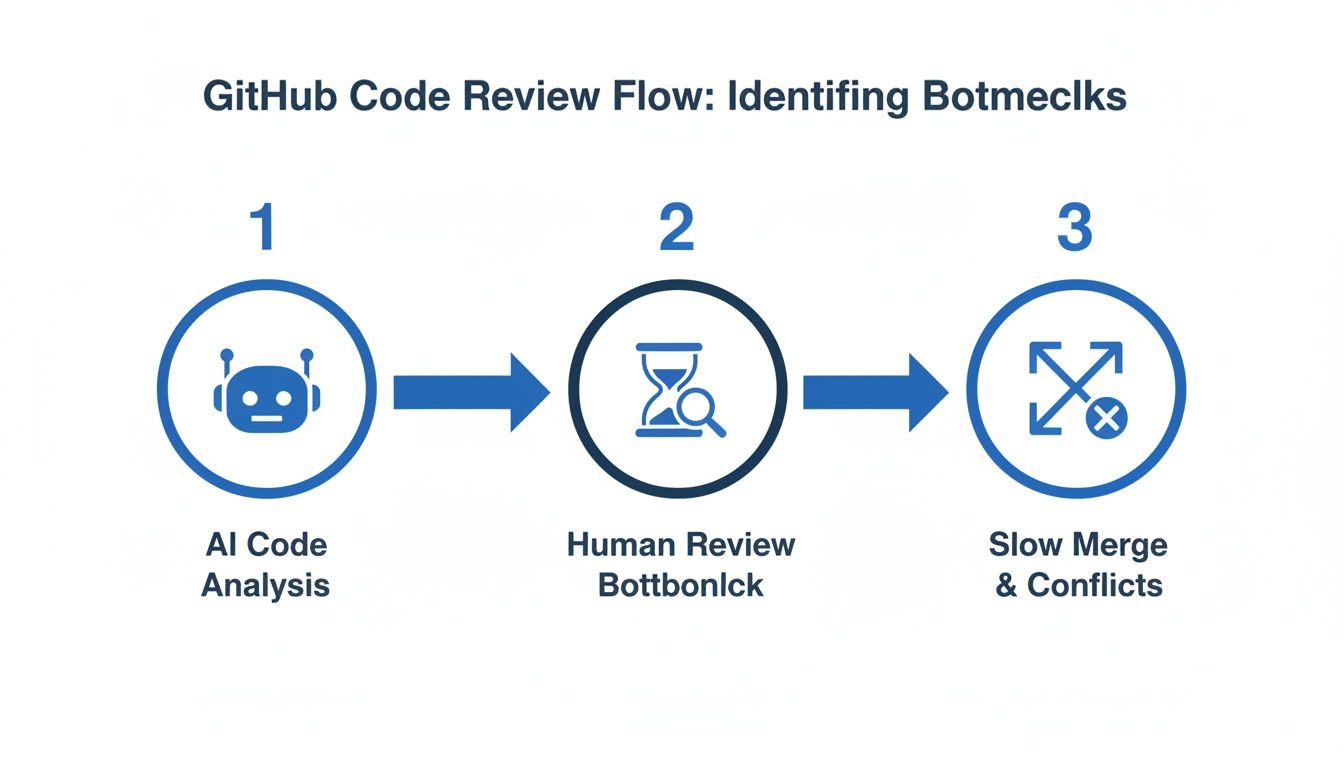
Delays at any single stage don't just add up; they compound, leading to those slow, painful merges everyone dreads.
Automating Quality and Security Checks in Your Pipeline
Your team’s brainpower is a finite resource. Wasting it on manually checking for style violations, missing semicolons, or predictable bugs is a terrible use of that resource. Human reviews are most valuable when they focus on the tricky stuff—complex logic, architectural soundness, and business intent. These are the tasks that require critical thinking, not just pattern matching.
This is exactly where automation becomes your best friend in the github review code process. By handing off all the repetitive work to your CI/CD pipeline, you establish a solid quality baseline that every single pull request has to meet before a human ever lays eyes on it. It’s a systematic way to guarantee consistency and, more importantly, free up your engineers to do more meaningful work.
Setting Up Your Automated Quality Gates
GitHub Actions offers a powerful, native way to build these quality gates right into your workflow. You can set up jobs that trigger on every push to a pull request, running a series of checks that act as an automated first pass. This gives the developer an immediate feedback loop, long before asking for a teammate's time.
A strong automated pipeline needs a few key stages:
- Linting and Formatting: Tools like ESLint for JavaScript or Black for Python can automatically enforce your team’s coding standards. This just vaporizes entire categories of nitpicky, time-wasting review comments about style.
- Unit and Integration Tests: Your test suite is your number one defense against regressions. Running it automatically makes sure new changes don't break what's already working. Honestly, a PR with failing tests shouldn't even be on the review docket.
- Static Analysis: These tools analyze code without even running it to find potential bugs, code smells, and anti-patterns. They’re great at catching the kinds of issues that tests might otherwise miss.
By automating these foundational checks, you’re not just saving time; you’re fundamentally changing the culture around code reviews. The conversation shifts from "did you remember to run the linter?" to "does this architectural approach make sense for our long-term goals?"
Integrating Security Scans Early and Often
Quality isn't just about whether the code works; it's also about whether it's secure. Finding vulnerabilities at the end of the development cycle is a recipe for expensive, frustrating rework. The only sane approach is to make security checks an integral part of your pull request pipeline from the very beginning.
GitHub's own Dependabot is a fantastic starting point. It automatically scans your dependencies for known vulnerabilities and even creates PRs to update them for you. For a deeper dive, you can integrate Static Application Security Testing (SAST) tools. These tools scan your actual source code for common security flaws like SQL injection or cross-site scripting.
When you bake these scanners into your GitHub Actions, you can configure them to fail the build if a critical vulnerability pops up. This acts as a powerful guardrail, preventing insecure code from ever getting close to your main branch. For a closer look, our guide on automated code reviews offers more strategies for building a truly robust, secure pipeline. This approach turns security into a shared responsibility, not just an afterthought.
Giving and Receiving Feedback That Actually Helps
You can have the most sophisticated automation in the world, but it won’t fix a broken team dynamic. The human side of a github review code process is where great teams are made—or broken. The way feedback is delivered determines whether you’re fostering collaborative growth or just creating a culture of friction and resentment.
It’s the difference between a learning opportunity and a personal critique.
The goal is always to improve the code, not to criticize the coder. This simple mindset shift changes everything. Instead of just pointing out what’s "wrong," try framing your comments as questions or suggestions that invite discussion. This feels way less confrontational and opens the door for a productive conversation.
Framing Constructive Feedback
Let’s be honest: vague feedback is useless. Effective comments are specific, actionable, and delivered with a bit of empathy. You have to explain the "why" behind your suggestion.
Instead of saying "this is inefficient," explain the potential impact and offer a clearer alternative.
- Bad:
This function is confusing. - Good:
Could we rename this function to better reflect that it handles user authentication? 'handleAuth' might be clearer than 'procData'. - Bad:
This is wrong. - Good:
I noticed this approach might not handle edge cases where the user input is null. What do you think about adding a check here?
A great rule of thumb is to focus on the future state of the code. Comments should be about making the code better together, not about judging past decisions.
One of the best tools for this is GitHub's "Suggested Changes" feature. It lets you offer a concrete fix right inside your comment. The author can accept it with a single click, turning what could have been a long back-and-forth into an immediate improvement. It moves the review from abstract advice to a tangible solution.
Receiving Feedback Professionally
Receiving feedback well is just as critical as giving it. It's so easy to get defensive when someone points out flaws in your work. We've all been there. The key is to detach your ego from your code and see every review as a chance to learn something new.
If a comment isn't clear, don't guess—ask for clarification. A simple, "Could you give me an example of what you mean?" can save hours of rework. Remember, the reviewer has the fresh perspective you lost after staring at the same lines of code for hours.
Finally, balance is everything. If you're a reviewer, make a point to leave positive comments, too. A quick "Great refactor, this is much cleaner!" goes a long way. This kind of positive reinforcement builds trust and makes the constructive feedback much easier to swallow, strengthening the entire team's github review code culture.
Using In-IDE AI to Supercharge Your Code Reviews

The biggest drag on any GitHub review process is the dead time. It’s a familiar story: a developer pushes code, opens a pull request, and then… waits.
This feedback loop is a massive productivity killer, sometimes stretching from hours into days. But a real shift is happening right now, pulling the entire review process out of the PR comment thread and dropping it directly into the developer's editor.
Modern, in-IDE AI tools are collapsing this feedback loop by providing instant verification as the code is written. Instead of waiting for a teammate to spot an AI hallucination or a subtle security flaw, these tools act like a real-time partner. They catch problems before they ever become a commit, let alone a pull request.
This completely changes the dynamic of a github review code workflow. It goes from a slow, reactive process to an immediate, proactive one.
Catching Errors Before They Happen
The real magic of in-IDE review is its deep contextual awareness. Specialized AI agents can track everything from the original prompt you gave a coding assistant to your repository’s history and existing documentation. This lets them validate that AI-generated code doesn't just work—it actually aligns with what you wanted in the first place.
This pre-review step automatically enforces quality and security guardrails by checking for things like:
- AI Hallucinations: Is the generated code logically solving the intended problem, or did it introduce some bizarre, fabricated logic?
- Security Vulnerabilities: Scanning for common flaws like injection risks or improper error handling the moment they’re typed out.
- Policy Violations: Making sure every line sticks to your organization's coding standards, naming conventions, and compliance rules.
By providing this immediate feedback, the tool wipes out entire categories of errors before they can waste a human reviewer's time.
Shifting reviews into the IDE means that by the time a pull request is created, it has already passed a rigorous automated check. Human reviewers can then focus entirely on high-level architecture and logic, knowing the foundational quality is already assured.
The Impact of AI-Assisted Reviews
This isn't just a theory; it's already delivering real results. We're seeing AI assistance significantly improve the code review process. For instance, GitHub Copilot Chat has been shown to slash review time by 15% while also making reviewers happier.
When developers use it to generate review comments, the authors accept nearly 70% of those suggestions. That signals a huge level of trust in AI-driven feedback.
Beyond specialized IDE integrations, a whole range of the best AI tools for programming can also seriously improve your development workflow. By bringing these intelligent assistants directly into the coding environment, teams can finally kill the frustrating wait times and ensure every PR is high-quality from the get-go.
Common Questions About GitHub Code Reviews
Let's be honest, navigating the nuances of a modern github review code process can feel like a moving target. As teams get bigger and the tools keep changing, questions and bottlenecks are just part of the game. Here, I'll tackle some of the most common challenges I've seen developers and team leads run into.
The goal is to get you past these hurdles and help you build a review culture that’s both fast and effective.
How Can We Significantly Reduce Time Spent On Code Reviews?
This is the big one. Everyone feels like code reviews are a time sink. The key to speeding things up isn't a single magic bullet but a mix of better habits, smart automation, and the right tools.
First, you have to stop reviewing massive pull requests. A PR with thousands of lines is a nightmare for the reviewer and creates a huge cognitive load. It's almost impossible to review it well. Push your team to create small, atomic PRs that solve one specific problem. The context is easier to grasp, and the review itself is exponentially faster.
Next, automate everything you possibly can with GitHub Actions. Linters, formatters, unit tests, and basic security scans should all run automatically. This sets a baseline for quality, meaning that by the time a human actually looks at the PR, all the trivial stuff has already been caught and fixed.
But the single most powerful way to speed things up is to shift the review process earlier. Think about it: most of the back-and-forth happens after the PR is submitted. In-IDE AI review tools act as a "pre-reviewer," catching AI-generated errors, security flaws, and policy violations while you're still coding. This makes sure PRs are high-quality from the start, which just kills those frustrating review cycles.
What's The Best Way To Handle Disagreements During A Review?
Technical disagreements are going to happen. The trick is to keep them from getting personal or toxic. To do that, you need a clear framework for resolving conflicts that keeps the focus on the code, not the coder.
Always frame your comments as questions or suggestions, not commands. Instead of saying, "This is wrong," try something like, "What was the thinking behind this approach? I'm wondering if we considered X." That simple shift in tone invites a conversation instead of putting someone on the defensive.
If a debate in the PR comments goes back and forth more than a couple of times, that's your cue to switch to a higher-bandwidth format. A quick five-minute video call can resolve what might take an hour of typing.
And if you truly hit an impasse? Defer to your team's established coding standards or the designated tech lead. The real goal is the best outcome for the project, so document the final decision—and the reasoning behind it—right in the PR for everyone to see later.
How Do We Make Our Code Review Process Scale As The Team Grows?
Scaling a review process is about building systems, not just asking people to work harder. The informal habits that worked for a three-person team will absolutely fall apart when you hit ten or twenty engineers.
Your CODEOWNERS file is your best friend here. Use it religiously to automatically route PRs to the right teams or subject matter experts. This gets rid of the guesswork and makes sure the people with the most context are always looped in.
Next, your branch protection rules need to be non-negotiable. Requiring status checks to pass and a minimum number of approvals before any merge is a critical safeguard. This enforces your quality standards across the board, no matter who is submitting the code.
Most importantly, you need to codify your standards with tools. As a team gets bigger, that "tribal knowledge" about how things should be built starts to fade. AI-powered guardrails that check for security policies, compliance rules, and architectural conventions right in the IDE ensure everyone is on the same page without adding manual review overhead for every new hire.
Can AI Code Review Tools Actually Replace Human Reviewers?
This question comes up a lot, and the answer is a firm no. AI tools aren't here to replace human reviewers; they're here to make human reviewers massively more effective.
AI is brilliant at the systematic, detail-oriented checks that humans find boring and are likely to miss. We're talking about spotting complex security vulnerabilities, ensuring style consistency across a million lines of code, or validating tricky API contracts.
This frees up your engineers to focus on what they do best:
- High-level architectural decisions: Does this change fit with our long-term vision for the product?
- Business logic alignment: Does the code actually do what the business needs it to do?
- Mentoring and knowledge sharing: Using the review as a moment to teach and share context.
The most effective github review code process is a partnership. AI handles the exhaustive, low-level checks, which lets humans provide the strategic, high-impact oversight that keeps the codebase healthy and maintainable for years to come.
kluster.ai offers a real-time AI code review platform that runs directly in your IDE, providing instant verification as you code. By catching errors before they ever become a pull request, we help teams halve their review time and merge with confidence. Start for free or book a demo to bring organization-wide standards into every developer’s workflow.