

A Practical Guide to Code Reviews with GitHub
When you think of code reviews with GitHub, you probably picture the classic pull request workflow. You push your changes, open a PR, and your teammates drop comments, suggest tweaks, and eventually give their approval before you merge. It's the bedrock of collaboration for countless teams, helping keep code quality high and stopping bugs before they hit production.
Why Modern Code Reviews Need a Smarter Approach
But let's be honest, in a world of rapid development cycles, that traditional process is often a massive bottleneck. Every engineering team knows the pain.
You get stuck in endless review cycles, where PRs bounce back and forth over minor feedback, killing your momentum. This constant context switching is a productivity killer, forcing you to jump back into code you wrote days ago instead of focusing on what's next.
The feedback itself can be all over the place, depending entirely on who's reviewing, how busy they are, or even what kind of day they're having. This makes the whole process feel arbitrary and subjective. Getting your Code reviews best practices right is no longer a "nice-to-have"; it's essential for turning this bottleneck into a genuine value-add.

The Impact of AI-Generated Code
Now, throw AI coding assistants like GitHub Copilot into the mix. These tools are incredible for boosting speed, but they also pump out huge volumes of code that someone still has to scrutinize. The result? Bigger, more complex PRs that are a nightmare for a human to review thoroughly.
It's way too easy for subtle logic errors, security holes, or little deviations from team standards to slip through when a reviewer is staring down hundreds of lines of AI-generated code. The very tools meant to speed us up can end up slowing us down at the most critical checkpoint: the review.
The core challenge isn't just about finding bugs; it's about ensuring the logic, architecture, and intent behind the code are sound—a task that becomes exponentially harder with large, machine-generated changes.
Building a Better Workflow
This is where we need to rethink our approach. This guide will walk you through building a modern framework for code reviews with GitHub that tackles these problems head-on. By weaving in smart automation and clear processes, you can create a workflow that actually speeds up development without cutting corners on quality.
The goal is to get past the frustrating back-and-forth and build a system that delivers:
- Faster Merges: Catching issues early and automating the routine checks slashes the time from PR creation to merge.
- Higher Quality Code: When you enforce standards automatically, your code stays consistent, and human reviewers can focus on the big-picture stuff.
- A Collaborative Culture: An efficient and fair process transforms code reviews from a chore everyone dreads into a positive, educational experience.
We’ll show you exactly how to set up a workflow that not only improves your code but also builds a healthier, more productive engineering culture.
Setting the Stage for Effective GitHub Pull Requests
A good code review on GitHub doesn't kick off when a reviewer gets a notification. It starts the second a developer creates the pull request. The quality of that initial PR sets the tone for everything that follows. A poorly explained, massive PR is just asking for friction, confusion, and a painfully slow review cycle.
On the other hand, a well-crafted pull request acts as a roadmap for the reviewer. It gives them the context they need, explains the why behind the code, and turns the whole process into a productive conversation instead of an interrogation. This isn't about adding red tape; it's about respecting your team's time and building a workflow that actually flows.
Craft Small, Atomic Pull Requests
If there's one habit that will change the game for your team, it's creating small, atomic pull requests. An atomic PR tackles one specific thing—a single bug fix, a small feature, or a targeted refactor. This approach is unbelievably powerful because it slashes the cognitive load on the person reviewing it.
Think about it. When a reviewer is looking at a PR with 50 lines of code, they can actually grasp the full context, poke at edge cases, and give thoughtful feedback. But when they're faced with a monster PR changing 500 lines across a dozen files, they’re forced to skim. That’s when critical issues slip through the cracks.
Key Takeaway: The goal is to make each pull request so easy to understand that a reviewer can confidently approve it in minutes, not hours. Small PRs are the bedrock of that speed and confidence.
For instance, instead of one giant PR titled "Update User Profile Page," break that work down into logical, bite-sized chunks:
feat: Add avatar upload componentfix: Correct validation logic for email fieldrefactor: Abstract user settings into a reusable service
This granular approach not only makes reviews faster but also leaves you with a much cleaner and more useful Git history.
Standardize Submissions with PR Templates
Consistency is your best friend in any review process. GitHub's pull request templates are a simple but mighty tool for making sure every PR comes with the context your team needs. Just create a pull_request_template.md file in your repository's .github directory, and you can prompt authors to provide the crucial details every single time.
A good template does more than just ask "What changed?" It guides the author to paint the full picture. Getting familiar with the nuts and bolts of the pull and merge process is important, but starting with a solid template is step one.
A high-impact PR template is the foundation for clear communication and efficient reviews. Here’s a look at what the most effective templates usually include.
Key Components of a High-Impact PR Template
| Component | Purpose | Example Snippet |
|---|---|---|
| Problem Context | Links to the relevant ticket (Jira, Linear, etc.) and explains the "why" behind the change. It answers the question, "What problem are we solving?" | Resolves: [TICKET-123]This change addresses the user session timeout issue reported in Q3. |
| Solution Overview | Provides a high-level summary of the implementation approach. This helps reviewers understand the overall strategy before diving into the code. | I've introduced a new middleware to intercept API requests and refresh the user's token. |
| Testing Strategy | Details how the changes have been tested, including manual steps, unit tests, or integration tests. This section builds confidence that the solution works as intended. | - [x] Added new unit tests for the TokenService``- [x] Manually tested the login flow on Chrome and Safari |
| Visual Evidence | Includes screenshots or GIFs for any UI changes. A visual representation can communicate the impact of a change far more effectively than words alone. | **Before:**[Screenshot of old UI]**After:**[GIF of new interactive element] |
| Reviewer Checklist | A simple checklist for the author to confirm they’ve followed best practices, like running linters, adding tests, and updating documentation, before requesting a review. | - [x] Code follows the style guide- [x] All tests are passing- [x] Documentation has been updated |
By baking these components into your process, you eliminate the guesswork and ensure every PR arrives ready for a productive review.
Automate Assignments with CODEOWNERS
One of the most common bottlenecks is just figuring out who should review a PR. The CODEOWNERS file is GitHub's answer to this problem, automatically assigning reviewers based on which files or directories were changed.
This file lives in your .github directory and lets you map file paths to specific GitHub users or teams.
For example, your CODEOWNERS file might look something like this:
Assign the UI team to any changes in the components directory
/src/components/ @my-org/ui-team
Ensure a database expert reviews any schema migrations
/db/migrations/ @db-admin
Let the security team review all changes to authentication logic
/src/auth/ @my-org/security-reviewers
Using CODEOWNERS takes the guesswork out of the assignment process. It ensures the right experts are always looped in, which helps break down knowledge silos and seriously improves the quality of feedback. Critical code gets the scrutiny it deserves from the people most qualified to provide it—automatically.
Put Your Code Quality on Autopilot with GitHub Actions
Manual code reviews are absolutely essential for catching tricky architectural flaws and subtle logic errors. But using a senior developer's time to spot missing semicolons or style issues? That's a massive waste.
This is exactly where you can put your quality control on autopilot. By automating the first line of defense, you free up your team to focus on what humans do best: thinking critically about the code's design, impact, and whether it actually solves the user's problem.
GitHub Actions is the perfect tool for this job. It's a powerful CI/CD platform baked right into your repository, letting you build workflows that automatically run checks on every single push or pull request. Think of it as a tireless robot that handles all the repetitive but critical tasks, ensuring a baseline of quality before a human reviewer even lays eyes on the code. This makes the entire code reviews with GitHub process faster and way more effective.
Kicking Off Your First CI Workflow
A continuous integration (CI) workflow is just a series of automated steps that compile, test, and validate your code. Getting one running in GitHub is surprisingly easy. All you need is a simple YAML file in your repository’s .github/workflows/ directory.
This workflow guarantees every pull request is automatically checked against your team's standards, flagging any issues directly on the PR. It’s a tight feedback loop that catches problems the moment they're introduced.
Here’s a real-world example for a Node.js project. This workflow triggers on every push to the main branch and on any pull request that targets main.
name: Node.js CI
on: push: branches: [ "main" ] pull_request: branches: [ "main" ]
jobs: build: runs-on: ubuntu-latest
strategy: matrix: node-version: [18.x, 20.x]
steps:
- uses: actions/checkout@v4
- name: Use Node.js ${{ matrix.node-version }} uses: actions/setup-node@v4 with: node-version: ${{ matrix.node-version }} cache: 'npm'
- run: npm ci
- run: npm run build --if-present
- run: npm test This simple setup automatically installs dependencies and runs your test suite against two different Node.js versions. It provides immediate feedback if the changes introduce any regressions, long before anyone has to manually pull the branch.
Integrating Linters and Formatters
Beyond just running tests, you can use GitHub Actions to enforce a consistent coding style across your entire codebase. This completely eliminates those nitpicky, soul-crushing comments about spacing, semicolons, or line length that clog up manual reviews.
A few popular tools for this are:
- ESLint: The go-to for identifying and fixing problems in JavaScript and TypeScript.
- Prettier: An opinionated code formatter that just makes everything look uniform. No more arguments.
- Ruff: An unbelievably fast linter and formatter for the Python world.
You can tack a step onto your existing CI workflow to run these tools. For instance, to add a Prettier check, you just add a step that runs the formatter in check mode.
- name: Run Prettier Check run: npm run format:check If the code doesn't match the project's formatting rules, this step will fail, and the PR will be blocked from merging until the author fixes it. This one small check guarantees every line of code hitting your main branch is clean and consistent.
Pro Tip: When you automate style checks, you shift the entire conversation from "you missed a semicolon" to "does this logic solve the user's problem?" This fundamentally elevates the quality and focus of your code reviews.
Bolstering Security with Automated Scanners
In today's world, automated security checks are non-negotiable. GitHub gives you powerful, integrated tools that you can drop into your workflow to find vulnerabilities before they ever have a chance to reach production.
Two key tools you should enable right now are:
- Dependabot: This is a lifesaver. It automatically scans your dependencies for known vulnerabilities and can even open pull requests to update them to secure versions. It’s a low-effort, high-impact way to protect your project from supply chain attacks.
- CodeQL: This is GitHub’s own static analysis engine that finds security holes in your code. It treats code as data and runs queries against it to identify common flaws like SQL injection, cross-site scripting, and other nightmares.
Enabling these tools is often as simple as flipping a switch in your repository settings or adding a predefined GitHub Action to your workflow. They work silently in the background, giving you a crucial safety net.
Recent studies on code review metrics show just how vital this automated layer is, especially with the explosion of AI-assisted coding. While tools like GitHub Copilot have been shown to boost code approval rates by 5%, AI-generated code isn't infallible. A shocking 29.1% of AI-written Python code contains potential security weaknesses, making automated scans and mandatory human oversight absolutely essential. You can discover more insights about pull request stats and how teams are performing on GitHub. By automating these checks, you build a robust process that gets the speed benefits of AI while guarding against its risks.
Implementing Branch Protection Rules
Automated checks are a fantastic first line of defense, but what good are they if a developer can just merge a pull request before the checks even finish running? Without some real enforcement, your carefully crafted workflows are nothing more than friendly suggestions. This is where you lock down your quality gates with GitHub's branch protection rules.
Protecting your main development branch—whether you call it main, master, or develop—is non-negotiable for keeping your production environment stable. Think of these rules as the ultimate gatekeeper, preventing any code from being merged until it meets the exact standards you define. They transform your quality process from a simple checklist into an unbreakable contract.
Core Protections for Your Main Branch
Setting up these rules is one of the highest-leverage actions you can take to improve your code reviews with GitHub. Just head to your repository's settings, click "Branches," and add a protection rule for your primary branch.
At an absolute minimum, you should flip these switches on:
- Require a pull request before merging: This is the big one. It completely disables direct pushes to the branch, forcing every single change through the formal PR process where it can be properly reviewed and discussed.
- Require status checks to pass before merging: This rule is what gives your GitHub Actions workflows teeth. It literally blocks the merge button until all your required CI checks—tests, linters, security scans—have run and passed with flying colors.
- Require conversation resolution before merging: It's a small checkbox, but it has a huge impact. This setting ensures that every single review comment has been formally addressed before a PR can be merged, making it impossible for feedback to get lost or ignored.
These three settings create a powerful, self-enforcing feedback loop. A developer opens a PR, automated checks kick off, and if anything fails, the PR is visibly blocked. Bad code gets stopped in its tracks, automatically.
Mandating Human Oversight and Approvals
While automation is great for catching typos and syntax errors, it can't assess business logic or architectural soundness. That’s where human review remains irreplaceable, and branch protection rules let you enforce this critical step.
You can configure your rules to require a specific number of approvals before a PR is mergeable. For most teams, requiring at least one or two approvals is a solid baseline. This simple rule guarantees that another set of human eyes has signed off on the changes, preventing a single developer from pushing unvetted code into the wild.
A common and highly effective setup is to require two approvals for any changes targeting the main branch. This strikes a great balance between the need for a thorough review and the goal of maintaining development velocity, as it significantly reduces the chance of a single reviewer missing a critical issue.
To take this a step further, enable the Require review from Code Owners rule. This is a game-changer. When a pull request touches code owned by specific teams or individuals in your CODEOWNERS file, this rule mandates that at least one of those designated owners must provide an approving review. You can learn more about how to set up and leverage GitHub CODEOWNERS in our detailed guide. This is absolutely critical for sensitive parts of your application, like authentication logic, payment processing, or core infrastructure.
Advanced Safeguards for a Resilient Workflow
Once you have the basics down, a few additional rules can add another powerful layer of security and integrity to your process.
Consider enabling these for maximum protection:
- Dismiss stale pull request approvals when new commits are pushed: This one is crucial. If a reviewer approves a PR, but the author then pushes more changes, this rule automatically invalidates the original approval. It forces a re-review of the new code, preventing sneaky last-minute changes from slipping in unchecked.
- Do not allow bypassing the above settings: This applies all your protection rules to repository administrators, ensuring no one—regardless of their permissions—can merge unverified code. It closes the ultimate backdoor.
- Prevent force pushes: Disabling force pushes is essential for maintaining a clean, intelligible Git history. It prevents developers from overwriting the branch's history, which can erase commits and create absolute chaos for the rest of the team.
Catching Issues Early with In-IDE AI Reviews
The best way to fix a problem is to make sure it never happens in the first place. While automated checks in your pull requests are great, they're still a reactive approach. A developer writes code, pushes it, waits for CI to run, and then circles back to address the feedback. Even when it’s fast, that loop is full of context switching and wasted time.
A much smarter strategy is to "shift left," moving those quality checks from the repository directly into the developer's Integrated Development Environment (IDE). This is where in-IDE AI review tools come in, offering real-time feedback as the code is being written—long before it's ever committed or pushed.
Your AI-Powered Code Review Co-Pilot
Imagine an AI agent watching over your shoulder, offering instant analysis the moment code is generated. That's the core idea behind platforms like kluster.ai. These tools aren't just running a simple linter; they act as intelligent agents that genuinely understand the context of your work.
They analyze AI-generated code by comparing it against several key data points:
- The Original Prompt: Does the code actually solve the problem you asked it to?
- Project History: Does this new code fit with existing patterns and conventions in your repository?
- Team Conventions: Does it follow the specific naming schemes, architectural rules, and security policies your team lives by?
This holistic view allows the AI to catch subtle but critical issues that traditional static analysis tools would miss completely.
This process flow visualizes how preemptive checks, approvals, and merges create a streamlined path to production.
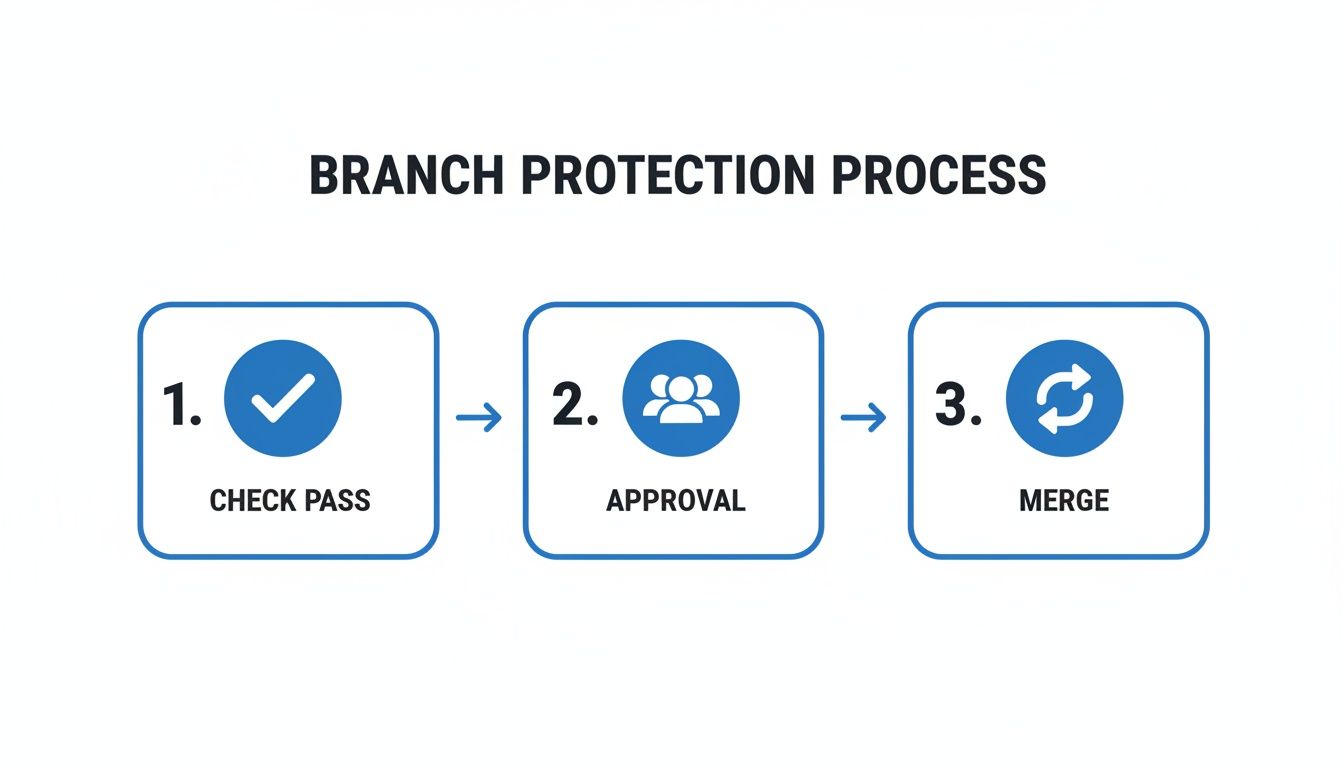
By embedding these quality gates directly into the coding phase, the review cycle gets dramatically shorter, ensuring only vetted code moves forward.
Preempting Hallucinations and Security Gaps
AI coding assistants are incredibly productive, but they're also notorious for "hallucinating"—generating code that looks plausible but is logically flawed, inefficient, or insecure. An in-IDE AI reviewer acts as an immediate sanity check. By understanding the developer's original intent, it can instantly flag when the generated code deviates from that request.
By catching these issues in the editor within five seconds, you eliminate the tedious back-and-forth that plagues traditional code reviews with github. The pull request becomes a final confirmation, not the starting point for a lengthy debate.
This proactive approach lets teams automatically review 100% of AI-generated code against their own guardrails. GitHub's own data on the code review landscape shows that while AI can speed up reviews by 15%, it also introduces risks like larger PRs that are nearly impossible to inspect manually. For DevSecOps, this means enforcing guardrails before code even hits the repository is non-negotiable. Modern AI agents track prompts, project history, and context to catch hallucinations, regressions, and vulnerabilities instantly in the IDE, effectively halving review times and enabling faster merges. You can read the full research about these trends in AI-assisted development on getpanto.ai.
The Impact on Your GitHub Workflow
When you adopt in-IDE AI reviews, the entire dynamic of your GitHub workflow changes for the better. The quality of code pushed to a pull request is significantly higher from the get-go. And when you're integrating AI into your code review workflows, selecting the right model is critical for success. You can gain insights into how to compare AI models effectively to ensure your tools meet your team's specific needs for accuracy and performance.
This leads to several direct benefits:
- Drastically Reduced Review Times: With most of the low-level errors and policy violations caught and fixed in the IDE, human reviewers can focus their attention on high-level architecture and logic.
- Fewer Review Cycles: The "ping-pong" of a PR bouncing between author and reviewer is minimized because the code arriving for review is already in great shape.
- Faster Merges: Many PRs can be merged in minutes, not days. The review becomes a quick validation step rather than a deep, time-consuming investigation.
- Consistent Standard Enforcement: Your team's coding standards, security policies, and best practices are enforced automatically and consistently for every developer, every time.
Ultimately, integrating AI reviews directly into the IDE doesn't replace the human element of code review. It augments it. It frees up your team's most valuable resource—their brainpower—to focus on building great software, not policing syntax.
Common Questions About GitHub Code Reviews
Even with the best tools and workflows, some questions always pop up. Refining a process like code reviews with GitHub is a marathon, not a sprint, and pretty much every team stumbles over the same hurdles. Here are some straight-up, practical answers to the challenges I see developers and engineering leads face all the time.
How Do We Handle Large or Complex Pull Requests?
Honestly, the best defense here is a good offense. You have to build a team culture that instinctively creates small, atomic pull requests. Big PRs should be the rare exception, not the rule.
When a massive PR is truly unavoidable—maybe for a huge, sweeping refactor—the only way to stay sane is to break the review down into smaller chunks. Don't even try to review the whole thing in one shot.
This is where GitHub's own tools are your best friend. The commit-by-commit view is perfect for this. It lets you walk through the changes in the same logical steps the author took to build it. Leave your comments on specific commits to keep the feedback tight and focused.
To get the team on the same page, announce the large PR in your main comms channel, like Slack or Teams. Give a quick summary of what's changing and maybe even suggest a path for reviewers to follow. For the really gnarly parts, a quick 15-minute screen-share with the author can save you hours of confusing back-and-forth in PR comments.
What Is the Ideal Number of Reviewers for a PR?
There’s no single magic number that works for everyone, but requiring at least two reviewers is a solid, battle-tested practice. Think of it as simple probability: one person will almost certainly miss something that a second pair of eyes will catch. It adds a crucial layer of safety without grinding your entire process to a halt.
You can get smart about this by using a CODEOWNERS file to automatically pull in the right experts for specific parts of your codebase. For most routine changes, two reviewers is the sweet spot.
But for the really critical stuff—changes touching security, core infrastructure, or payment systems—you absolutely should bump that requirement to three or more designated experts. The goal is always to find that balance between being thorough and moving quickly. Too few reviewers, and you're taking on unnecessary risk; too many, and you end up with review paralysis where everyone is waiting for someone else to hit the approve button.
How Can We Speed Up Reviews Without Sacrificing Quality?
Automation and pre-submission checks are your secret weapons here. Use GitHub Actions to run all the robotic, mundane checks for you: linting, formatting, running unit tests, and basic security scans. This one move filters out so much noise, letting your human reviewers focus their brainpower on what really matters—the logic and the architecture.
"Shifting left" with in-IDE AI review tools also makes a huge difference in cutting down the endless PR ping-pong. By catching common mistakes before the code is even committed, you guarantee the PR is in much better shape the moment it’s opened. We've seen how tools like GitHub Copilot have reshaped development, making code reviews 15% faster on average with features like Copilot Chat. But there's a catch: while AI helps you write code faster, it can also lead to massive PRs that bog down senior developers.
This is where platforms like kluster.ai come in. They provide instant, in-IDE AI reviews that catch issues before the code ever leaves the developer's machine. This enforces standards automatically and can cut review times in half, ensuring even AI-generated code merges in minutes, not days. You can dig into more of these findings on AI's impact on development from quantumrun.com.
Finally, set clear expectations as a team for review turnaround. A 24-hour goal is a good place to start. Make it clear that code review is a high-priority task for everyone, not something to be crammed in at 5 PM on a Friday.
Best Practices for Giving and Receiving Feedback
A healthy review culture is built on constructive, respectful communication. You have to remember the goal is to improve the code together, not to tear down the author.
When you're giving feedback, stick to these principles:
- Be Specific: Instead of saying "this is confusing," try "this function name doesn't clearly describe what it does."
- Explain Your 'Why': Don't just point out a problem. Link your feedback to a best practice, a potential risk, or a team standard.
- Frame as Suggestions: Phrasing things as a question often works better. "Have you considered this approach?" feels a lot different than "Do it this way."
When you're on the receiving end, your mindset is just as critical:
- Assume Good Intent: Your teammates are trying to help. They want the code to be better, just like you do.
- Ask for Clarification: If a comment is vague, don't guess what they mean. Ask for an example or a better explanation.
- Don't Get Defensive: It's about the code, not you. See the feedback as a chance to learn and improve.
By making these norms the standard for your team, you build the psychological safety needed for real, honest technical debate. It transforms code reviews from a source of friction into one of your most powerful tools for collaboration and mentorship.
Ready to eliminate PR bottlenecks and enforce standards automatically? kluster.ai provides instant, in-IDE AI code reviews that catch issues before they ever become a pull request. Start free or book a demo to see how you can halve review times and merge trusted code in minutes.