

A Guide to GitHub Code Owners for Better Code Reviews
Ever been on a growing project where pull requests start to feel like a game of hot potato? A new PR opens, and the eternal question hangs in the air: "Who's supposed to review this?"
Without a clear system, developers start guessing. They tag the same senior engineer every time, ping a whole channel hoping someone bites, or worse, just let the PR sit there collecting dust. This chaos is more than just annoying—it’s a massive drag on your team's velocity.
This exact kind of slowdown is what GitHub Code Owners was built to fix.
What Are GitHub Code Owners and Why Do They Matter?

Imagine a project with dozens of engineers. Ambiguity about who should review what creates serious bottlenecks. PRs stall, waiting for the right person to notice them. Sometimes, reviews get done by engineers who don't have the full context, leading to superficial feedback and missed bugs. The entire development cycle gets bogged down.
The CODEOWNERS file is your way out of this mess. Think of it as a definitive map of your codebase's guardians.
Your Codebase's Built-In Guardian
At its core, CODEOWNERS is just a simple text file that lives in your repository. But inside that file, you define powerful ownership rules. For example, you can declare that any change to the src/billing/ directory must be reviewed by the @payments-team.
When a PR is opened that touches any file in src/billing/, GitHub automatically reads this file and instantly adds the @payments-team as a required reviewer. No more guessing, no more manual tagging. The error-prone step of finding the right expert is completely gone.
The real magic of GitHub Code Owners is how it transforms code review from a chaotic guessing game into a streamlined, accountable process. It guarantees the right eyes are on the right code, every single time.
This simple change brings a few immediate, powerful benefits:
- Crystal-Clear Accountability: It removes all doubt about who is responsible for which part of the code. This empowers teams to truly own their domains.
- Faster Development Cycles: By automatically routing PRs to the correct reviewers, you slash the time they spend just waiting around.
- Seriously Improved Code Quality: When subject matter experts are the ones doing the reviews, you get far more insightful feedback. This leads directly to a more stable, higher-quality codebase.
Development Workflow With vs Without CODEOWNERS
To really see the difference, let's compare a typical development workflow before and after implementing a CODEOWNERS file. It becomes immediately obvious how one simple configuration file can fundamentally improve team efficiency and code integrity.
| Process Step | Without CODEOWNERS | With CODEOWNERS |
|---|---|---|
| PR Creation | Developer manually tags reviewers, often guessing who is available or knowledgeable. | GitHub automatically assigns the correct individuals or teams based on file paths. |
| Review Assignment | PRs can sit unassigned for hours or days, waiting for someone to claim them. | Review requests are sent instantly, minimizing idle time and starting the feedback loop. |
| Review Quality | Reviewers may lack specific context, leading to generic feedback or missed issues. | Domain experts provide targeted, high-quality feedback, catching subtle bugs. |
| Merge Process | Inconsistent review standards; PRs might be merged without proper oversight. | Merging is blocked until designated owners approve, creating a reliable quality gate. |
The contrast is stark. One path leads to confusion and delays, while the other creates a smooth, predictable, and high-quality review process. By automating the most tedious part of the PR lifecycle, you free up your team to focus on what actually matters: building great software.
How to Set Up Your First CODEOWNERS File
Alright, let's get our hands dirty. Creating your first CODEOWNERS file is a lot less intimidating than it sounds. Think of it as a simple text file that acts as the ultimate rulebook for who needs to review what in your repository.
Getting started is as simple as creating the file in the right spot and adding your first ownership rule.
Choosing the Right Location
GitHub is pretty specific about where it looks for this file. It checks three locations in a precise order, and it stops at the very first one it finds. So, you only need to create one.
- The
.github/directory (Recommended): This is the gold standard. Sticking yourCODEOWNERSfile here keeps your project's root directory tidy and neatly groups all your GitHub-specific configurations, like workflows and issue templates. - The root directory: This works, but it can clutter up the top level of your project, especially as your repository grows.
- The
docs/directory: This is the least common option, and you'd really only use it if your repository is almost exclusively for documentation.
For the sake of consistency and sanity, just create your file at .github/CODEOWNERS. Trust me on this one.
Understanding the Basic Syntax
The beauty of the CODEOWNERS syntax is its simplicity. If you've ever worked with a .gitignore file, you'll feel right at home. Each line has two parts: a file pattern, followed by one or more owners.
You can specify an owner in a few ways:
- GitHub Username:
@username - GitHub Team:
@organization/team-name - Email Address:
user@example.com
The
CODEOWNERSfile follows a "last match wins" rule. This is critical. If a file matches multiple patterns, the very last pattern in the file that applies to it will determine the final owner. The order of your rules matters—a lot.
Let's look at a quick example. Imagine a standard web app structure. Your CODEOWNERS file might look something like this:
Comments start with a #, just like in shell scripts.
Assign a default owner for everything. A good safety net.
- @octo-org/everyone
All JavaScript files belong to the JS experts.
*.js @octo-org/javascript-gurus
The frontend team owns the entire UI directory.
/src/ui/ @octo-org/frontend-team
But the core design system components have their own specialists.
/src/ui/components/ @octo-org/design-systems
The "Last Match Wins" Rule in Practice
The order of the rules is the single most common thing that trips people up. Let's break down that example to see how the "last match wins" logic actually works for a specific file, say /src/ui/components/Button.js.
- First, the file matches
*. The temporary owner is@octo-org/everyone. - Next, it matches
*.js. Ownership gets handed off to@octo-org/javascript-gurus. - Then, it matches
/src/ui/. Now, the owner is@octo-org/frontend-team. - Finally, it hits the most specific rule:
/src/ui/components/. The final owner becomes@octo-org/design-systems.
This top-down approach is incredibly powerful. It lets you set broad, general owners at the top of the file and then carve out specific exceptions as you move down. This pattern is exactly what you need to manage ownership in a complex monorepo or a fast-growing project.
This feature is available on all major GitHub plans, but keep in mind the file has a hard limit of 3 MB. That might sound like a lot, but it's a good reminder to use wildcard patterns efficiently instead of listing out every single file. For all the nitty-gritty details, check out the official documentation about GitHub Code Owners.
Enforcing Ownership with Branch Protection Rules
A CODEOWNERS file on its own is really just a helpful list of suggestions. Sure, it automatically pings the right people to review a pull request, but it doesn't actually stop anyone from clicking that big green merge button without their approval.
That’s a pretty big gap in the process.
To give your ownership rules some actual teeth, you need to connect them to GitHub’s branch protection rules. This simple step transforms your CODEOWNERS file from a polite recommendation into a mandatory quality gate. It’s the difference between asking someone to take a look and requiring their sign-off before any code ships.
Once you flip this switch, you’ve built a powerful, automated shield for your most important branches, like main or develop.
Activating the Code Owners Requirement
Getting this set up is straightforward and happens right in your repository's settings. Once configured, GitHub will physically gray out the merge button on any pull request until at least one of the designated code owners gives their thumbs-up.
Here's how you do it:
- Head over to your repository’s Settings tab.
- In the sidebar on the left, click on Branches.
- Find the rule for the branch you want to protect (like
main) or click Add rule to create a new one. - First, you have to check the box for Require a pull request before merging. This is a prerequisite.
- Then, and this is the important part, check the box for Require review from Code Owners.
This next image shows exactly where to find these key settings.
That highlighted checkbox is the simple but powerful link that brings your entire CODEOWNERS file to life, making sure no code slips through without an expert review.
With this one change, you’ve created an automated enforcement mechanism. Now, if a junior developer tries to push a change to a critical billing file, the system will block the merge until someone from the @payments-team (as defined in your CODEOWNERS) approves it. This builds a robust layer of defense right into your workflow.
Fine-Tuning Your Protection Settings
Just requiring a review is a fantastic start, but for a truly solid workflow, there are a few other settings you should enable alongside it. These options plug common loopholes and ensure every review stays relevant.
- Dismiss stale pull request approvals when new commits are pushed: This one is non-negotiable. If a developer gets an approval and then pushes another change—even a small one—this setting automatically invalidates the old approval. This forces a fresh review of the latest code, preventing unreviewed changes from sneaking in last minute.
- Require status checks to pass before merging: This is your safety net. It ensures all your automated checks—like unit tests, linters, and security scans—are green before a merge is even possible. It's a cornerstone of any modern development pipeline. You can learn more about integrating these checks in our complete guide to CI/CD best practices.
- Do not allow bypassing the above settings: Enable this to prevent repository administrators from overriding these rules. It ensures the process is followed by everyone, every time, with no exceptions.
By combining a
CODEOWNERSfile with thoughtfully configured branch protection rules, you establish a system where code quality and accountability are not just encouraged—they are programmatically enforced.
This combination creates a secure, predictable path to production. Every change is automatically routed to the right expert, and the system guarantees their approval is locked in before the code ever hits your main branch. It’s one of the most effective ways to scale code quality without drowning in manual oversight.
Advanced Strategies for Monorepos and Large Teams
When your team scales, a single, flat CODEOWNERS file just doesn't cut it anymore. What worked for a small team quickly becomes a massive bottleneck in a sprawling monorepo with dozens of microservices and teams shipping code at the same time. The secret isn't to abandon it, but to evolve your strategy from a simple list into a structured system that actually mirrors how your organization works.
Managing a monorepo or any large, multi-team project demands smarter CODEOWNERS patterns. You have to stop thinking about individual files and start thinking in terms of entire domains, services, and shared infrastructure. This shift is what prevents review chaos and keeps responsibility crystal clear, even when multiple teams are pushing code to the same repo.
Architecting a Tiered Ownership Model
One of the most powerful patterns for big projects is tiered ownership. Picture your codebase as a pyramid.
At the very bottom, you have the foundational code—the really critical stuff like core libraries, CI/CD configurations, and infrastructure-as-code. A central platform or SRE team should own this layer. No exceptions.
On top of that, you have the individual application or service layers, each owned by its dedicated feature team. This structure lets you put the strictest reviews on foundational changes while giving feature teams the freedom to move fast in their own domains.
Here’s what that looks like in a CODEOWNERS file:
Tier 1: Core Infrastructure (Owned by Platform Team)
.github/workflows/ @my-org/platform-engineering terraform/ @my-org/platform-engineering libs/shared-utils/ @my-org/core-devs
Tier 2: Feature Teams (Owning their services)
services/authentication/ @my-org/auth-team services/payments/ @my-org/payments-team services/ui-components/ @my-org/frontend-guild
Fallback for anything not explicitly owned
- @my-org/engineering-leads
This tiered approach, combined with GitHub’s "last match wins" rule, builds a powerful hierarchy. A tweak to
services/payments/api.jsis automatically routed to the@payments-team, but a change to a GitHub Actions workflow in.github/workflows/deploy.ymlgoes straight to the@platform-engineeringteam.
The diagram below shows how CODEOWNERS fits into the bigger picture. It's the gatekeeper that sits right behind your branch protection rules.
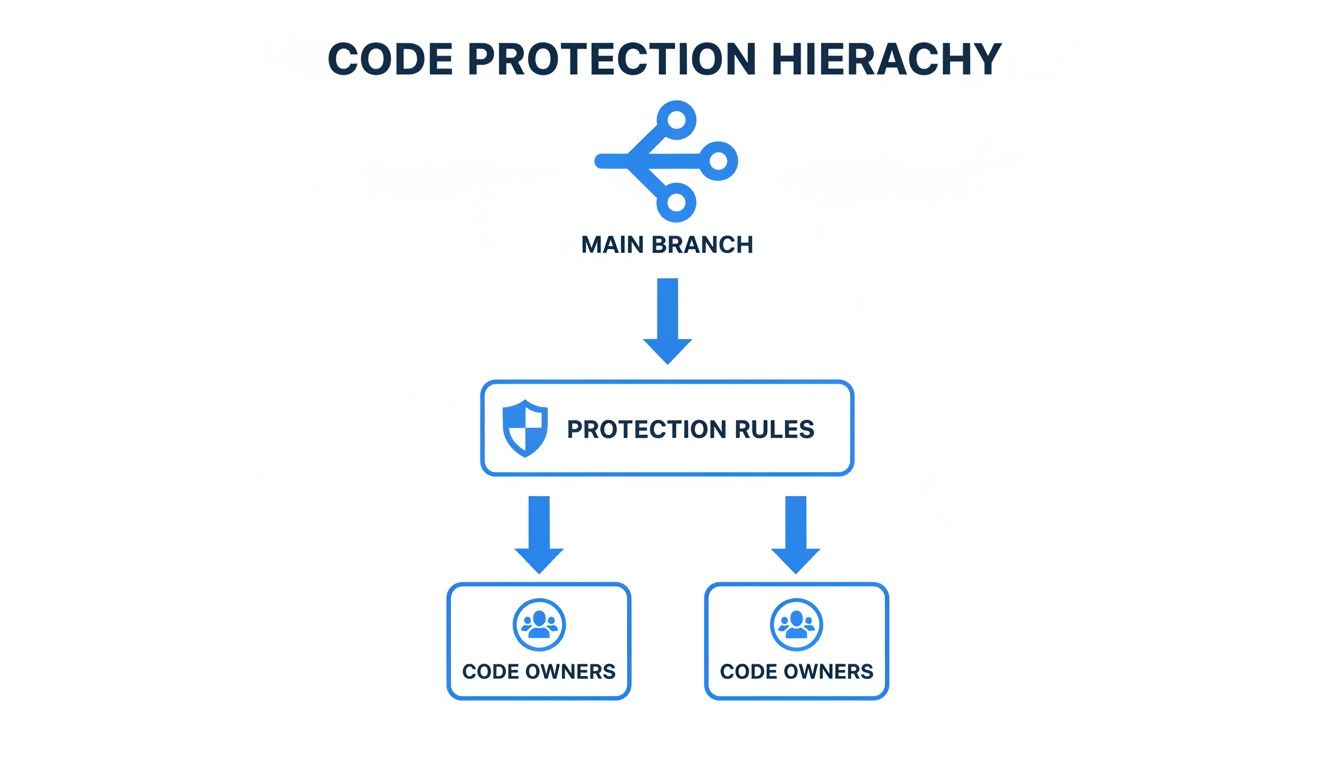
This visual makes it clear: to make ownership stick, you have to activate the CODEOWNERS file through branch protection rules. That’s what turns it into a mandatory checkpoint for your main branch.
Managing Cross-Cutting Concerns
So, what about the files that don't neatly fit into one team's box? I’m talking about cross-cutting concerns—things that impact everyone, like documentation, security policies, or top-level project configs. Giving them to one team creates a bottleneck, but leaving them unowned is just asking for trouble.
The answer is to create specialized groups or guilds to watch over them:
- Documentation:
docs/can be owned by a@docs-guildwith members pulled from different teams. - Security Files: Critical files like
SECURITY.mdor dependency manifests should go to a dedicated@security-championsteam. - Global Configuration: Root-level files like
package.jsonortsconfig.jsonare perfect for a group of senior architects or engineering leads.
Key Insight: Your
CODEOWNERSfile is a living document, not a set-it-and-forget-it config. It needs to be reviewed and updated at least quarterly to keep up with team restructuring, new services, and shifting responsibilities in your org.
Recent research has really hammered home the importance of keeping these ownership groups small and focused. It turns out that smaller code ownership groups massively outperform larger ones in review speed and merge times. Teams with ownership concentrated among just 2-3 senior engineers merge pull requests way faster than those where it's spread across a big group. Why? Because fragmented decision-making is a recipe for delay.
Ultimately, a scalable CODEOWNERS strategy is all about creating clarity and killing friction. If you structure your file thoughtfully, you can empower your teams, protect your most critical code, and guarantee that every change—even in the most complex repos—gets the right eyes on it without slowing everyone down. For those working with different platforms or curious about broader industry standards, you might want to explore career opportunities at leading development platforms like GitLab.
Automating Code Reviews to Support Code Owners
 Human reviewers are the heart of a quality codebase, but they're not robots. As pull requests pile up, even the most dedicated code owner gets hit with reviewer fatigue. The result is inconsistent feedback, longer review cycles, and a slowdown that drags on the whole team.
Let's be honest, a huge chunk of manual review time is spent on stuff a machine could do—spotting style violations, catching common bugs, or flagging missing dependencies. This is precious time your senior engineers could be using to solve real architectural problems.
This is exactly where automation becomes an indispensable partner to your GitHub Code Owners strategy. By plugging automated tools into your workflow, you can build a powerful, two-stage review process that frees your human experts to focus on what actually matters.
The Limits of Manual Reviews
Relying only on human oversight creates predictable bottlenecks. When a code owner is swamped or on vacation, pull requests can sit gathering dust for days. This doesn’t just frustrate developers; it delays critical bug fixes and feature releases.
On top of that, human reviews are inherently subjective. One reviewer might be a stickler for performance, while another obsesses over readability. This kind of inconsistency leads to confusing feedback and a codebase that lacks a clear, unified standard.
Relying on automation for the first pass of a review isn't about replacing human experts—it's about empowering them. It lets you shift their valuable time from finding syntax errors to validating business logic and architectural soundness.
Automated systems, on the other hand, are objective and relentless. They don’t get tired, they don’t miss small details, and they apply the exact same standards to every single line of code, every single time.
Creating a Two-Stage Review Process
The most effective modern workflows blend the best of both worlds: the tireless precision of machines and the nuanced judgment of human experts. The idea is simple: let automation handle the initial grunt work.
This creates a ridiculously efficient system:
- AI-Powered First Pass: The moment a pull request is opened, an automated tool instantly scans the code. It’s looking for bugs, security vulnerabilities, style issues, and anything that violates team-specific conventions.
- Human Expert Final Pass: Once the automated checks are green, the GitHub Code Owners file pings the designated human reviewer. They get a pull request that’s already "clean"—free from common errors and polished to meet established standards.
This division of labor is a total game-changer. The code owner is no longer bogged down in nitpicking. Instead, they can immediately focus on the high-level stuff: Does this change solve the right problem? Is the architecture sound? Does it align with the project's long-term vision?
The Synergy of Automation and Ownership
Integrating these tools doesn't just make reviews faster; it makes them fundamentally better. For teams looking to get started, exploring platforms that offer automated code reviews is the perfect first step. Some tools, like kluster.ai, can even run directly in a developer's IDE, catching issues before the code is ever committed.
This synergy between automation and human ownership pays off immediately. It slashes the back-and-forth that plagues so many pull requests, letting teams merge code faster and with way more confidence. By offloading the tedious work to machines, you empower your best engineers to apply their expertise where it has the greatest impact—driving innovation and maintaining a high-quality, secure codebase.
Even with a perfectly mapped-out CODEOWNERS file, things can go sideways. Pull requests get stuck, the right reviewers never get tagged, and you're left scratching your head. It happens.
But when it does, the root cause is usually a small, easy-to-fix issue. Most problems boil down to one of three things: a simple syntax error, the wrong permissions, or a misunderstanding of how GitHub reads the file. A single typo in a username or a misplaced path can stop the whole process in its tracks.
Why Are Reviewers Not Being Assigned?
This is, by far, the most common headache. A developer opens a pull request, and the expected code owner isn't automatically added as a reviewer. It feels broken, but the fix is usually straightforward once you know where to look.
Nine times out of ten, it’s one of these culprits:
- Syntax Errors: A misplaced
@symbol, a typo in a username (@gihub-userinstead of@github-user), or an incorrect team name (@my-org/Frontendwhen it should be@my-org/frontend) will cause a rule to fail silently. You have to double-check every single character. - Incorrect File Location: GitHub is picky. It only looks for the
CODEOWNERSfile in three specific places: the root directory,docs/, or.github/. The community standard is.github/CODEOWNERS, so make sure your file is right where it expects to find it. - Insufficient Permissions: This one trips up a lot of teams. A user or team listed as an owner must have
Writeaccess to the repository. If they only haveReadorTriagepermissions, GitHub will just ignore the rule and won't assign them for review.
Unraveling the "Last Pattern Wins" Logic
Another source of confusion is how GitHub decides which rule to use when a file matches multiple patterns. It’s simple but critical: the last matching pattern in the file wins. This can lead to some very unexpected assignments if your rules aren't ordered logically.
For example, take a look at this CODEOWNERS file:
Generic JS files
*.js @javascript-team
Specific UI components
src/components/ @ui-team
With this setup, a change to src/components/Button.js correctly assigns the @ui-team. But what happens if you flip the order? The @javascript-team would be assigned instead, because the *.js pattern appears later in the file and becomes the final match.
When you're debugging ownership issues, always read your
CODEOWNERSfile from top to bottom. Follow the path of the changed file and find the very last rule it matches. That’s your real owner.
By methodically checking your syntax, permissions, and rule order, you can solve just about any CODEOWNERS issue and get your automated reviews flowing smoothly again.
Frequently Asked Questions
Even the best guides leave a few questions unanswered. Let's tackle some of the most common ones that pop up when teams start using CODEOWNERS.
Can I Have Multiple CODEOWNERS Files in One Repository?
Nope, GitHub keeps it simple: one CODEOWNERS file per repository.
It looks for the file in a specific order—first in the .github/ directory, then in the root, and finally in docs/. The very first one it finds is the only one it uses. So, make sure all your ownership rules are consolidated into that single, authoritative file.
What Happens If a Code Owner Lacks Write Access?
This is a great question and highlights one of GitHub's built-in safety features. If a user or team in your CODEOWNERS file doesn't have write permissions, GitHub just ignores that line. They won't be requested for review, and their approval won't count.
It’s a simple security measure to ensure that only people who can actually merge code can approve it.
How Do I Require More Than One Code Owners Approval?
The CODEOWNERS file itself doesn't control the number of approvals; it just decides who gets tagged for review. The "how many" part is handled entirely by your branch protection rules.
To require multiple approvals, just head over to your branch protection settings and set "Required approving reviews" to whatever number you need. For example, setting it to 2 means you'll need one code owner's approval plus one other review before merging.
This setup gives you a ton of flexibility. You can enforce a two-person review policy on all changes while still making sure the right domain expert always gets a look.
Can Authors Approve Their Own Pull Requests?
By default, they can, but you almost certainly want to turn this off. In your branch protection rules, there’s a critical setting called "Dismiss stale pull request approvals when new commits are pushed." You should enable it.
This is the rule that prevents someone from pushing code and immediately approving it themselves, even if they're a listed code owner. It forces a true peer review, which is the whole point of the exercise.
Your code owners define who reviews the code, but what reviews the reviewer? kluster.ai provides instant, in-IDE AI code reviews to catch bugs, security flaws, and style issues before a human ever sees the PR. This frees your code owners to focus on architecture, not nitpicks. Learn how to halve your review time.