

What is a pull request? A Clear Guide for Developers (what is a pull request)
If you’ve ever worked on a team project, you know the fear of accidentally breaking something that everyone else depends on. A pull request (or PR) is the safety net that prevents that chaos in software development.
Think of it like editing a shared document. Instead of changing the original text directly, you make a copy, suggest your edits, and then ask the author to review and approve them. That’s a pull request in a nutshell: a formal proposal to merge your new code into the project's main codebase. It’s the absolute cornerstone of how modern software gets built collaboratively.
What is a Pull Request, Really?
At its heart, a pull request is a starting point for a conversation. When you're tackling a new feature or smashing a bug, you don't work on the "live" version of the code. Instead, you create your own isolated copy, called a branch. This keeps the stable, primary version of the project—usually called main or master—safe and sound while you work.
Once you’re happy with your changes, you don't just shove them into the main code. You open a pull request. This packages up everything you've done and presents it to your teammates, effectively saying, "Hey, I've built something cool. Can you take a look before we make it official?"
The Core Idea: A Formal Review
The pull request creates a dedicated space for code review. It's what turns coding from a solo activity into a team sport—a concept that exploded in popularity after GitHub introduced the feature back in 2008. The scale is staggering; today, developers create over 100 million PRs on GitHub every year. You can dig into the history of this growth in GitHub's community documentation.
This formal review process is critical. It gives the team a chance to inspect every proposed change for a few key things:
- Correctness: Does this code actually work? Does it do what it's supposed to do?
- Quality: Does it align with our team's standards and best practices?
- Clarity: Is this code easy to read? Will we be able to maintain it a year from now?
A pull request isn't just about merging code. It’s about building shared understanding and collective ownership over the project's quality.
Every pull request you'll ever open or review has a few essential parts. The table below breaks down the key components you'll find every single time.
Anatomy of a Pull Request
| Component | Purpose | Example |
|---|---|---|
| Title | Provides a quick, one-line summary of the changes. | "Fix user login button alignment on mobile" |
| Description | Explains the "what" and "why" behind the changes, often linking to a ticket. | "This PR addresses ticket #432..." |
| Commits | Shows the detailed history of changes made in the branch. | feat: add user profile endpoint |
| File Changes | Displays a line-by-line "diff" view of all added, modified, or deleted code. | + function newUser() { ... } |
Understanding these components is the first step. With a clear title, a solid description, and a clean history of commits, you set your teammates up for a smooth and effective review.
Why Pull Requests Are Non-Negotiable for Modern Teams
Think of pull requests as the very heart of a healthy development culture. They’re what transform coding from a solo, heads-down activity into a collaborative craft. More than just a technical step, a PR is your first and best line of defense against bugs, protecting the stability of the entire project. This is where quality is really forged.
Without them, developers would push code directly to the main branch—a risky move that could unleash a flood of unforeseen errors. A PR forces a pause, creating a mandatory checkpoint where peers can examine the logic, spot potential issues, and suggest improvements before a single user is affected. It's a simple, proactive strategy that systematically crushes bugs before they ever see the light of day.
A Safety Net for Code Quality
At its core, a PR is a safety inspection. Imagine a junior developer submits a pull request with a database query that works, but it's wildly inefficient. During the review, a senior engineer can easily spot the performance issue and suggest a better approach. Just like that, a potential bottleneck becomes a valuable teaching moment.
This peer review process acts as a powerful quality gate, ensuring every change adheres to the team's standards. It’s brilliant at catching everything from subtle logic flaws to critical security vulnerabilities that one person might have missed. The discussion that happens inside the PR becomes a living space for mentorship and shared ownership.
A pull request institutionalizes the question, "Can we make this better?" It shifts the focus from just getting a feature done to getting it done right.
Creating Living Documentation and Shared Knowledge
Every merged pull request becomes a permanent part of your project’s history. The title, the description, and all the review comments combine to create living documentation. They explain not just what changed, but more importantly, why it changed. Months later, when a new team member is trying to understand a weird piece of code, the PR history gives them the full story.
This process also naturally spreads knowledge across the entire team. Developers learn about different parts of the codebase just by reviewing their colleagues' work. Of course, for this to work smoothly, everyone needs access. That's why one of the first steps for any modern team is learning about adding collaborators in GitHub to make sure the right people can participate.
By making code review a standard part of the workflow, pull requests build a more resilient, knowledgeable, and aligned engineering team. They aren't just a feature of Git; they are a fundamental pillar of modern software engineering.
The Pull Request Lifecycle, Step by Step
Alright, you get what a pull request is and why it’s so important. Now, let's trace its journey from a fresh idea on your local machine all the way to becoming a permanent part of the main codebase. This lifecycle is the daily rhythm of any collaborative development team.
Every single change starts with creating a dedicated workspace. You never work directly on the main branch—that’s just asking for trouble. Instead, you create a new, isolated feature branch. Think of it as your personal sandbox, a place where you can build, break, and fix things without disturbing the stable, working code.
Step 1: Create and Isolate Your Work
First things first, you need to create and switch to your new branch. It’s like opening a fresh copy of the project where you can experiment without any consequences.
Create a new branch called 'feature/user-profile-update' and switch to it
git checkout -b feature/user-profile-update
That single command does two things at once: it creates the new branch and immediately makes it your active working environment. Now you're free to write code, tweak files, and squash bugs, all without putting the main branch at risk.
Step 2: Commit and Push Your Changes
As you make progress, you’ll want to save your work in small, logical chunks called commits. Each commit should be a self-contained unit of work—like fixing a single bug or adding one small feature—and should have a clear message explaining what you did.
Add your changed files to the staging area
git add .
Save your changes with a descriptive message
git commit -m "feat: Add avatar upload functionality"
Once you have a few commits ready, you need to get them off your local machine and onto the shared remote repository (like GitHub). This is what makes your new branch visible to the rest of the team.
Push your new branch and its commits to the remote repository
git push -u origin feature/user-profile-update
Step 3: Open the Pull Request
With your code now safely on the remote server, you can officially open the pull request. This is the moment you formally ask for a review. On platforms like GitHub, you’ll usually see a big button to create a PR as soon as you push a new branch.
You'll give it a clear title and, most importantly, a detailed description. Don't be lazy here! Explain the "what" and the "why" behind your changes. What problem does this solve? How did you solve it? Is there anything reviewers should pay special attention to?
The infographic below really nails the three pillars that make this process indispensable.
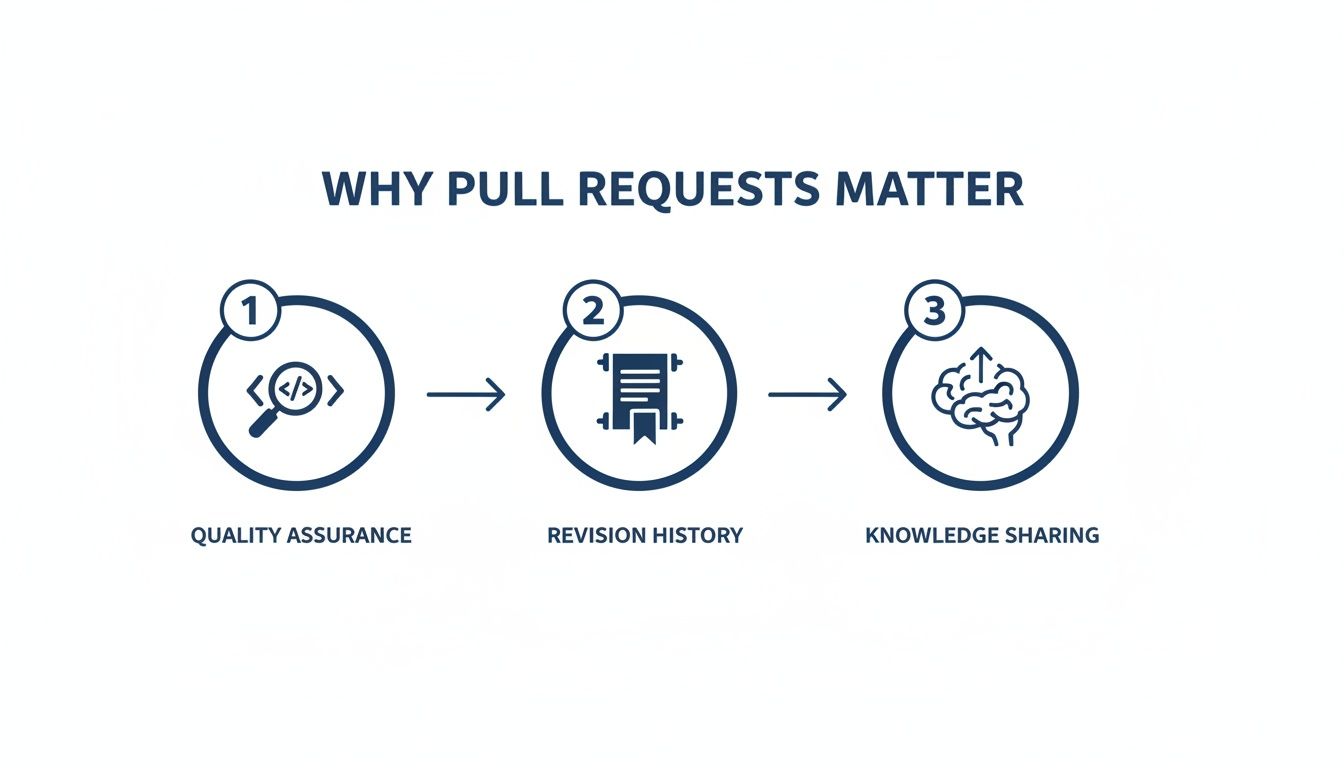
This whole flow is designed to enforce quality, maintain a clean project history, and spread knowledge across the team.
Step 4: Review and Merge
Once the PR is open, your teammates jump in to review the code. They might leave comments, ask clarifying questions, or request changes. This isn't a test or a critique; it's a collaborative discussion aimed at making the code better.
If your reviewers ask for changes, you just make more commits on your local branch and push them up. The pull request will update automatically with the new code.
The goal of code review isn't just to find flaws. It's about building a better solution together by combining different perspectives and sharing expertise.
When everyone is happy with the changes and any automated checks (like tests or builds) have passed, a project maintainer will merge your pull request. This is the final step. It takes all the commits from your feature branch and integrates them into the main branch, making your contribution an official part of the project.
For a closer look at the commands and workflows involved, our guide on the GitHub pull and merge process breaks down the mechanics in more detail.
Mastering the Art of the Perfect Pull Request
Knowing the lifecycle of a pull request is one thing. Mastering the art of creating one that your team actually enjoys reviewing? That's a whole different skill.
The best developers get that a PR is really just an exercise in communication. It's about respecting your teammates' time. A thoughtfully crafted PR gets reviewed faster, sparks better feedback, and ultimately gets the entire team moving quicker.
If you take away just one thing, let it be this: keep your pull requests small and focused.
A single PR that tries to fix three bugs and add two new features is a reviewer's absolute nightmare. It's confusing and impossible to untangle. Instead, break it up. Submit a separate PR for each distinct task. A small, targeted PR is just plain easier to understand, faster to review, and far less likely to break something unexpected.
Crafting a Clear and Helpful PR
Beyond just keeping it small, the context you provide is everything. A title like "Bug fix" is completely useless. A great title is descriptive and gets right to the point, like "Fix User Login Button Alignment on Mobile." Your reviewer knows exactly what they're looking at before they even click.
That clarity needs to carry over into the description. Never, ever leave it blank. Use that space to explain the "what" and the "why" behind your changes. A pull request template is a fantastic way to make this automatic, prompting you to fill in the essentials every time.
- Link to the Ticket: Always connect your PR back to the ticket in your project management tool (Jira, Trello, etc.). This gives reviewers the full backstory.
- Explain Your Approach: Briefly walk through how you solved the problem. Did you explore other options? Why did you land on this particular solution?
- Add Screenshots or GIFs: For any visual changes, a picture is worth a thousand words. Show the "before" and "after" so the impact of your work is immediately obvious.
A great pull request doesn't just present code; it tells a compelling story about a problem and its solution. It anticipates the reviewer's questions and answers them upfront.
Digging into the data reveals some interesting benchmarks for team efficiency. Across over 500 teams, the average PR touches between 150-300 lines of code. In healthy, active projects, you'll see a merge rate around 70-80%. Agile teams also tend to keep the number of open PRs under 10 to avoid creating bottlenecks. You can explore more of these stats in PullKeeper's analysis.
Respecting the Reviewer's Time
Finally, do your team a favor and make sure your code is clean before you ask for a review.
Run all the tests locally. Lint your code. Most importantly, review your own changes first. Think of it like proofreading an email before hitting send. Catching your own simple mistakes saves everyone a headache.
For a deeper dive into what to look for, check out our detailed pull request checklist. By making these practices a habit, you build a reputation as a thoughtful, professional developer whose work is a pleasure to review.
Speeding Up Code Reviews with AI and Automation
The pull request is a fantastic process, but let's be honest—the review phase can grind everything to a halt. It's often the biggest bottleneck in the whole development cycle. Waiting for a human review kills momentum, especially when it’s just to catch simple mistakes that slipped through. This is where AI and automation are completely changing the game.
Modern development workflows now lean heavily on automation as the first line of defense. The moment you open a pull request, before a teammate even gets a notification, a whole suite of automated tools kicks into gear. Think of them as digital gatekeepers ensuring a baseline of quality, freeing up precious human time for the tricky stuff like logic and architecture.
Automation: The First Gatekeeper
These automated checks typically live inside a Continuous Integration (CI) pipeline. It’s like an automated QA checklist that runs every single time someone proposes a change.
- Linters and Formatters: These tools are the style police. They automatically scan for inconsistent formatting and common coding errors, making sure the entire codebase stays clean and readable.
- Automated Tests: Unit, integration, and end-to-end tests fire off to make sure the new code didn’t accidentally break anything that was already working. For teams serious about speed, solid strategies for Automating Regression Testing are a non-negotiable part of the CI pipeline.
- Security Scans: Specialized tools hunt for known vulnerabilities and insecure coding patterns, stopping security flaws from ever making it into the main branch.
By catching all this low-hanging fruit, automation handles the tedious parts of a code review. This lets your developers focus on what actually requires a human brain.
"Shifting Left" with Real-Time AI Review
The next leap forward is to catch issues even earlier, a concept everyone calls "shifting left." Instead of waiting until a pull request is created, AI-powered tools give you feedback instantly, right inside your Integrated Development Environment (IDE). It’s a proactive approach to writing good code from the start.
Imagine an AI assistant looking over your shoulder and analyzing your code as you type it. Before you even think about creating a PR, tools like kluster.ai can flag potential logic errors, performance drags, and security holes in real time. This is especially powerful now that so much code is AI-generated, which can sometimes introduce subtle but nasty flaws.
By providing instant, in-IDE feedback, AI code review gets rid of the frustrating back-and-forth of a normal PR cycle. It turns the review from a gate you have to pass into a collaborative partner that helps you write better code from the get-go.
This real-time analysis doesn't replace the pull request; it complements it. The PR becomes a final sign-off, a place for high-level architectural discussion instead of a hunt for typos and simple bugs.
This speed is crucial. Data shows the median time to merge a PR is a whopping 26 hours. That number can be slashed when the code entering the review queue has already been pre-vetted. By combining CI automation with in-IDE AI, teams can merge reliable code in minutes, not days.
Answering Your Most Common Pull Request Questions
Once you start using pull requests regularly, you’ll inevitably hit a few common roadblocks or hear terms that aren't immediately obvious. Think of this section as your field guide for those "wait, what does that mean?" moments.
We're cutting through the jargon to give you straight answers to the questions that pop up in the real world, bridging that gap between theory and your day-to-day work.
What’s the Difference Between a Pull Request and a Merge Request?
This is easily the most common point of confusion, but the answer is refreshingly simple: they’re the exact same thing. The concept, the workflow, the purpose—it's all identical.
The only difference is what the hosting platform decides to call it.
- Pull Request (PR) is the term you'll see on GitHub and Bitbucket.
- Merge Request (MR) is what GitLab calls it.
That’s it. If you know how to use a PR on GitHub, you already know how to use an MR on GitLab. It’s a formal request to review your code and merge it into another branch, plain and simple.
How Do I Handle Merge Conflicts in My Pull Request?
First, don't panic. A merge conflict is a totally normal part of working on a team. It just means Git can't automatically figure out how to combine your changes with updates that have happened on the target branch (like main), usually because you and someone else edited the same lines.
To fix it, you have to step in and tell Git what the final version should look like. Start by pulling the latest changes from the target branch into your feature branch.
git pull origin main
Git will flag the files with conflicts. When you open them, you'll see markers like <<<<<<<, =======, and >>>>>>> that show you exactly where the competing changes are. Your job is to edit the code inside those markers, deleting the bits you don't want and keeping what you need to create the final, correct version.
Once you’ve cleaned it up, just save the files, commit your fix, and push the changes. The pull request will automatically update, and the conflict will disappear.
A merge conflict isn’t a mistake. It’s just a signal that it’s time to sync up with the team’s latest work. Learning to resolve them is a core developer skill.
Should I Delete a Branch After a Pull Request Is Merged?
Yes. Absolutely, yes.
Once your PR is approved and merged, your feature branch has done its job. All of that work is now officially part of the main branch's history. Keeping the old branch around just creates clutter.
Deleting it is just good housekeeping. It keeps your repository clean and makes it crystal clear what work is finished versus what’s still in progress. A repo filled with dozens of old, merged branches is a nightmare to navigate.
Thankfully, platforms like GitHub and GitLab make this super easy. You’ll almost always see a big "Delete branch" button right on the merged PR page. Click it.
What Is a Draft or WIP Pull Request?
A Draft Pull Request (sometimes called a "Work in Progress" or WIP) is your way of telling the team, "Hey, I'm working on this, but it's not ready for a real review yet." It’s a fantastic tool for getting early feedback or running your automated checks without spamming your teammates with review notifications.
You’d use a draft PR to:
- Get early feedback: Maybe you're unsure about an approach. You can open a draft PR and share the link with a specific person to get their thoughts before you go too far down the wrong path.
- Run CI checks: Opening any PR, even a draft, usually triggers your project's automated test suite. This lets you confirm your changes pass all the checks before you bother a human reviewer.
- Signal your intent: It’s a clear sign to everyone else that this feature is being worked on, which helps avoid duplicated effort.
When you're finally confident that the code is ready for a formal look, you just click a button to mark it as "Ready for Review." That’s when it officially enters the review queue and notifies your team.
The pull request is a massive step up for team collaboration, but the review process itself can still be a huge bottleneck. This is where kluster.ai complements the PR workflow by giving you real-time, in-IDE code review before you even commit your code. By catching logic errors, security flaws, and style issues as you type, you create cleaner pull requests that are ready to merge in minutes, not days. See how it works at https://kluster.ai.