

Unlocking Efficiency with Code Review Automation
Code review automation is pretty simple at its core: it's using software to automatically scan source code for common problems like bugs, style mistakes, and security holes. This frees up developers from doing the same boring, repetitive checks over and over again. Think of it as an automated partner that lives inside your development pipeline, giving you instant feedback and making sure everyone follows the same quality rules.
From Human Bottleneck to Automated Partner

Picture your development process as a super-fast assembly line. For a long time, the final quality check was done by a few expert engineers who had to inspect every single piece by hand. It was thorough, sure, but painfully slow and created a massive bottleneck. That's exactly what manual code review has become in modern software development.
This guide is all about making the switch to an automated partner—a system that works right alongside your developers to catch common mistakes the second they're made. We'll start with the basics of automation, move into how to actually implement it, and even touch on the advanced stuff with AI.
It's like moving from a small craft workshop to a modern factory. Automation handles all the repetitive quality checks, freeing up your best engineers to focus on the big picture: architecture, design, and genuine innovation.
This shift is crucial. Manual reviews are still great for digging into complex business logic, but they often get bogged down by trivial issues. These delays are a huge reason for developer burnout; in fact, some studies show it’s one of the top three things that leave engineers feeling completely drained.
Why Automation Is No Longer Optional
The problem is that human attention is a limited resource. Every minute a senior engineer spends pointing out a missing semicolon or an inconsistent variable name is a minute they aren't spending on high-impact work that actually moves the needle. Code review automation tackles this head-on by giving all the objective, rule-based tasks to a machine.
This change does wonders for your team's culture. Instead of developers sitting around, blocked and waiting for a review, they get immediate, unbiased feedback. The whole conversation changes from being corrective to being collaborative.
To really get why this is such a big deal, it helps to understand the fundamentals of traditional 10 Code Review Best Practices. Those principles don't go away; automation just puts them on steroids.
Here’s what you’re really trying to achieve with automation:
- Ship Faster: By slashing the time pull requests sit waiting for review, your team can merge and deploy new features much more quickly.
- Enforce Consistency: Automated tools make sure every single line of code follows the same style guides. This makes the entire codebase cleaner and easier for everyone to maintain.
- Make Developers Happier: It gets rid of the frustrating back-and-forth over tiny details, letting developers stay in the zone and solve real problems.
- Boost Security: Automated scans can spot common vulnerabilities like SQL injection or cross-site scripting long before that code ever gets near production.
At the end of the day, code review automation isn’t about replacing your engineers. It’s about augmenting them. It creates a powerful partnership where machines handle the predictable stuff and humans focus on complex problem-solving. The result is faster, safer, and more reliable software, and this guide will show you exactly how to build that partnership.
Let's cut through the buzzwords. Code review automation isn't about firing your developers and hiring robots. It’s about giving your best people a superpower: a tireless digital assistant that handles all the boring, repetitive parts of quality control.
Think of it as a set of tools wired directly into your development workflow, programmed to enforce your team's standards and catch common mistakes before a human ever has to see them.
At its core, automation uses static analysis (SAST), linters, and style checkers as an always-on quality inspector for your codebase. It’s like having a security guard who patrols your code 24/7, checking every single line against a rulebook for potential bugs, security holes, and style issues. This system works tirelessly in the background, making sure the basics are always covered.
This isn't just a niche practice anymore; it's becoming standard. The global code review market, which covers both manual and automated tools, was already worth $784.5 million in 2021 and is on track to hit $1.03 billion by 2025. That growth is being fueled by one thing: the push to integrate AI and machine learning to make reviews faster and smarter. You can dive deeper into the numbers by checking out the full research on the code review market.
Freeing Humans for the Work That Matters
This automated first pass is what changes the game. It saves your human reviewers from the soul-crushing task of pointing out misplaced commas, inconsistent variable names, or simple syntax errors. Instead of getting bogged down in trivial "nitpicks," they can invest their limited time and brainpower on the questions that actually matter.
The whole point of code review automation is to handle the objective, repeatable checks. This elevates human review from a simple inspection to a strategic discussion. It shifts the focus from "Did you write the code correctly?" to "Did you write the right code?"
This frees up your most experienced engineers to focus on the big picture—the stuff a machine can't figure out:
- Logic and Architecture: Is the thinking behind this feature solid? Will it scale when we have 10x the users?
- Problem-Solving: Does this change actually solve the customer's problem in a smart way?
- Maintainability: Is this code clean and easy to understand? Or will the next developer who touches it curse my name?
- Security Context: Does this introduce a subtle business logic flaw that a simple pattern-matcher would completely miss?
An Analogy: The Automated Sous-Chef
Think about a high-end restaurant kitchen. The head chef isn’t spending their day chopping onions or measuring flour. They have a team of sous-chefs for that precise, repetitive prep work. This frees the head chef to focus on designing the menu, perfecting flavor combinations, and making sure every single dish is perfect.
In this scenario, code review automation is your team's digital sous-chef.
It handles all the prep work—checking formatting, spotting common mistakes, and making sure all the basic ingredients are correct. This lets your senior developers act as the head chefs, focusing purely on the creative and complex parts of software architecture. By offloading the grunt work, you empower your best people to do their best work.
Choosing Your Automation Strategy
Jumping into code review automation isn't a one-size-fits-all deal. It's about being strategic, placing the right checks at the right points in your development workflow. The best approach really depends on what your team is trying to achieve—whether that's lightning-fast feedback for developers, iron-clad quality gates, or deep, contextual analysis of every change.
Think of it like setting up a home security system. You don't just put one lock on the front door and call it a day. You probably have sensors on the windows, maybe a camera out front, and an alarm that ties everything together. Each piece serves a unique purpose, but they all work together to create a solid defense.
This simple flowchart breaks down the fundamental split in the review process. When a code change comes in, automation is the first line of defense, handling all the predictable, repetitive checks. Only after that does a human need to even look at it.
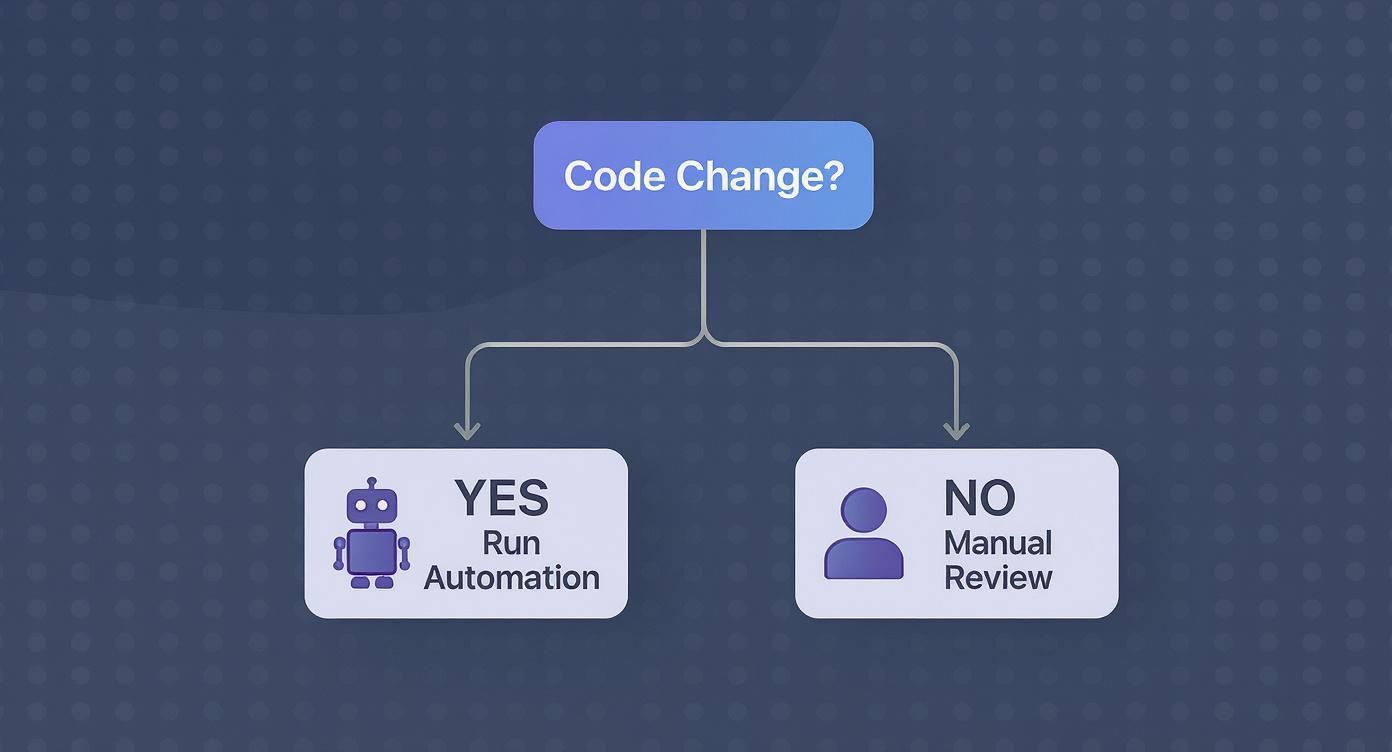
This really gets to the core value of automation: it cuts through the noise. It lets your senior engineers apply their expertise where it actually matters, not on spotting missing semicolons.
Let's break down the four main ways to build out this layered defense.
Pre-Commit Hooks: The Local Spell-Check
Pre-commit hooks are the simplest form of code review automation. These are just small scripts that run on a developer’s local machine every single time they try to commit code. This creates your first and fastest feedback loop, catching obvious issues before they ever leave the developer's computer.
It’s like a writer running a spell-checker before sending a draft to their editor. That’s a pre-commit hook in a nutshell. It catches simple, objective mistakes instantly.
Common uses for pre-commit hooks include:
- Linting: Automatically flagging or fixing style and syntax errors.
- Formatting: Making sure all code follows a consistent format using tools like Prettier or Black.
- Secret Scanning: Preventing someone from accidentally committing an API key or password.
This approach is incredibly powerful because the feedback is immediate—we’re talking seconds. The downside? It relies on individual developers to set it up and keep it running, so it’s not a guaranteed quality gate for the whole team.
CI/CD Pipeline Integration: The Central Quality Gate
Integrating automation into your CI/CD pipeline is the industry standard for enforcing quality across the board. The moment a developer pushes code or opens a pull request, a series of automated checks get triggered on a central server. If any of those checks fail, the build is blocked. Simple as that. No bad code gets merged.
This is the formal security checkpoint at the airport. Everybody has to go through it, and the rules are the same for everyone. It’s a non-negotiable step that guarantees a baseline of quality and security for every single change.
This method transforms code review from a friendly suggestion into a hard requirement. It creates a consistent, auditable record of every quality check, making sure nothing slips through the cracks.
While this is super effective, the main trade-off is speed. A developer might have to wait a few minutes for the CI pipeline to finish its run, which can easily break their focus and slow things down.
In-IDE Feedback: The Real-Time Coach
In-IDE (Integrated Development Environment) feedback brings the analysis directly to the developer while they’re still writing code. Tools that run inside editors like VS Code or JetBrains IDEs act like a helpful partner looking over your shoulder. They highlight potential errors, style issues, and even logical flaws on the fly.
This is like having a GPS that reroutes you the second you make a wrong turn instead of letting you drive for miles down the wrong highway. It’s far more efficient to prevent mistakes in the first place than to find and fix them later.
This approach is fantastic for boosting developer productivity and enforcing standards without creating a bottleneck. You can learn more about the different types of tools available in our guide to automated code review tools.
AI-Assisted Reviews: The Expert Opinion
The most advanced strategy uses AI to perform contextual reviews that are much closer to what an experienced human peer would do. Unlike traditional static analysis tools that just check against a list of predefined rules, AI can actually understand the intent behind the code.
AI-powered systems can analyze an entire pull request, summarize what the changes do, spot subtle logical flaws, and even suggest more efficient ways to write an algorithm. This elevates automation from a simple rule-checker to a genuine analytical partner.
To help you decide which path is right for your team, here's a quick comparison of these four approaches.
Comparison of Code Review Automation Approaches
| Approach | Where It Runs | Feedback Speed | Primary Benefit | Primary Challenge |
|---|---|---|---|---|
| Pre-Commit Hook | Developer's local machine | Instant (seconds) | Prevents simple errors from ever being committed. | Relies on individual developer setup; not enforceable. |
| CI/CD Pipeline | Central server (e.g., GitHub Actions) | Slow (minutes) | Enforces consistent quality standards for the entire team. | Feedback loop is slow and can interrupt workflow. |
| In-IDE/Real-Time | Developer's IDE (e.g., VS Code) | Real-time (as you type) | Prevents mistakes before they happen; boosts productivity. | Can be resource-intensive; depends on IDE plugin quality. |
| AI-Assisted | Cloud service / IDE plugin | Fast (seconds to a minute) | Provides deep, contextual analysis similar to a human. | Newer technology; can have a higher implementation cost. |
Ultimately, the strongest strategies don't just pick one of these. They combine them. You might use pre-commit hooks for quick local checks, a CI pipeline as your ultimate quality gate, and an in-IDE tool for real-time coaching. By layering these approaches, you build a comprehensive system that delivers fast feedback, enforces high standards, and frees up your developers to focus on what they do best: building incredible software.
The Real-World Benefits of Automated Reviews

Let's be honest, code review automation isn't just about catching a few extra bugs. It's a strategic move that fundamentally changes how your team operates, delivering real business value that goes far beyond the codebase. Think of it less as a technical upgrade and more as an investment in speed, quality, and your developers' sanity.
The first thing you'll notice is a huge jump in development velocity. Manual reviews are legendary bottlenecks. Pull requests sit gathering dust for hours, sometimes days, waiting for a pair of human eyes. Automation flips that script by providing instant feedback, slashing that wait time and letting teams merge and ship features much, much faster.
Suddenly, your business is more agile, able to react to market shifts and customer feedback without the usual development delays.
Enforcing Quality and Security at Scale
Speed is great, but consistency is king. Automation is the ultimate impartial referee for code quality. It doesn't have opinions or bad days; it just ensures every single line of code follows the same style guides, formatting rules, and best practices. This makes your codebase cleaner, easier to maintain, and far less intimidating for new developers to jump into.
Then there's security. Automated scans are your first and most important line of defense, programmed to spot common vulnerabilities long before they ever get a whiff of your production environment.
These tools are constantly on the lookout for:
- Static Application Security Testing (SAST): This is your scanner for classic weaknesses like SQL injection, cross-site scripting (XSS), and dodgy configurations.
- Secret Detection: It stops developers from accidentally committing API keys, passwords, or other sensitive credentials straight into the repository. We've all seen it happen.
- Dependency Scanning: This checks all the third-party libraries and packages you're using for known vulnerabilities, which is critical in modern development.
Catching these problems early isn't just a best practice; it dramatically reduces the risk of a breach that could cost you dearly down the road.
Improving Developer Experience and Morale
This might be the most underrated benefit of all: the massive boost to developer morale. Automation kills the soul-crushing, subjective debates over trivial style issues—the "nitpicks" that clog up manual reviews and create friction.
Instead of waiting for a senior dev to point out a missing semicolon, developers get instant, objective feedback from the tool. This smooths out the entire workflow and builds a culture where people can focus on solving genuinely hard problems instead of arguing about syntax.
By handling the repetitive, objective tasks, code review automation allows human reviewers to focus on what they do best: mentoring, discussing architectural decisions, and validating business logic.
The rise of AI has thrown this into overdrive. The AI code generation market is already valued at $4.91 billion in 2024 for a reason. Teams using AI-assisted tools see real results. One study found an 8.69% increase in pull requests per developer and a 15% improvement in merge rates. Even better, successful build rates shot up by a staggering 84% when AI tools were in the mix. You can dig into the findings on AI's impact on development yourself.
This isn't just about moving faster—it's about building better, more reliable software without burning out your team.
Your Blueprint for Implementing Automation
Ready to stop talking about automation and actually do it? Putting an effective code review automation strategy in place isn't like flipping a switch. It's more like creating a thoughtful roadmap that brings your team along for the ride, making sure the new system feels like a helpful partner, not just another noisy distraction.
Think of it like building a house. You don't just start throwing up walls and hope for the best. You start with a solid blueprint that everyone agrees on. That plan ensures the final structure is strong, functional, and exactly what you need. The same idea applies here.
Define Your Quality Gates Collaboratively
First thing's first: get your team in a room and figure out what your "quality gates" are. These are the non-negotiable standards every single piece of code has to meet before it gets merged. This can't be a top-down mandate; it has to be a team effort. When everyone helps define the rules, they feel ownership over the process.
Your quality gates should nail down the answers to a few key questions:
- Code Coverage: What’s the absolute minimum test coverage we’ll accept for new code? 80% is a common starting point, but your number might be different.
- Linting Rules: Which specific style and syntax rules are we going to enforce? Getting this locked down eliminates those endless, pointless debates in pull requests.
- Security Checks: What kinds of vulnerabilities, like the OWASP Top 10, must be scanned for automatically?
- Performance Thresholds: Are there any performance benchmarks that new code is forbidden from degrading?
Getting everyone on the same page before you even look at a tool is the single most important step. It gives your automation a clear purpose and unites the team behind it.
Select the Right Tools for Your Stack
Once you know what you want to enforce, you can figure out how to do it. The market for these tools is absolutely exploding, and for good reason—modern software is getting more complex by the day. The global AI code review tool market was valued at around $2 billion in 2023 and is expected to hit $5 billion by 2028. That growth tells you everything you need to know about the urgent need for faster, safer development.
When you're picking your tools, think about your specific tech stack, your team's size, and what you’re trying to achieve. A small startup might get by just fine with a free, easy-to-use linter. A big enterprise, on the other hand, will need a serious platform with advanced security scanning and compliance reporting.
Treat your automation tools like a core piece of your infrastructure, not just another plugin. The right tools should blend into your workflow and give clear, actionable feedback without making life harder for your developers.
Integrate into Your CI/CD Pipeline
With your tools picked out, it's time to plug them in. The best place to run your automated checks is right inside your Continuous Integration/Continuous Deployment (CI/CD) pipeline. This creates a single, authoritative quality gate that all code has to pass through.
It doesn’t matter if you use GitHub Actions, GitLab CI, Jenkins, or something else. The goal is the same: automatically kick off your checks whenever a pull request is opened or updated. If a check fails, the pipeline should block the merge. Simple as that. This makes your quality standards impossible to ignore.
As you build out your plan, a critical piece of the puzzle is integrating automation with Git seamlessly. When you get this right, the feedback from your tools feels like a natural part of the development flow, not a clunky afterthought.
Start Small and Iterate Based on Feedback
This last step is the most critical: resist the temptation to turn on every single rule at once. This is a classic mistake, and it always leads to "alert fatigue"—developers get so buried in notifications that they just start ignoring everything.
Instead, take it one step at a time:
- Start with a Minimal Rule Set: Begin with a small, hand-picked set of rules that catches only the most critical, high-impact issues.
- Gather Feedback: Go ask your team what they think. Are the alerts actually helpful? Are there a bunch of false positives driving them crazy?
- Refine and Expand: Your rulebook should be a living document. Add new rules gradually and tweak the existing ones based on what your team finds valuable.
This slow-and-steady rollout builds trust in the system. It ensures your code review automation becomes a powerful asset that speeds things up, not a frustrating hurdle that slows everyone down.
The Next Wave with AI-Powered Code Reviews
We're stepping into a new era where automation isn't just about checking rules—it's about understanding intent. Traditional static analysis tools are great, but they're also limited. Think of them like a spell-checker that finds typos but can’t tell you if your story makes any sense.
AI-powered code reviews are a different beast entirely. Unlike tools that just hunt for predefined patterns, AI models can grasp the context of a change. They learn from your entire codebase, its history, and even its documentation to give feedback that feels like it’s coming from a seasoned team member. This is intelligent code review automation that goes way beyond syntax.
Beyond Linting to True Comprehension
AI assistants are now doing tasks once reserved for human experts. They can spot complex logical flaws, suggest more efficient algorithms, and even predict potential bugs based on patterns in your past commits. This shifts automation from being a simple gatekeeper to a genuine analytical partner.
Imagine an AI that can:
- Summarize a monster pull request in plain English, so reviewers get the point in seconds.
- Spot duplicate logic across different files, even when the code isn't a perfect copy-paste.
- Offer fix suggestions that actually match your team’s unique coding style and architectural patterns.
This level of insight amplifies your team's expertise, letting them solve problems at a scale that just wasn't possible before. It’s not just about finding errors; it’s about improving the very fabric of your code.
By understanding the 'why' behind the code, AI-powered tools provide context-aware suggestions that align with the project's architecture and goals. This elevates the review process from a simple check to a collaborative design discussion.
An AI Partner Embedded in Your Workflow
The best AI doesn't live on some separate dashboard; it plugs directly into the developer’s daily workflow. Solutions like kluster.ai bring this intelligence right into the IDE, offering real-time feedback as you write. This is a game-changer because it catches issues at the moment of creation, stopping them from ever making it into a pull request.
This in-IDE approach means the AI acts as a co-pilot, not just an inspector after the fact. It can reference repository history, documentation, and chat context to make sure its suggestions are perfectly aligned with what the developer was trying to do. This real-time verification catches everything from hallucinations and regressions to performance hogs before the code ever leaves the editor.
The benefits of integrating AI for code are massive, completely changing how developers write, test, and review their work.
Ultimately, this next wave is all about creating a smarter, faster feedback loop. It frees developers from tedious checks and lets human reviewers focus their brainpower on high-level architectural decisions and mentoring. When you combine human expertise with AI’s analytical power, teams can hit a level of speed, safety, and quality that was never on the table before.
Common Questions About Code Review Automation
Whenever teams start talking about automating code reviews, some very practical questions—and a healthy dose of skepticism—always come up. It's a big shift, moving from a process that's entirely manual to one that leans on tooling, and it touches both culture and tech. Let's tackle the most common concerns head-on to clear things up.
A lot of engineers worry that bringing in automation is the first step toward making human expertise obsolete. That’s a fundamental misunderstanding of the goal. The real aim is to make your best developers even better, not replace them.
Will Automation Replace Our Human Reviewers?
Absolutely not. The goal of code review automation is to augment your developers, making them far more effective. Think of it as your first line of defense. It handles the objective, repetitive, and frankly boring checks that eat up so much time.
Automation is brilliant at catching things like:
- Syntax errors and style guide violations
- Known security vulnerabilities
- Missing test coverage or documentation
This initial pass frees up your senior developers to focus on what humans do best: judging architectural decisions, questioning complex business logic, and mentoring junior engineers. It lets them be strategic instead of getting bogged down in trivialities.
How Do We Avoid Alert Fatigue From False Positives?
This is a huge one. A noisy tool that cries wolf all the time gets ignored, fast. The trick is to roll it out gradually. Don't just flip on every single rule from day one and flood your team with warnings.
Instead, start small. Pick a handful of high-confidence checks that only flag critical issues.
Treat your automation configuration like you treat your code. It needs to be version-controlled, reviewed by the team, and tweaked over time. When everyone has a say, the tool becomes a trusted signal instead of just noise.
Give developers an easy way to suppress a warning when they have a good reason, but make them add a quick note explaining why. As the team gets comfortable and sees the value, you can carefully add more rules. This way, your code review automation system stays helpful.
What Metrics Should We Track To Measure Success?
To prove this is all worth it, you need to track a few key performance indicators (KPIs) that show real improvements in speed and quality. Don't go crazy with metrics; a few core ones will tell the story.
Here's what to watch:
- Pull Request Cycle Time: The total time from when a PR is opened until it's merged. With automated feedback, this should drop like a rock.
- Change Failure Rate: The percentage of your deployments that blow up in production. Catching bugs earlier means this number should go down.
- "Nitpick" Comment Volume: The number of comments about style, formatting, or syntax. This should fall to nearly zero as the tool handles all of that automatically.
Ready to eliminate review bottlenecks and enforce standards effortlessly? kluster.ai plugs directly into your IDE, giving you real-time, AI-powered code reviews that fix issues before they even become a pull request. Halve your review time and merge with confidence. Start free or book a demo with kluster.ai today.