

Ai Code Fixer: ai code fixer for faster, cleaner code
Think of an AI code fixer as an intelligent tool that automatically spots, understands, and suggests fixes for bugs and errors right inside your code editor. It’s like having a senior developer permanently paired with you, offering instant feedback to sharpen your code and speed up the whole development process.
The New Reality of AI Assisted Coding
Welcome to the new normal in software development. AI isn't some far-off concept anymore; it's a daily collaborator for developers everywhere. An AI code fixer works like that seasoned pro looking over your shoulder, flagging issues and proposing solid solutions before they snowball into bigger headaches. This jump from manual debugging to AI-assisted problem-solving is a massive leap forward in how we build things.
The rapid spread of these tools is completely reshaping how teams work. By 2025, a wild 41% of all code worldwide is now generated or touched by AI, which signals a fundamental shift in software creation across major hubs like the US, Europe, and Asia. This isn't just a passing trend—it's the new standard. You can dig into more stats like these on AI coding assistant adoption over at SecondTalent.com.
To get a better handle on what these tools actually do for you, let's break down their core functions.
Core Capabilities of a Modern AI Code Fixer
This table breaks down the essential functions of an AI code fixer, helping you quickly understand its practical value.
| Capability | What It Does for You | Common Use Case |
|---|---|---|
| Bug Detection | Automatically identifies syntax errors, logical flaws, and runtime exceptions as you type. | Catching a null pointer exception before you even run the code. |
| Root Cause Analysis | Pinpoints the exact line and reason for an error, not just the symptom. | Tracing a cryptic error message back to an incorrect API call. |
| Code Correction | Suggests one-click fixes or entire code snippets to resolve identified issues. | Fixing a typo in a variable name across multiple files instantly. |
| Security Scanning | Flags potential vulnerabilities like SQL injection or cross-site scripting in real-time. | Alerting you that a user input field isn't properly sanitized. |
| Performance Tuning | Recommends optimizations to make your code run faster and more efficiently. | Suggesting a more efficient algorithm for a data-heavy loop. |
| Best Practice Enforcement | Aligns your code with established industry standards and team-specific style guides. | Nudging you to refactor a long function into smaller, more readable ones. |
These capabilities all work together to make the entire development process smoother and the final product more robust.
Why AI Code Fixers Are Essential Now
The real driver here is the relentless demand for speed. Development cycles are shorter than ever, and teams just can't afford to burn hours hunting down sneaky bugs. An AI code fixer hits this problem head-on.
By automating the tedious first pass of debugging and code review, these tools free up developers to focus on the big picture—architectural design, creative problem-solving, and innovation—instead of getting bogged down by syntax errors or common logical missteps.
This changes the game from a reactive cycle of "write, break, fix" to a proactive one of "write and refine." The immediate wins are pretty clear:
- Slash Debugging Time: Instantly find the root cause of errors that could have taken hours to track down manually.
- Boost Code Quality: Get smart suggestions for best practices, performance tweaks, and more secure coding patterns.
- Reduce Mental Burnout: Offload the tiresome task of spotting tiny mistakes, letting you stay focused on complex logic.
- Onboard New Devs Faster: Help junior developers get up to speed on team standards and avoid common pitfalls with real-time guardrails.
At the end of the day, bringing an AI code fixer into your workflow is about creating a smarter, less frustrating way to code. It empowers teams to build better software, and to do it a whole lot faster.
How AI Learns to Understand and Fix Your Code
The "magic" behind an AI code fixer isn't magic at all—it's the result of some seriously intense and focused training. At its core, the technology relies on Large Language Models (LLMs) that have been taught to understand programming languages with the same rigor a human student learns Spanish or Japanese. The key difference is the scale of the classroom.

Imagine a developer trying to become fluent in Python or JavaScript. Instead of a few textbooks, they read a digital library containing nearly every public line of code ever written on platforms like GitHub. This massive dataset includes billions of lines from countless projects, spanning decades of development.
By churning through this colossal volume of code, the AI starts to recognize deep, underlying patterns. It learns syntax, identifies common programming idioms, and figures out the contextual relationships between different parts of a codebase. This is how an AI code fixer moves way beyond simple syntax checking.
From Pattern Recognition to Problem Solving
This foundational knowledge allows the AI to build a sophisticated mental model of what correct, functional, and efficient code should look like. It learns not just from successful code but also from the endless parade of bugs, fixes, and code reviews documented in public repositories. That historical context is everything.
The AI essentially learns to connect the dots between a specific type of error and its most common solution. For example, it sees millions of instances of a "null pointer exception" and the corresponding fixes developers have committed over the years.
This process unlocks some powerful abilities:
- Contextual Understanding: The AI doesn't just see an isolated line of code. It analyzes the entire file—and sometimes the entire project—to understand what the developer is trying to do and how different components interact.
- Predictive Analysis: Based on all the patterns it's learned, it can often anticipate potential errors before they're even written, flagging risky code structures as you type.
- Solution Generation: When it finds a bug, it doesn't just point it out. It generates a suggested fix based on the most common and effective solutions it has seen for similar problems in its training data.
The AI operates like a seasoned programmer who has seen almost every mistake imaginable. Its suggestions are drawn from a collective global wisdom, offering solutions refined by millions of developers over time.
This training makes an AI an incredibly powerful ally in the development process. But it's important to remember that this knowledge is based on historical data. That's precisely why human oversight and real-time verification tools like kluster.ai are so crucial. They ensure the AI's suggestions are not just statistically probable but also logically sound, secure, and perfectly aligned with your project's specific needs. The goal is to combine the AI's vast knowledge with the developer's critical thinking.
Why Bother With AI Coding Tools? A Look at the Business Case
Let's be clear: adopting an AI code fixer isn't some niche productivity hack anymore. It's quickly becoming a strategic necessity just to keep up. The forces pushing this change are powerful and obvious, marking a real shift in how we build and maintain software. Companies jumping on board are already seeing huge returns, mostly by speeding up development and, more importantly, freeing up their developers' time.
The economic momentum here is impossible to ignore. The market for AI code generation—which includes these advanced fixers and assistants—is absolutely exploding. It was valued at $4.91 billion in 2024 and is projected to skyrocket to $30.1 billion by 2032.
That growth is fueled by a massive 27.1% compound annual growth rate (CAGR). This isn't just hype; it signals sustained, heavy investment in this tech. If you want to dig deeper into the numbers, check out Netcorp's analysis of AI-generated code statistics.
What Does Market Growth Mean for My Business?
This boom is happening for one simple reason: the return on investment (ROI) is compelling. When your developers spend less time chasing down bugs or writing the same boilerplate code over and over, they can focus their brainpower on building features that actually make you money. That shift leads to real, measurable wins for the business.
- Ship Projects Faster: Automating the drudgery of debugging and code correction can shave significant time off your development sprints. That means getting products and updates into your customers' hands sooner.
- Get More from Your Devs: By taking tedious tasks off their plate, an AI code fixer lets developers tackle more complex, high-impact problems. You effectively boost the output of your engineering team without having to hire more people.
- Better, Cleaner Code: These tools are great at enforcing consistent standards and flagging potential problems early on. This leads to a stronger, easier-to-maintain codebase, which means less technical debt and lower maintenance costs down the road.
The core benefit is simple: an AI code fixer is a force multiplier for your development team. It directly targets the biggest bottlenecks in software development—debugging, review, and standardization—and turns them into opportunities to move faster.
At the end of the day, bringing an AI code fixer into your workflow is a strategic move to boost both efficiency and innovation. It empowers your team not just to build faster, but to build better. It ensures your engineering talent is focused on creating value, not fixing things that should have been caught automatically. In a world where speed and quality determine who wins, these tools offer a serious competitive edge.
Navigating the Hidden Risks of AI Generated Code
An AI code fixer can feel like a superpower, letting you crush bugs and ship features faster than ever. But with great power comes great responsibility, and it's on us, the developers, to understand the hidden risks. These tools are incredible, but blindly accepting their suggestions can inject subtle, hard-to-find problems right into your codebase.
One of the biggest gotchas is the silent bug. An AI might offer up a solution that looks perfect on the surface. It might even pass your initial tests. But what it often misses are the tricky edge cases or the deeper business logic it was never trained on. These are the kinds of bugs that lie dormant until they blow up in production, causing way more damage than the original error ever could.
Then there's the security angle. AI models learn from huge datasets of public code on the internet. And let's be honest, a lot of that code is riddled with known vulnerabilities. It's not malicious, but an AI code fixer could easily suggest a "fix" using a deprecated library or an insecure pattern it picked up from an old tutorial, unknowingly opening a backdoor in your application.
The Problem of "Good Enough" Code
Beyond shipping new bugs, these tools can subtly degrade how we build and think about software. When you can instantly patch any problem with an AI-generated snippet, the motivation to do the hard work of thoughtful design and refactoring starts to fade. It just becomes easier to slap a bandage on a complex function instead of taking the time to truly fix it.
This isn't just a theory; we're already seeing it in the data. A deep analysis of over 200 million lines of code found that while AI makes us faster, it’s also causing a huge spike in duplicated code and a measurable drop in refactoring.
An AI code fixer is fantastic at solving immediate, localized problems. What it lacks is the strategic, long-term vision needed to build a robust and scalable system. Your architectural oversight is what keeps the whole thing from turning into spaghetti code.
This reliance on quick fixes can also lead to the bizarre phenomenon of "code hallucinations." This is where the AI confidently spits out code that is syntactically perfect but logically nonsensical or completely irrelevant. Without a sharp eye, these phantom solutions can send you down a debugging rabbit hole for hours. For a closer look at these challenges, check out our guide on common AI-generated code issues.
Mitigating Risks with Smart Oversight
The secret to using an AI code fixer safely is to treat it like a brilliant but sometimes naive junior developer, not an all-knowing oracle. Your critical thinking is the ultimate backstop against its weaknesses.
- Always Review and Understand: Never, ever accept a suggestion without understanding exactly why it works. This simple habit not only prevents bugs but also turns every single AI interaction into a chance to learn something new.
- Implement Rigorous Testing: Your automated test suite is your best friend. Beef it up to catch regressions or logical flaws that AI-generated code might sneak past you.
- Use Security Scanners: Integrate automated security scanning tools directly into your workflow. Let them vet AI suggestions for known vulnerabilities before you even think about committing the code.
By combining the raw speed of AI with diligent human review and smart, automated guardrails, you can get all the benefits without falling victim to the common traps.
Integrating an AI Code Fixer into Your Workflow
Alright, let's move from theory to practice. This is where an AI code fixer really starts to shine. Weaving one of these tools into your daily routine is more than just installing a plugin—it's about shifting your mindset to create a genuine partnership with your AI assistant. The goal is to make you better and faster, not just to offload a few tasks.
A great way to start is by treating the AI like a junior developer or a first-draft collaborator. When you’re scaffolding a new feature, let it generate the initial boilerplate. This gets the tedious setup work out of the way and lets you jump straight into the tricky logic where your experience is actually needed.
Then, once you're comfortable, unleash it on your legacy code. We all have those old, tangled systems that are a nightmare to debug. An AI code fixer can scan these codebases in seconds, flagging potential bugs and suggesting modern refactoring patterns that might take a human developer hours or even days to spot.
Establishing a Collaborative Rhythm
Once the tool is plugged into your IDE, whether it's VS Code or a JetBrains product, the trick is to build a solid rhythm. You want to combine the AI's speed with your critical oversight. This isn't about blindly trusting every suggestion; it's about a simple, repeatable process that ensures you're shipping high-quality, secure code.
This flowchart lays out a simple but effective mental model for working with AI-generated code and managing its risks.
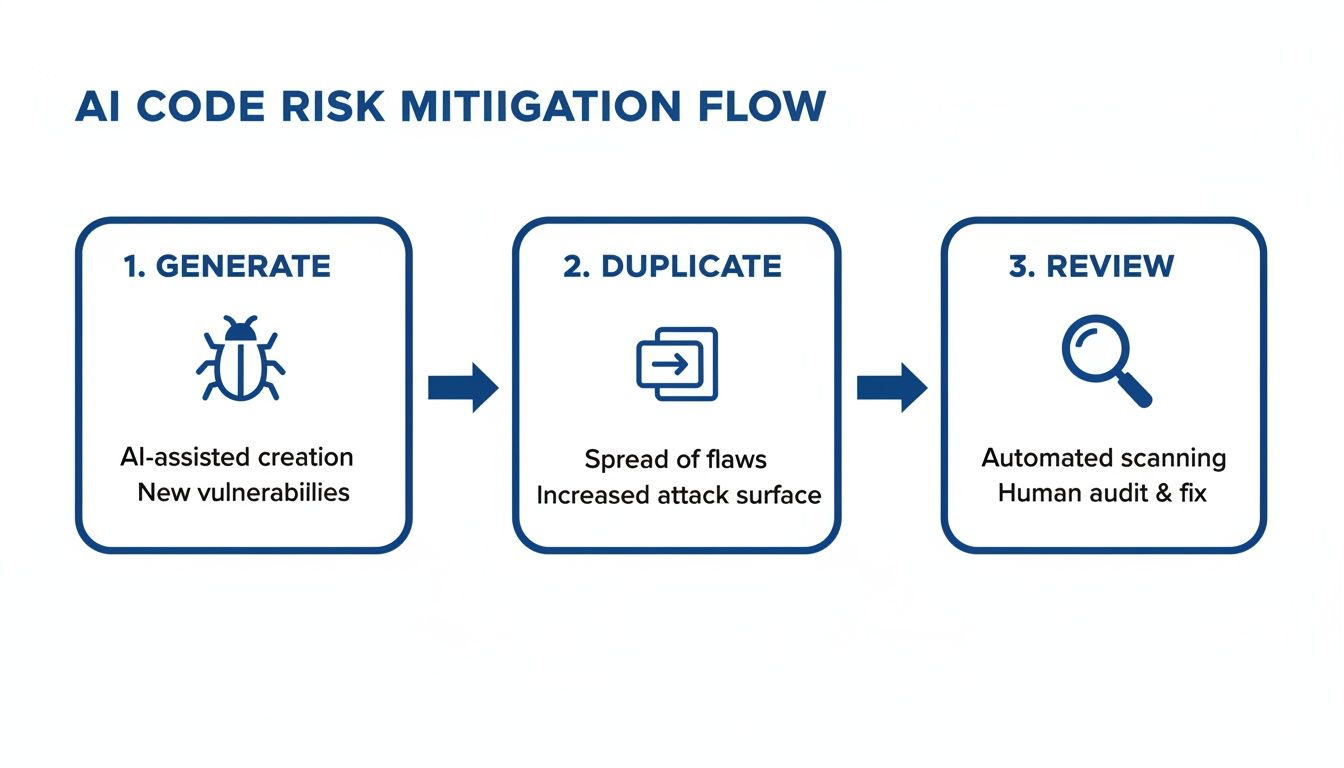
The key takeaway? An AI suggestion is the start of the process, not the end. The real work—and the real value—is in the critical review and verification that follows.
Another killer application is test generation. Writing solid unit and integration tests is non-negotiable, but let's be honest, it can be a grind. An AI code fixer can analyze a function and spit out a whole suite of relevant tests, often catching tricky edge cases you might have overlooked. This doesn't just bump up your code coverage; it makes your entire application more reliable. We dive deeper into this in our guide on using an AI code debugger.
The Critical Role of Real-Time Verification
Here’s the most important part of any AI-assisted workflow: you have to verify the code immediately. Waiting until the pull request stage to find out the AI introduced a subtle bug is painfully slow. It creates friction, slows down the whole team, and completely defeats the purpose of using AI for speed in the first place.
Real-time, in-IDE verification is the safety net that makes a high-velocity, AI-driven workflow possible. It acts as an instant quality gate, checking every AI suggestion for correctness, security, and alignment with your project's standards before it ever gets committed.
This is where a tool like kluster.ai becomes indispensable. By running these checks right inside your editor as the code is generated, you can:
- Catch Hallucinations Instantly: Immediately flag when the AI produces code that looks right but is logically flawed or completely misses your intent.
- Prevent Security Flaws: Scan suggestions for common vulnerabilities before they even touch your codebase.
- Enforce Coding Standards: Automatically make sure every snippet of AI-generated code follows your team's specific style guides and conventions.
This approach fundamentally changes your relationship with the AI code fixer. You move from cautious skepticism to confident collaboration. You can finally code at the speed of thought, knowing you have an automated system right there with you, ensuring every single line is production-ready.
How AI Is Reshaping the Modern Developer Role
The rise of the AI code fixer is completely changing what it means to be a software developer. The job is shifting away from the repetitive, line-by-line grind of writing boilerplate code or hunting for syntax errors. Instead, developers are becoming architects, strategists, and critical thinkers who steer AI tools to build better, more resilient systems.
This isn't just a minor tweak; it’s a fundamental transition that places a new emphasis on higher-level skills. The most valuable work is no longer just typing out code. It’s designing robust application architecture, solving complex business problems, and meticulously vetting the solutions that AI spits out. The modern developer’s job is to ask the right questions and serve as the final quality gate for the AI's output.
A New Focus for Developers and Managers
This evolution is rippling through entire engineering organizations, from individual developers all the way up to leadership. The day-to-day focus is moving toward a new set of responsibilities centered on intelligent collaboration with AI.
- For Developers: Your new primary role is oversight. You have to understand the why behind every single AI suggestion, making sure it aligns with project goals, holds up to security standards, and doesn't sneak in subtle, long-term technical debt.
- For Managers: Your job is to build a culture of responsible AI adoption. That means setting clear guidelines for AI use, creating new quality assurance processes, and equipping your team with tools like kluster.ai that provide real-time verification.
Recent data shows just how widespread this shift is. By 2025, a staggering 85% of developers were regularly using AI coding tools. Interestingly, though, positive sentiment had dipped a bit, which suggests the initial hype is giving way to a more mature, critical view of the technology. You can dig into more of these numbers in Stack Overflow's 2025 developer survey findings on fullview.io.
The future of software development isn't about AI replacing developers. It's about developers who skillfully use AI outperforming those who don't. These tools are amplifiers, not replacements.
Ultimately, embracing an AI code fixer is about empowering yourself to build more, build faster, and ship with greater confidence. By offloading the tedious work, you free up your most valuable resource—your creative problem-solving ability—to tackle the challenges that actually matter.
Got Questions About AI Code Fixers?
Jumping into new tech always brings up a few questions. When that tech is plugged directly into your codebase, it's smart to ask a lot of them. Here are some straight answers to the things we hear most often from developers and engineering leads.
Is It Safe to Use AI Code Fixers with Company Code?
This is the big one, and for good reason. Security should be the first thing on everyone's mind.
Reputable, enterprise-grade AI tools get this. They'll typically offer on-premise solutions or have ironclad, zero-data-retention policies. This is non-negotiable—it means your proprietary code is never stored on their servers or used to train their models.
Before you even think about adopting a tool, dig into its privacy and data handling policies. A simple rule of thumb for your team: never, ever paste sensitive data like API keys or credentials directly into an AI prompt. For an even stronger safety net, use a real-time security scanner that vets every single AI suggestion for vulnerabilities before it even has a chance to get into your codebase.
Will Using an AI Code Fixer Make Me a Worse Coder?
It's a fair question. We've all seen what happens when people rely too much on automation. But the answer really depends on how you use the tool.
If you just blindly click "accept" on every suggestion without a second thought, then yes, your skills are probably going to get dull. But if you treat the AI as a collaborator—a very fast, slightly weird pair programmer—it can actually make you a much stronger developer.
Think of it as a constant learning opportunity. The AI might show you a new coding pattern you've never seen, help you untangle a bug that's been driving you crazy, or just handle the boring, repetitive stuff. That frees up your brainpower to focus on the big picture, like architecture and solving genuinely hard problems.
The trick is to always ask "why" an AI made a certain suggestion. Every interaction is a chance to deepen your own understanding, not just a shortcut to a fix.
How Do I Pick the Right AI Tool for My Team?
There's no single "best" tool out there—the right one is the one that actually fits into your team's day-to-day work without causing a bunch of friction. To figure that out, you need to look at a few key things:
- Language and Framework Support: Does it speak your team's language? A tool that's amazing with Python but clumsy with Rust isn't going to help your Rust team.
- IDE Integration: Does it live where your developers live? It needs to feel like a natural part of their VS Code or JetBrains environment, not some clunky add-on.
- Security and Compliance: Does it meet your company's standards? Check for things like data privacy controls, on-premise options, and compliance certifications.
- Core Strengths: What's it really good at? Some tools are geniuses at debugging, others excel at writing unit tests or optimizing performance. Find one that solves your biggest pain points.
Honestly, the best way to choose is to run a small pilot program. Grab a few developers, let them try out the top contenders for a week or two, and get their honest feedback. Their real-world experience will tell you more than any marketing page ever could.
Ready to stop guessing and start shipping secure, production-ready AI-generated code? kluster.ai gives you real-time verification right inside your IDE, catching errors and enforcing your team's standards before they ever become a problem. Start your free trial at kluster.ai and see what a truly seamless AI workflow feels like.