

Functional Vs Unit Testing A Developer's Deep Dive
Digging into the functional vs unit testing debate really comes down to one thing: scope. Unit testing is like putting a single component under a microscope. It checks the smallest, most isolated pieces of your code—think one function or method—to make sure the logic is sound. Functional testing, on the other hand, zooms out. It looks at a complete user workflow to see if it delivers what the business actually asked for.

Understanding The Core Differences
Software testing isn't a one-size-fits-all deal. It's a layered strategy, and both unit and functional tests are critical pillars. They just operate at totally different altitudes and chase different goals. Knowing which one to grab for the job is key to building an app that’s not just stable, but also genuinely useful.
At its heart, unit testing is a developer's best friend. You're focused on the tiniest testable parts of the code, which we call "units." We're talking individual functions, methods, or components. These tests run in a vacuum, using mocks and stubs to fake any external dependencies, which makes them lightning-fast. That speed is their superpower—it gives developers immediate feedback that their latest changes didn't just break something fundamental.
Now, functional testing flips the script and puts on a user's hat. It couldn't care less about the elegant code you wrote; it only cares if the app works. This kind of testing validates a whole slice of functionality, like logging in, adding an item to a cart, or submitting a form. By nature, these tests need multiple components to work together, proving that the integrated system actually solves the user's problem.
I've always found it helpful to think of it this way: Unit testing asks, "Did I build the thing right?" Functional testing asks, "Did I build the right thing?" One is about technical precision, the other is about delivering on a promise.
To make this crystal clear, let's stack them up side-by-side.
Quick Comparison Unit Vs Functional Testing
This table cuts right to the chase, giving you a high-level look at where these two testing methods diverge. It's a great starting point before we dive deeper into the weeds.
| Attribute | Unit Testing | Functional Testing |
|---|---|---|
| Primary Goal | Verify the correctness of a single, isolated code component. | Validate that a feature or workflow meets business requirements. |
| Scope | Microscopic—one function, method, or class. | Macroscopic—an entire user journey or business process. |
| Perspective | White-box (developer knows the internal structure). | Black-box (tester focuses on inputs and outputs only). |
| Speed | Extremely fast (milliseconds per test). | Slower (seconds to minutes per test). |
| Dependencies | Isolated using mocks and stubs. | Relies on integrated environments and real dependencies. |
| Who Writes It | Primarily developers during the coding phase. | Primarily QA engineers or developers in a testing phase. |
As you can see, they’re designed to solve different problems at different stages. One gives developers confidence in their code, while the other gives the business confidence in the product.
A Detailed Analysis Of Core Testing Attributes
Alright, let's move past the textbook definitions. To really get a handle on functional vs. unit testing, you have to look at the attributes that make them fundamentally different. While they both exist to make your software better, the way they handle scope, speed, and dependencies gives them completely separate jobs in your development cycle.
Getting these nuances right is the key to building a testing strategy that actually works—one that nips bugs in the bud without grinding your team’s progress to a halt.
The Big Picture vs. The Microscope
The single biggest difference in the functional vs unit testing debate is scope. It’s not even close. Unit tests are intentionally microscopic. They are designed to put one, tiny piece of logic under a microscope and verify it does its job perfectly, in total isolation.
Think about a single sorting algorithm tucked away inside a bigger data processing module. A unit test would feed that specific function an unsorted array and just check that the output is sorted correctly. It's a surgical strike. The test doesn't care how the data got there or where it's going next; it only cares that the algorithm itself is correct.
Functional testing, on the other hand, pulls the camera way back for a panoramic view. It’s not about one function; it's about an entire user-facing feature, from start to finish. A functional test might verify the whole "Export to CSV" feature. That means simulating a user clicking the button, which triggers our data processing module (including that sorting algorithm), generates the file, and downloads it. The test confirms the entire workflow delivers what the user expects.
Attribute Deep Dive Functional Vs Unit Testing
To really hammer home the differences, let's break down their core attributes side-by-side. This table cuts through the noise and shows you not just what is different, but why it matters for your team.
| Attribute | Unit Testing In-Depth | Functional Testing In-Depth | Key Takeaway |
|---|---|---|---|
| Purpose | Validate that a single, isolated piece of code (a function or method) behaves exactly as expected. It's about code-level correctness. | Validate that a complete user workflow or feature meets business requirements from start to finish. It's about user-level correctness. | Unit tests find bugs in the code's logic. Functional tests find bugs in the system's behavior. |
| Scope | Microscopic: A single function, method, or class. | Macroscopic: An entire feature, user story, or application workflow (e.g., login, checkout). | Scope is the defining difference. One looks at a tree, the other looks at the whole forest. |
| Speed | Extremely Fast: Executes in milliseconds. No network calls, no database access, no UI rendering. | Slow: Can take seconds to minutes per test. Involves UI interactions, network latency, and database queries. | The speed of unit tests makes them ideal for immediate developer feedback. Functional tests are for less frequent, more comprehensive validation. |
| Dependencies | Strictly Isolated: Uses mocks, stubs, and spies to simulate external dependencies (APIs, databases). The goal is to remove all external variables. | Fully Integrated: Relies on a live, running application with all its real dependencies (UI, services, database). The goal is to test the connections. | Unit tests fail because your code is broken. Functional tests can fail because your code, the network, or a third-party service is broken. |
| Feedback Loop | Instantaneous: Developers run them constantly on their local machine, often before every commit. | Delayed: Typically run in a CI/CD pipeline after a build is deployed to a staging environment. | Fast feedback from unit tests keeps developers in the zone. Slower feedback from functional tests validates the entire integrated system. |
| Who Writes Them? | Almost always developers, often alongside the feature code (e.g., in TDD). | Primarily QA engineers or automation specialists, but sometimes developers contribute. | This division of labor allows developers to focus on implementation details while QA focuses on the end-user experience. |
Understanding these distinctions is crucial. You don’t choose one over the other; you use them together because they solve completely different problems. Unit tests give you confidence that your building blocks are solid, while functional tests ensure you’ve assembled them into something that actually works for the user.
Speed And The Feedback Loop
The massive difference in scope has a direct, and huge, impact on execution speed. This, in turn, dictates the kind of feedback loop you can build for your developers. Unit tests are built for raw speed, often running in milliseconds because they’re just executing a tiny bit of code with no real dependencies like databases or APIs.
This blistering pace is their superpower. A developer can run hundreds, even thousands, of unit tests with every single code change, right from their IDE or as an automated pre-commit hook. It’s an almost instantaneous safety net, screaming "Hey, you just broke something!" seconds after it happens.
A fast feedback loop is the bedrock of agile development. Unit tests provide this by telling a developer their change broke something fundamental in seconds, not hours. This immediacy prevents context switching and keeps momentum high.
Functional tests, by nature, are the tortoises in this race. Simulating a real user journey means you have to deal with the real world: interacting with a live UI, waiting on network requests, and talking to other integrated services. A single functional test can take anywhere from a few seconds to several minutes to run. Because of this, they’re usually run much less frequently, like in a dedicated stage of a CI/CD pipeline after a build hits a testing environment.
Dependencies And Environmental Isolation
This brings us to the next critical differentiator: how each test handles dependencies. Unit tests achieve their speed and precision through strict isolation. They lean heavily on test doubles—things like mocks, stubs, and spies—to fake the behavior of any external modules.
For example, a unit test for a function that fetches user data wouldn't actually hit the database. It would use a mock object that pretends to be the database and just returns a predefined user record. This makes the test deterministic; it will only fail if the function’s own logic is busted, not because the network is down or the database is slow. This concept of isolation is a core principle, which you can read more about in our guide on software component testing.
Functional tests do the complete opposite. They thrive on integration. Their entire reason for existing is to prove that different components, services, and systems are all playing nicely together. A functional test for a user login flow must interact with the actual UI, the real authentication service, and the user database to have any meaning.
This reliance on a fully integrated environment makes functional tests a lot trickier to set up and maintain, but they're invaluable for catching the kinds of bugs that only show up when all the pieces are connected. These are exactly the types of issues that unit tests are designed to miss.
Who Performs The Test And When
Finally, the timing and ownership of these tests are completely different. Developers are typically the ones writing unit tests, often doing it at the same time as the production code itself, especially in a Test-Driven Development (TDD) workflow. QA teams, on the other hand, usually take the lead on functional tests after a feature is considered "code complete."
The numbers back this up. According to the World Quality Report, unit tests can run 10 to 100 times faster than functional ones. A simple test for a square root function might be over in milliseconds, while a full-blown test of a hotel booking workflow—covering search, selection, and payment—can easily take several minutes. You can dig into more data on these performance gaps in this comprehensive testing analysis.
This natural division of labor creates a powerful partnership. Developers focus on code-level correctness, ensuring the logic is sound. Meanwhile, QA professionals concentrate on validating the user-centric business requirements, ensuring the final product does what it’s supposed to do. It’s this balance that leads to a truly effective quality process.
Applying The Testing Pyramid In Your Strategy
It's one thing to know what unit and functional tests are, but it's another thing entirely to figure out how to balance them. The best testing strategies don't just throw a bunch of tests at the wall to see what sticks. They follow a battle-tested model called the Testing Pyramid, which serves as a strategic blueprint for writing efficient tests and getting fast feedback.
The philosophy behind the pyramid is dead simple: write a ton of tests that are fast, cheap, and reliable, and a much smaller number of tests that are slow, expensive, and sometimes flaky. Sticking to this structure gives you the biggest bang for your buck on your testing efforts.
The Anatomy Of A Healthy Testing Strategy
A well-built pyramid has three distinct layers, and each plays a critical role:
- The Base (Unit Tests): This is the foundation of your entire strategy and, by far, the largest part. We're talking about thousands of small, isolated unit tests that run in milliseconds. Because they have zero external dependencies, they give developers instant feedback, catching logic errors right at the source before the code even gets committed.
- The Middle (Integration Tests): This layer is leaner. It’s focused on making sure different components or services play nicely together. These tests are more involved than unit tests because they touch multiple parts of your system, like verifying that your application can actually talk to the database.
- The Peak (Functional/E2E Tests): Right at the very top sits the smallest layer: functional and end-to-end (E2E) tests. These are the most expensive to write, run, and maintain. Their job is to validate complete user journeys through a live application, ensuring the whole system works as expected from a real user's point of view.
The testing pyramid isn't just a theoretical concept; it's a cornerstone strategy in modern software development. Google famously recommends a 70/20/10 split: 70% unit tests, 20% integration tests, and a mere 10% functional tests. This model, championed by agile testing advocate Mike Cohn in the early 2010s and adopted by tech giants, shows exactly why unit tests form the dominant base. You can dig deeper into how this strategic blueprint drives success across the industry.
This diagram helps visualize how the attributes of tests change as you move up the layers.
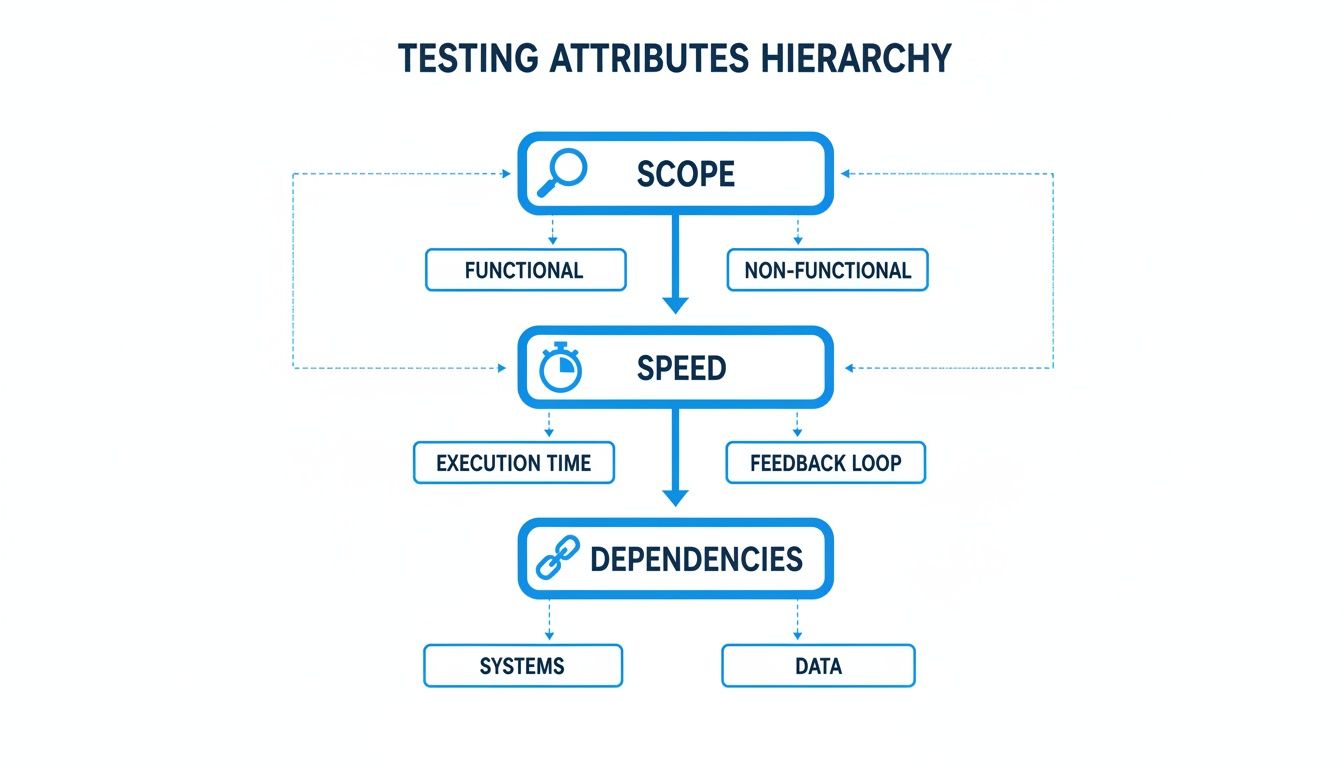
As you climb from unit to functional tests, the scope gets wider, the dependencies pile up, and the execution speed drops off a cliff.
The Danger Of The Inverted Pyramid
An unhealthy testing strategy often looks like an inverted pyramid, an anti-pattern commonly known as the "Ice Cream Cone." This happens when a team leans heavily on slow, brittle functional tests while completely neglecting the foundational unit tests.
The Ice Cream Cone is a recipe for slow feedback loops and high maintenance costs. When a functional test fails, it can be incredibly difficult and time-consuming to debug because the failure could be in any one of the dozen integrated components.
This over-reliance on functional testing is a huge red flag and creates several critical problems:
- Slow Feedback: Teams end up waiting minutes, or even hours, for a test suite to finish, completely killing developer productivity.
- High Maintenance: Small UI changes constantly break functional tests, trapping engineers in a never-ending cycle of fixing brittle scripts.
- Difficult Debugging: A single failed functional test gives you almost no clue about the root cause, forcing developers to go on a bug hunt across multiple services.
- Flaky Results: These tests often fail because of environmental hiccups—like network latency or a service timeout—not actual bugs. This erodes the team's trust in the test suite.
A healthy functional vs unit testing balance isn't just a "nice-to-have" for a modern CI/CD pipeline; it's non-negotiable. By building a massive base of unit tests, you catch the overwhelming majority of defects quickly and cheaply. Functional tests then become what they were always meant to be: a final, high-level check that the fully assembled product meets user expectations, not your primary tool for finding simple logic errors.
Real World Examples With Code Snippets
Theory is great, but seeing code in action is where the concepts really click. To nail down the difference between unit and functional testing, let's step away from the abstract and look at some real code. These examples will show you exactly how the scope, tools, and goals differ in practice.

Unit Testing A Single Function
First up, a classic unit test. Let’s say we have a simple JavaScript function tucked away in cartUtils.js. Its job is to calculate the total price of items in a shopping cart and apply a discount if the user has a valid code.
The function itself is just pure logic, no bells or whistles.
// src/cartUtils.js export function calculateCartTotal(items, discountCode) { const subtotal = items.reduce((sum, item) => sum + item.price, 0); if (discountCode === 'SAVE10') { return subtotal * 0.90; // Apply a 10% discount } return subtotal; }
Now, we'll write a unit test for this function using Jest, a super common JavaScript testing framework. The entire point here is isolation. We're only checking the logic inside calculateCartTotal and nothing else.
// tests/cartUtils.test.js import { calculateCartTotal } from '../src/cartUtils';
describe('calculateCartTotal', () => { it('should return the correct total without a discount', () => { const items = [{ price: 20 }, { price: 30 }]; expect(calculateCartTotal(items, null)).toBe(50); });
it('should apply a 10% discount with the correct code', () => { const items = [{ price: 50 }, { price: 50 }]; expect(calculateCartTotal(items, 'SAVE10')).toBe(90); }); });
This test runs in a flash. It's precise, has zero external dependencies, and instantly tells a developer if their logic is sound. It’s all about that tight, immediate feedback loop.
Functional Testing A User Workflow
Okay, let's switch gears completely and look at a functional test. We're no longer focused on one tiny piece of code. Instead, we're going to test an entire user workflow: successfully logging into an application. This test couldn't care less about the code underneath; it only cares if a user can actually accomplish their goal.
We'll use Cypress, a modern tool built for exactly this kind of testing, to write a script that mimics what a real person would do in a browser.
A functional test script is like a digital user. It clicks, types, and moves through the app's UI, checking that the system behaves as expected every step of the way. It’s a true black-box approach that validates the whole system from the outside in.
This script automates the login process from start to finish.
// cypress/e2e/login.cy.js describe('User Login Flow', () => { it('allows a user to log in and redirects to the dashboard', () => { // 1. Visit the login page cy.visit('/login');
// 2. Find form fields and enter credentials cy.get('input[name="email"]').type('testuser@example.com'); cy.get('input[name="password"]').type('correct-password');
// 3. Click the login button cy.get('button[type="submit"]').click();
// 4. Assert the user is on the dashboard cy.url().should('include', '/dashboard'); cy.contains('Welcome, Test User!').should('be.visible'); }); });
The difference is night and day, right? This test needs a running application. It touches multiple components—the UI, the authentication service, maybe a database—and confirms a complete, user-facing outcome. It's slower and more complex, but it's absolutely crucial for ensuring the system actually delivers on its promises.
Seeing these two examples side-by-side makes the core distinction in the functional vs unit testing debate crystal clear. One checks the bricks, the other checks the wall.
Integrating Tests Into Your CI/CD Pipeline
Knowing the difference between functional and unit testing is just the starting line. The real magic happens when you strategically weave them into an automated Continuous Integration and Continuous Deployment (CI/CD) pipeline. This turns testing from a manual headache into a powerful, consistent quality gate that stands guard over your codebase.
A modern CI/CD pipeline is really just a series of automated checkpoints that code must clear before it ever sees production. Each stage serves a specific purpose, and both unit and functional tests have distinct, non-overlapping roles to play. Nailing this sequence is the bedrock of a reliable delivery process. You can learn more about perfecting your entire workflow by exploring these essential CI/CD best practices.
Unit Tests: The First Line Of Defense
Unit tests are the gatekeepers. They're built for pure speed and precision. Since they run in milliseconds and don't touch external systems, they are perfect for running on every single commit. This is the "fail fast" philosophy in its purest form.
Before a developer's code is even considered for the main branch, the pipeline kicks off the entire unit test suite. This creates an incredibly tight feedback loop, often finishing in less than a minute.
- Trigger: Kicks off automatically on every
git pushor when a pull request is created. - Environment: Runs in a clean, throwaway container with zero external services.
- Feedback: Delivers an immediate pass/fail status right inside the developer's pull request.
A failing unit test at this point sends a crystal-clear signal: the change just broke a fundamental piece of logic. The merge gets blocked, stopping the bug cold before it ever pollutes the main codebase, and the developer gets instant, actionable feedback to fix it.
Functional Tests: The User Acceptance Gate
Once the unit tests pass and the code is merged, a fresh build of the application gets deployed to a dedicated testing environment—often called "staging" or "QA." This is where functional tests enter the picture. Their job is to validate the fully integrated application, just as a user would.
When adding new components to a system, like when creating an API, it's vital to plug its tests into the pipeline at this stage. Functional tests confirm that your shiny new endpoints actually play nice with the rest of the system.
Because they're slower and need a live, running application, functional tests run less often. They serve as the final, crucial acceptance gate before code gets the green light for production.
- Trigger: Runs automatically after a successful deployment to a staging environment.
- Environment: Needs a fully configured, integrated environment that mirrors production.
- Feedback: Validates complete user journeys and business rules, confirming the integrated system works as a cohesive whole.
This two-step validation process plays to the strengths of each test type. Unit tests give you granular, high-speed checks at the code level. Functional tests provide comprehensive, big-picture assurance at the system level. Together, they build a rock-solid pipeline that inspires confidence with every commit.
How In-IDE AI Tools Can Enforce Testing Standards
Keeping testing standards high across a development team is a constant struggle. You can write the best guidelines in the world, but making sure every developer actually writes solid tests—especially when AI assistants are cranking out code—is tough. It's easy for incomplete test coverage to sneak in, leading to regressions that nobody catches until it's too late.
The modern way to solve this is to stop waiting for pull requests. Instead of catching issues at the end of the line, validation needs to happen right in the developer's workspace. In-IDE AI code review tools provide real-time, automated checks on your testing practices as the code is being written. It's like having an immediate quality gate that spots problems in seconds, not hours.
Shifting Test Validation All the Way to the Left
Think of it this way: specialized AI agents inside the IDE can actually understand a developer's intent and scan the repository's history for context. This allows them to automatically check if new code, particularly critical business logic, has proper unit tests to back it up. The entire review cycle gets turned on its head.
An engineering lead, for example, can set up simple rules to enforce the team's standards:
- Require unit tests for any new function touching financial data.
- Flag functions where AI-generated code has less than 80% test coverage.
- Suggest missing test cases for complex edge scenarios a developer might have overlooked.
This instant feedback loop, happening before code is even committed, lets teams squash logic errors and prevent regressions at the source. It’s a true "shift-left" approach that turns code review from a painful bottleneck into a smooth, continuous validation process.
This in-IDE approach for validating tests just makes sense.
The image above shows exactly what this looks like in practice. An AI agent gives feedback right inside the IDE, flagging a function that's missing a test. This kind of immediate, contextual alert lets developers fix the problem right there on the spot, keeping them in their workflow while ensuring testing standards are met.
The Real Impact of Catching Defects Early
This proactive validation isn't just a nice-to-have; it's incredibly valuable. It taps into a fundamental truth of software development: the earlier you catch a bug, the cheaper it is to fix. While functional tests are essential for end-to-end validation, unit tests are surgical, pinpointing defects with white-box precision.
A study from Capgemini found that development strategies heavy on unit testing can find 60% more defects before code even gets to integration. This avoids incredibly costly fixes down the line. It's a modern validation of Boehm's Law, a long-standing model that shows the cost to fix a bug can jump by 100x as it moves from development to production. You can dig deeper into these findings in this detailed comparison of testing strategies.
By enforcing strong unit testing practices directly in the IDE, teams can slash the cost of quality and, ultimately, build software that just works better.
Frequently Asked Questions
Even with a solid plan, questions always come up when you start putting theory into practice. Let's tackle some of the most common points of confusion around functional vs. unit testing and get you some straight answers.
Can Functional Tests Replace Unit Tests?
Absolutely not. Thinking one can replace the other is a classic mistake. They serve completely different, yet complementary, purposes.
Unit tests are your first line of defense. They’re surgical, fast, and designed to verify the tiny bits of logic inside individual components. This is what gives developers instant feedback, makes refactoring safe, and catches simple logic errors before they ever get committed.
Functional tests, on the other hand, confirm that all those individual pieces play nicely together to deliver a complete user workflow. If you only rely on functional tests, your entire process becomes slow, brittle, and expensive. When a functional test fails, good luck pinpointing the root cause—it’s like searching for a needle in a haystack, leading to long, painful debugging sessions.
A healthy testing strategy always starts with a strong foundation of unit tests. Functional tests are then layered on top to verify the integrated system, not to replace the granular checks that unit tests provide.
What Are The Best Tools For Each Testing Type?
The "best" tool always comes down to your tech stack and what your team is comfortable with, but there are definitely some clear industry leaders for both categories.
- For Unit Testing: These frameworks are typically lightweight and built to run locally in a developer’s environment without any fuss. The big names here are JUnit for Java, NUnit for .NET, pytest for Python, and Jest or Mocha in the JavaScript world.
- For Functional Testing: These tools are all about automating a browser and simulating how a real person would click through your application. Selenium is the old guard, the long-standing industry standard. Cypress brought a more modern, developer-friendly approach to the table, and Playwright, backed by Microsoft, is a powerful and rapidly growing contender.
How Much Test Coverage Is Actually Enough?
There’s no single magic number, but industry benchmarks give you a pretty good target to aim for.
For unit tests, a common goal is 70-90% code coverage. Chasing that last 10% to get to 100% often brings diminishing returns; you end up spending a ton of effort writing tests for trivial code. The real focus should be on covering your critical business logic, complex algorithms, and tricky edge cases.
For functional testing, the metric shifts from code coverage to requirement coverage. Here, the goal is to make sure every critical user path and business requirement is validated. Think about workflows like user registration, the checkout process, or core feature interactions. The right balance really depends on your app's complexity and your tolerance for risk.
Enforcing these testing standards across a growing team is a huge challenge. kluster.ai gives you real-time validation right inside the IDE, ensuring every developer—human or AI—writes high-quality tests before the code ever leaves their editor. Book a demo to see how kluster.ai can halve your review time.