

csharp unit testing: A Practical Guide
C# unit testing is all about writing small, automated tests for individual pieces of your application's code, completely cut off from everything else. Think of it like a quality check for each tiny gear in a complex machine before you put the whole thing together. This ensures every component works perfectly on its own, which is the bedrock of building solid, reliable software.
Why C# Unit Testing Is Your Code's Best Friend
Imagine you're building a skyscraper. You wouldn't wait until the whole thing is finished to test the strength of the foundation's concrete or the integrity of a steel beam, right? You'd test each component on its own under controlled conditions. That’s the exact philosophy behind C# unit testing. It's a disciplined way to prove that every small, logical piece of your code—a single method, a class, a function—behaves exactly as you expect it to.
This process gives you an incredible safety net. Once you have a solid suite of unit tests, you can refactor old code or add new features with total confidence. If you accidentally break something, a test will fail immediately, pointing you right to the problem.
The Arrange-Act-Assert Pattern
To keep things organized, developers lean on a simple but powerful pattern: Arrange-Act-Assert (AAA). It's the universal grammar for writing unit tests that are crystal clear and easy to follow.
- Arrange: First, you set the stage. This is where you create all the necessary objects, mock data, or set up any specific state your code needs to run.
- Act: Next, you do the thing. You call the specific method or execute the piece of code that you're actually testing. This is the "unit" under the microscope.
- Assert: Finally, you check the results. You verify that the outcome of the "Act" step was what you expected. Did the method return the right value? Did an object's state change correctly?
At its core, unit testing is about creating a collection of executable specifications. Each test clearly states, "Given this input, I expect this output." This transforms your tests into living documentation that is always perfectly in sync with your code.
This structured approach makes your tests predictable and dead simple to debug. When a test fails, you know exactly where to look—the bug is either in the code you're testing or in the assertion's expectation.
This reliability is a huge reason why C# is such a major player in the unit testing world. The market was valued at a staggering USD 1,740 million in 2024 and is only expected to keep growing. This trend shows just how committed the industry is to quality and how critical C# is for building robust applications. You can dig deeper into the developer ecosystem and check out the key C# trends from JetBrains.
Of course, the importance of testing and reliability goes beyond just your application code; it touches every layer of your system. It's worth exploring the best practices for Infrastructure as Code to see how these principles apply more broadly.
Choosing the Right C# Unit Testing Framework
Once you've got the core ideas of unit testing down, the next big step is picking your framework. This isn't just about downloading a tool; it’s about choosing a testing philosophy that fits your project and your team. In the C# world, this decision usually comes down to three heavyweights: xUnit, NUnit, and MSTest.
Each one has its own personality, its own strengths, and its own way of doing things. Making a smart choice upfront saves you a ton of headaches down the road. Let’s break them down so you can figure out which one feels right.
xUnit: The Modern, Opinionated Choice
Developed by the same mind that originally created NUnit, xUnit is the modern, and dare I say, opinionated successor. It was built with a clear philosophy: enforce strict test isolation to prevent flaky, unreliable tests.
How does it do this? By creating a brand-new instance of the test class for every single test method it runs. This might sound a little inefficient at first, but it's a game-changer. It makes it physically impossible for tests to contaminate each other by sharing state—a classic source of bugs in a test suite. This design choice nudges you, sometimes forcefully, toward writing self-contained and predictable tests.
xUnit also cleans up the syntax. It throws out attributes like [TestFixture] and [SetUp]. Instead, you use a standard class constructor for setup and implement IDisposable for teardown. The result is test code that looks and feels more like regular C# code, which makes it much easier for developers to pick up.
This simple flowchart nails the first question you should always ask before writing a test.
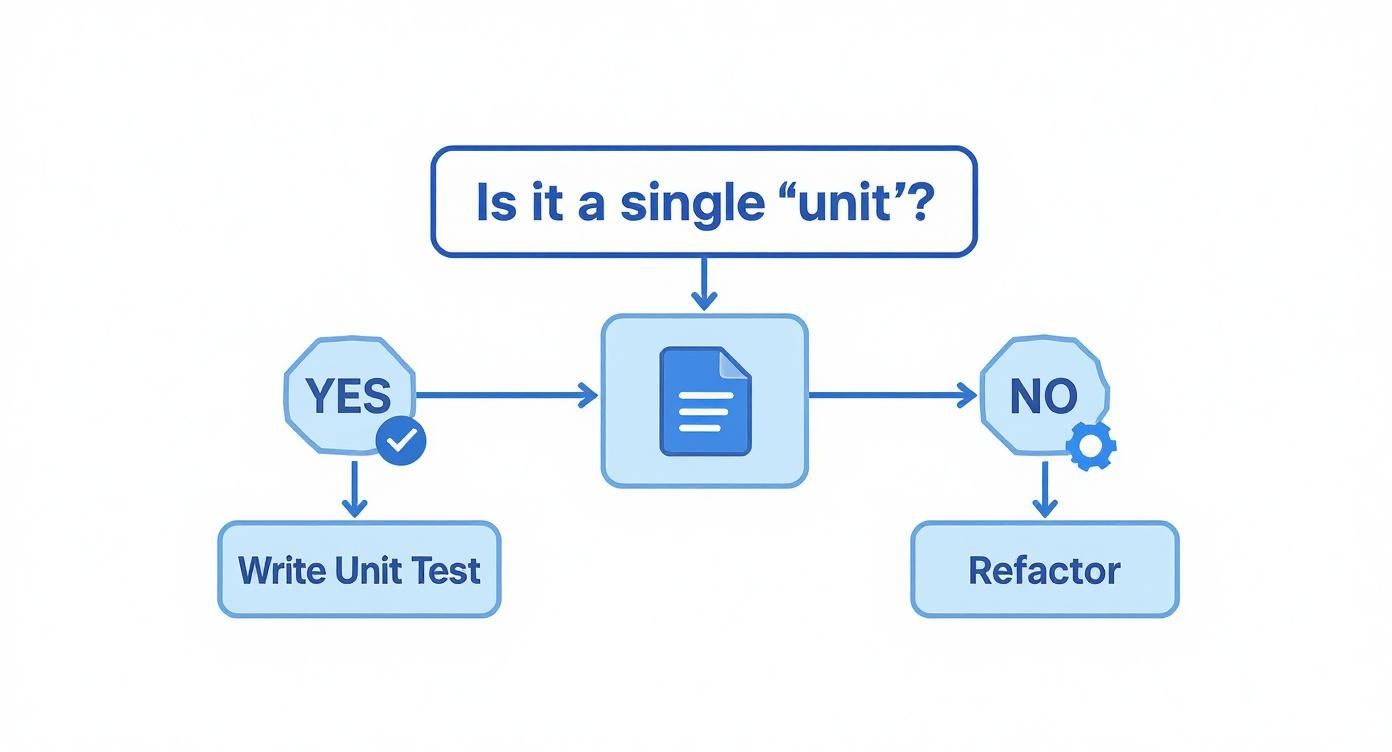
If what you're trying to test isn't a single "unit," your first job isn't to write a test—it's to refactor the code until it is.
NUnit: The Feature-Rich Veteran
NUnit is a true veteran of the .NET testing world. It’s been around the block, and its maturity shows in its incredible flexibility and massive feature set. If xUnit is the strict teacher, NUnit is the one that gives you all the tools and trusts you to use them wisely.
Unlike xUnit, NUnit creates a single instance of a test class and reuses it for all the test methods inside. This means tests can share state. While this can be a footgun if you're not careful, it can also be useful for certain complex or legacy scenarios. NUnit gives you attributes like [SetUp] and [TearDown] to help manage that shared context.
Where NUnit really pulls ahead is its rich ecosystem of attributes and assertions.
[TestCase]makes data-driven testing incredibly simple.[Theory]opens the door to property-based testing.[Repeat]helps you hunt down those annoying, intermittent failures by running a test multiple times.
All these features make NUnit an incredibly powerful and adaptable framework, especially for teams wrestling with older codebases or niche testing requirements.
MSTest: The Integrated Microsoft Standard
MSTest is Microsoft's own testing framework, and its superpower is its deep, native integration with Visual Studio. For a long time, it was the default choice simply because it was already there. While it used to lag behind the open-source competition, the modern MSTest V2 is a serious contender.
The biggest draw is still the seamless Visual Studio integration. Running, debugging, and analyzing tests just feels incredibly smooth and natural right inside the IDE. It's also worth noting that MSTest now runs tests in parallel by default, which can give your test suite a nice speed boost.
Like NUnit, it creates one instance of a test class for the entire run. You’ll see familiar attributes like [TestClass] and [TestMethod] that clearly mark your test code. While its feature set is now much more competitive, its main appeal is for teams who live and breathe the Microsoft development ecosystem, especially Visual Studio and Azure DevOps.
To make the choice a bit clearer, here's a quick side-by-side comparison.
C# Unit Testing Frameworks At a Glance
| Feature | xUnit | NUnit | MSTest |
|---|---|---|---|
| Core Philosophy | Strict test isolation, modern conventions | Flexible, feature-rich, and highly configurable | Deep integration with Visual Studio and the Microsoft ecosystem |
| Test Instantiation | New instance per test method (enforces isolation) | One instance per test fixture (allows shared state) | One instance per test fixture (allows shared state) |
| Setup/Teardown | Class constructor for setup, IDisposable for teardown | [SetUp] and [TearDown] attributes | [TestInitialize] and [TestCleanup] attributes |
| Extensibility | Good, with a clean and modern API | Excellent, with a vast ecosystem of extensions and runners | Good, and improving with MSTest V2 and V3 |
| Parallel Execution | Supported, configurable | Supported, with fine-grained control | Enabled by default at the method level |
| Best For... | Teams wanting to enforce strict TDD practices and isolation | Teams needing flexibility, advanced features, or testing legacy systems. | Teams heavily invested in the Visual Studio and Azure DevOps ecosystem. |
Ultimately, there's no single "best" framework. It all boils down to your team's philosophy.
Do you want xUnit’s strictness to build good habits? Or NUnit's massive toolbox for tackling any problem? Or do you prefer MSTest’s cozy integration for a frictionless workflow?
The right answer depends entirely on your project, your team's experience, and the kind of development culture you want to build.
Your First C# Unit Tests from Scratch

Theory is great, but the real learning happens when you start writing code. It's time to roll up our sleeves and build your first unit tests. We'll go from a plain C# class to a fully tested piece of logic that you can trust in production.
We’re going to build a practical example: a ShippingCostCalculator class. Its job is simple on the surface, but it's packed with business rules that are perfect for testing. By writing tests first, we're not just checking our work; we're creating a safety net that confirms our logic is solid today and protects it from breaking tomorrow.
This approach also turns your tests into a form of living documentation. Each test will spell out a single behavior of our calculator, making it crystal clear what the code is supposed to do for anyone who comes after you.
Setting Up the Code to Test
First, we need something to test. Let’s imagine a simple calculator that figures out shipping costs based on a package's destination and weight.
Here's our ShippingCostCalculator class. It has one public method, CalculateCost, which holds all the business logic we need to lock down with tests.
public class ShippingCostCalculator
{
public decimal CalculateCost(string destination, decimal weight)
{
if (weight <= 0)
{
throw new ArgumentException("Weight must be positive.", nameof(weight));
}
if (destination == "Domestic")
{
// $5 base fee plus $1.5 per kg
return 5.0m + (weight * 1.5m);
}
if (destination == "International")
{
// $20 base fee plus $4 per kg
return 20.0m + (weight * 4.0m);
}
return 0; // Default case for unknown destinations
}
}This little class has a few distinct behaviors we can isolate and test:
- It calculates the cost for a domestic shipment.
- It calculates the cost for an international shipment.
- It throws an exception for invalid (non-positive) weights.
- It returns zero for an unknown destination.
Writing Our First Test with the AAA Pattern
Okay, let's write a test to verify the domestic shipping cost. We'll use the classic Arrange-Act-Assert (AAA) pattern to keep our test clean and easy to understand. The syntax here is from xUnit, but the core idea is the same no matter which framework you choose.
First, we Arrange the world for our test. This means creating an instance of the ShippingCostCalculator and setting up our inputs.
Next, we Act by calling the CalculateCost method with the inputs we just arranged.
Finally, we Assert that the result we got back is exactly what we expected.
[Fact]
public void CalculateCost_ForDomesticShipment_ReturnsCorrectCost()
{
    // Arrange
    var calculator = new ShippingCostCalculator();
    var destination = "Domestic";
    var weight = 10m; // 10 kg
    var expectedCost = 20.0m; // 5 + (10 * 1.5)

    // Act
    var actualCost = calculator.CalculateCost(destination, weight);

    // Assert
    Assert.Equal(expectedCost, actualCost);
}
Look at that—it's clean, readable, and has a single, focused job. If this test ever fails, we’ll know precisely which piece of logic broke. That’s the heart of effective csharp unit testing.
Testing for Different Scenarios and Edge Cases
A solid test suite does more than just check the "happy path." Great tests also prove your code can handle weird inputs and edge cases. Let's add a few more tests to cover the other behaviors of our calculator.
We definitely need a test for international shipments to make sure that logic branch works. We'll follow the exact same AAA structure, just with different inputs and a new expected outcome.
[Fact]
public void CalculateCost_ForInternationalShipment_ReturnsCorrectCost()
{
    // Arrange
    var calculator = new ShippingCostCalculator();
    var destination = "International";
    var weight = 5m; // 5 kg
    var expectedCost = 40.0m; // 20 + (5 * 4)

    // Act
    var actualCost = calculator.CalculateCost(destination, weight);

    // Assert
    Assert.Equal(expectedCost, actualCost);
}
Notice how similar the structure is? This kind of consistency is what makes a test suite easy to maintain. Now, let's tackle something a little different: exceptions.
How to Test for Exceptions
Our code is designed to throw an ArgumentException if someone tries to calculate the cost for a package with zero or negative weight. A good unit test must confirm this guardrail is working. Thankfully, most testing frameworks have a special assertion just for this.
A critical part of unit testing is verifying not just what your code does, but also what it doesn't do. Testing that your code correctly throws exceptions for invalid input is just as important as testing for correct return values.
Here's how you can write a test to make sure an exception is thrown, using xUnit's Assert.Throws.
[Fact]
public void CalculateCost_WithZeroWeight_ThrowsArgumentException()
{
// Arrange
var calculator = new ShippingCostCalculator();
var destination = "Domestic";
var weight = 0m;
// Act & Assert
Assert.Throws<ArgumentException>(() => calculator.CalculateCost(destination, weight));
}In this test, the Act and Assert steps are combined into one. The test passes only if the code inside the lambda expression throws the exact exception type we specified (ArgumentException). If it throws a different exception—or no exception at all—the test fails, immediately flagging a problem.
With that, our safety net is complete. We now have the confidence to change or expand this calculator's logic without accidentally breaking something.
Isolating Code with Mocks and Stubs

Real-world code rarely lives in a bubble. Your classes almost always depend on other components to get their job done—things like fetching data from a database, calling an external API, or sending an email. When you sit down to write a unit test, how do you focus only on your logic without accidentally testing the database connection or a third-party service along with it?
The answer is test isolation, and the tools we use to achieve it are called test doubles. Think of a test double like a stunt double in a movie. When a scene is too risky or needs a special skill the main actor doesn’t have, the stunt double steps in. They look and act enough like the real actor to make the scene work, but you have complete control over their every move.
In C# unit testing, we use test doubles to stand in for real dependencies. This ensures our tests are fast, predictable, and laser-focused on the single unit of code we actually want to test.
Understanding Mocks, Stubs, and Fakes
While many developers use "mocking" as a catch-all term, there are actually a few distinct types of test doubles. Each has a specific job, and knowing the difference is the key to writing clean, effective tests.
-
Stubs: These are the simplest of the bunch. A stub just provides pre-programmed answers to calls made during a test. For instance, if your code needs to get a user from a repository, you can create a stub that always returns the same hardcoded user object. Stubs are all about providing state to let the test run.
-
Mocks: Mocks are a bit smarter. They are objects that you program with specific expectations. You can tell a mock, "I expect you to be called exactly one time, and it must be with these specific arguments." Mocks are less about providing state and more about verifying behavior and the interactions between objects.
-
Fakes: A fake is a more complex stand-in that has a workable, but simplified, implementation. The classic example is an in-memory database. It behaves like a real database for your test—you can add, query, and remove data—but it’s way faster and doesn't need a real database connection.
For most day-to-day C# unit testing, you'll find yourself working primarily with mocks and stubs. They hit the sweet spot, giving you the perfect balance of control and simplicity for isolating the code you're testing.
Practical Isolation with a Mocking Library
Manually creating these test doubles for every dependency would be a massive pain. This is where mocking libraries come to the rescue. Frameworks like Moq or NSubstitute make it incredibly easy to create mocks and stubs on the fly.
Let's say we have a UserService that depends on an IUserRepository to fetch user data. We only want to test the logic inside UserService, not the repository itself. With a library like Moq, we can create a mock of that repository in just one line of code.
The library gives you a clean, lambda-based syntax that feels natural inside C# and makes defining the behavior of your mock objects totally intuitive.
Here's a practical example. First, let's define our dependency interface and the service that uses it.
public interface IUserRepository
{
    User GetUserById(int id);
}

public class UserService
{
    private readonly IUserRepository _repository;

    public UserService(IUserRepository repository)
    {
        _repository = repository;
    }

    public string GetUserGreeting(int id)
    {
        var user = _repository.GetUserById(id);
        return $"Hello, {user.Name}!";
    }
}
Now, in our unit test, we can use Moq to create a stand-in for the IUserRepository.
[Fact]
public void GetUserGreeting_WithValidId_ReturnsCorrectGreeting()
{
// Arrange
var mockRepository = new Mock<IUserRepository>();
var fakeUser = new User { Name = "Alice" };
// Set up the mock to return our fake user when GetUserById is called with any integer
mockRepository.Setup(repo => repo.GetUserById(It.IsAny<int>())).Returns(fakeUser);
var service = new UserService(mockRepository.Object);
// Act
var result = service.GetUserGreeting(1);
// Assert
Assert.Equal("Hello, Alice!", result);
}In this test, we are in complete control. We didn't touch a database. We told the repository exactly what to do and when to do it. This makes our test lightning-fast and 100% reliable, focusing solely on whether the GetUserGreeting method correctly formats the string. That’s the power of isolation.
Embracing a Test-First Mindset with TDD
So far, we've approached testing as something you do after your code is written. But what if we flipped that on its head? What if you wrote the test before you even had a single line of implementation code?
That's the core idea behind Test-Driven Development (TDD). It's a workflow that completely changes the game, turning testing from a simple verification step into a powerful tool for designing software.
Instead of writing a big chunk of code and then scratching your head trying to figure out how to test it, TDD makes you define the goal first. You have to articulate exactly what you want the code to do before you worry about how it's going to do it. This small change in perspective naturally guides you toward writing small, focused, and incredibly testable code right from the start.
This isn't just some academic theory; it's a disciplined practice that leads to dramatically better software design. When you start with a test, you're forced to think about a class's public API and its specific responsibilities upfront, which almost always results in a cleaner, more decoupled architecture.
The Red-Green-Refactor Cycle
The heart of TDD is a simple, rhythmic loop known as Red-Green-Refactor. Think of it as a development dance with three steps that keeps you moving forward in small, safe, and verifiable increments.
-
Red (Write a Failing Test): Before writing any production code, you write a unit test for the feature you're about to build. Since the code doesn't exist yet, the test is guaranteed to fail. This is the "Red" light. Seeing it fail is a good thing—it proves your test works and that the functionality isn't already there by mistake.
-
Green (Make the Test Pass): Now, your one and only job is to make that failing test pass. Write the absolute simplest, most direct code you can to get to a "Green" light. Don't worry about making it perfect or elegant yet. Just make it work.
-
Refactor (Clean Up the Code): With a passing test acting as your safety net, you can now refactor with confidence. Clean up the code, rename variables, remove duplication, or improve the logic. If you accidentally break something, the test will immediately fail and tell you to take a step back.
TDD transforms unit tests from a mere safety net into a powerful design tool. The Red-Green-Refactor cycle guides you toward creating code that is not only correct but also clean, simple, and easy to maintain from the moment it's written.
You repeat this cycle for every tiny piece of new functionality. Write a failing test, make it pass, clean it up, and move on to the next. This process naturally promotes iterative progress and constant feedback, aligning perfectly with established software development best practices.
Integrating Tests into Your CI Pipeline
Writing tests is a great first step, but they become a true superpower when they're automated. This is where Continuous Integration (CI) enters the picture. A CI pipeline is an automated workflow that builds and tests your code every single time a change is pushed to your repository.
Tools like GitHub Actions, Azure DevOps, or Jenkins can be set up to automatically run your entire csharp unit testing suite on every commit. This creates a non-negotiable quality gate for your project.
Creating a Quality Gate with GitHub Actions
Imagine every time you or a teammate pushes code, a process kicks off in the background. It compiles the application and runs every single unit test you've written.
- If all tests pass, the change is considered safe to merge.
- If even one test fails, the build is marked as broken, and the team gets notified immediately.
This instant feedback loop is a game-changer. It catches regressions the moment they're introduced and puts an end to the classic "it works on my machine" problem. A CI pipeline that runs your unit tests is the ultimate guardian of your codebase, ensuring your application is always stable and empowering your team to ship features faster and with far more confidence.
Common Pitfalls in C# Unit Testing and How to Avoid Them

So, you're writing tests. That's a huge step in the right direction. But there's a world of difference between just writing tests and writing effective tests that actually safeguard your code. A poorly written test suite can quickly turn into a liability, slowing everyone down and giving you a false sense of security. To make sure your csharp unit testing efforts are a net positive, you need to know the common traps developers fall into.
One of the biggest mistakes is treating code coverage as a target instead of a compass. Chasing 100% coverage often leads to writing mountains of low-value tests that just check trivial properties to make a number go up. It's a classic case of missing the forest for the trees.
Instead, think of coverage reports as a map that highlights unexplored territory. Use them to find critical, untested logic in your application. An 80% coverage that nails all your core business rules is infinitely more valuable than 100% coverage that includes simple getters and setters.
The global software testing market is set to hit USD 97.3 billion by 2032, which shows just how seriously the industry takes quality. It's a professional commitment that goes way beyond just shipping code. You can see more on these industry trends in software testing.
Avoiding Brittle and Unreliable Tests
Ever had a test break after you simply renamed a private variable or refactored a helper method? That's a brittle test. They create constant noise, erode trust in your test suite, and turn maintenance into a nightmare.
The root cause is almost always the same: testing implementation details instead of public behavior. A unit test should care about what your code does, not how it does it.
Your test should act like a customer of your code. It only cares about the public inputs it provides and the observable outputs it receives. It shouldn't know anything about the private, internal machinery humming away inside the class.
To build tests that last, focus on these principles:
- Test the Public API: Your assertions should check what a customer of your code would see. Did a public method return the right value? Did an object's public state change correctly? Was the right exception thrown?
- Never Test Private Methods Directly: If a private method is so complex that you feel it needs its own dedicated test, that's a huge red flag. It's a sign that the logic should be extracted into its own class with a proper public interface.
- Avoid Mocking Everything: Over-mocking can handcuff your tests to the current implementation. Save mocks for true external dependencies that you can't control, like databases, third-party APIs, or the file system.
Keeping Your Test Suite Fast and Maintainable
As a project grows, a slow test suite becomes a ball and chain. If running tests takes too long, developers will start skipping them locally just to get work done. That completely defeats the purpose of having a rapid feedback cycle.
Here's how to keep your tests lean and mean:
- Strictly Isolate Unit Tests: A true unit test never touches the network, the database, or the file system. Period. Use mocks and stubs for all external dependencies to keep them fast and deterministic.
- Keep Tests Focused: Each test method should verify one, and only one, piece of logical behavior. This makes them way easier to read, understand, and debug when something inevitably fails.
- Use Descriptive Names: A test named
Calculate_WithNegativeInput_ThrowsExceptiontells you exactly what went wrong. A test namedTest1tells you nothing.
Getting a whole team to follow these rules can be tough. People forget, and old habits die hard. This is where modern tooling can really help. AI-powered review tools can be configured to automatically flag tests that violate these standards, like trying to access the network or using a bad naming convention. This builds quality checks right into the workflow. You can dive deeper into some best practices for code review.
A Few Common Questions About C# Unit Testing
As you start writing more tests, a few questions always seem to pop up. Let's tackle the big ones head-on so you can get back to coding with confidence.
What’s the Real Difference Between Unit and Integration Testing?
Think of your application like a car engine. A unit test is like taking a single spark plug out and testing it on a workbench. You're checking just that one component in total isolation to make sure it works exactly as designed. You use fake parts (mocks) to simulate the engine block and wiring.
An integration test, on the other hand, puts the spark plug back in the engine, connects the wires, and turns the key to see if it works with the other parts. You're testing how components fit and work together.
Both are critical. Unit tests are lightning-fast and tell you precisely where a piece of logic failed. Integration tests are slower but prove that the whole system collaborates correctly.
Seriously, How Much Test Coverage Is Enough?
Forget the magic number. Chasing 80% or 90% coverage is a trap that often leads to testing pointless code just to make a metric look good.
The real goal is confidence. Can you refactor a critical piece of code or ship a new feature without being terrified that you broke something? If the answer is yes, your coverage is good enough. Use coverage reports as a map to find dark corners of your business logic that you haven't tested, not as a report card.
Should I Be Testing Private Methods Directly?
As a rule of thumb, no. Private methods are implementation details—they're the "how" behind the "what." You should only be testing the public methods that call them.
If you have a private method that's so complex you feel an overwhelming urge to test it directly, that's usually a sign. It's your code telling you that the method wants to be its own class with a clean, public interface. Extract it, and suddenly it's easy to test through its public API, and your overall design is better for it.
Enforce these best practices and catch regressions before they happen with kluster.ai. Our in-IDE AI review platform verifies 100% of AI-generated code, ensuring your team ships trusted, production-ready code faster. Bring instant verification and organization-wide standards into every developer’s workflow by visiting https://kluster.ai.