

A Benchmark of Code Review Tools
Code review takes time. Good review takes more time. And in most teams it becomes a bottleneck that impacts the ability to ship high quality code fast.
AI code review tools exist to help with that. They can catch bugs and issues automatically, take pressure off senior reviewers, and shorten the feedback loop so developers spend less time waiting and context-switching. But teams only adopt them if two things are true. The tool has to be accurate enough, and it has to be usable enough that engineers keep paying attention to what it says.
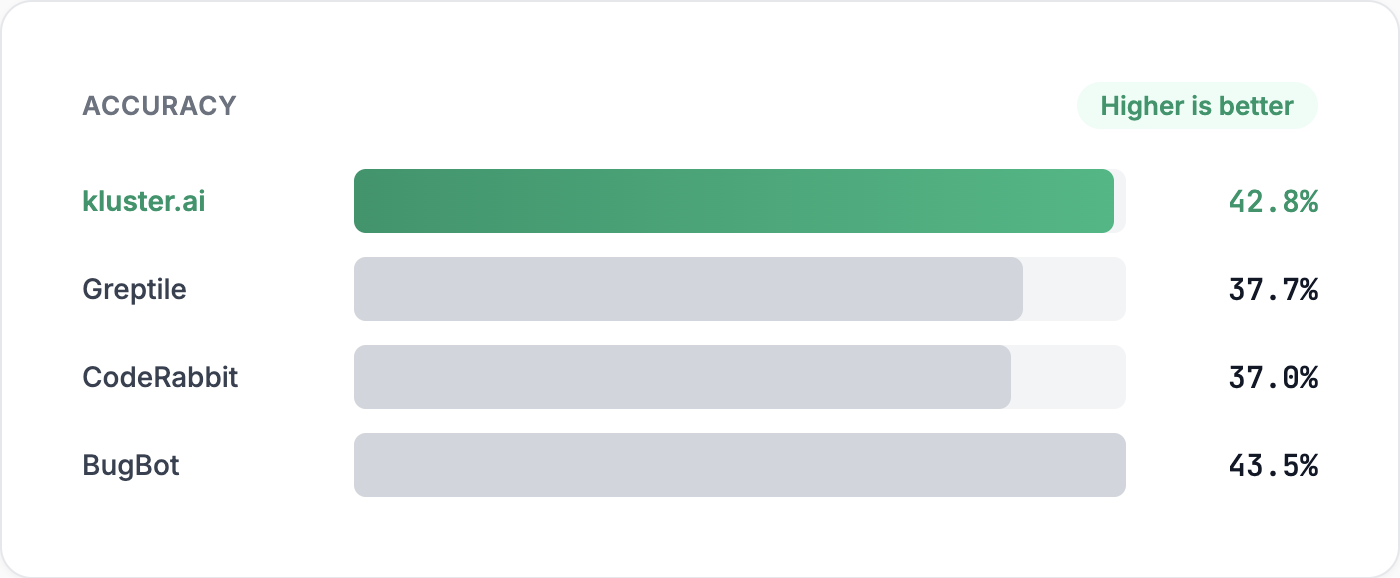
So let's start with the obvious question: which tool is most accurate? In these benchmarks, kluster.ai has the accuracy you would expect from the best tools, while delivering a massive speed advantage. Cursor BugBot is slightly higher at 43.5%, kluster.ai is 42.8%, and the others (CodeRabbit, Greptile) are in the high 30s. These tools are broadly comparable on headline accuracy.
We built this benchmark to be representative: changes taken from large, multi-language real-world codebases, a mix of bug-introducing and bug-fixing PRs, default settings for every tool, and strict scoring against ground-truth bug descriptions. The goal is to measure what teams actually feel in practice: correctness, noise, and time-to-feedback.
That matters because it means the decision is not “accuracy or speed”. You can get similar correctness and still choose a reviewer that fits naturally into the development workflow. After that, the deciding factors become noise and latency. Noise determines whether developers trust the tool. Latency determines whether the feedback arrives while the developer still has the change in mind.
This post explains what we measured, how we measured it, and what we found.
What We Compared
We compared four tools under default settings: kluster.ai, Greptile, CodeRabbit, and Cursor BugBot.
We used defaults because that is what teams evaluate first, and because tuning one tool but not another makes comparisons meaningless. kluster.ai can be run in a stricter mode that increases bugs and issues detected, trading precision for recall. We did not enable it here. The benchmark uses default mode to avoid tuning advantages and to reflect real deployments.
The benchmark run consists of 138 samples:
- 75 bug-intro samples where a bug exists after the change
- 63 bug-fix or clean samples where no bug exists
How We Ran the Tools
Most of the tools in this benchmark are designed to run as GitHub PR reviewers. For those tools, the harness creates a PR for each sample, posts the tool’s normal trigger command, and waits for the review to complete using GitHub checks plus tool-specific completion markers.
kluster.ai is designed to run inside the IDE (or coding agent), where it reviews the code you are editing and responds immediately. So for kluster.ai, we exercised the tool the way teams normally use it, but in an automated harness: the harness submits an IDE-style review request via the kluster.ai API against the same diff, then measures request-to-response latency.
Every tool saw the same changes. Each was evaluated through its primary integration path: PR review for PR-based tools, IDE-style requests for kluster.ai.
How We Scored Findings
If you have used code review tools, you have seen the most common failure mode. The tool finds something that sounds plausible, but it is not a real problem. That still costs time. Someone reads it, reasons about it, then discards it. We count these as false positives.
Rules
- A wrong bug or issue counts as a false positive.
- For bug-fix or clean samples, any claimed bug or issue counts as a false positive.
- A true positive requires identifying the correct bug or issue on bug-intro changes.
- A false negative means no issues detected when a bug exists.
Outcome logic
- TP: correct bug or issue found on bug-intro changes
- FP: wrong bug or issue, or any bug or issue claim on clean code
- FN: no positive claim when a bug exists
Results
Quality (Default Settings, 138 Samples)
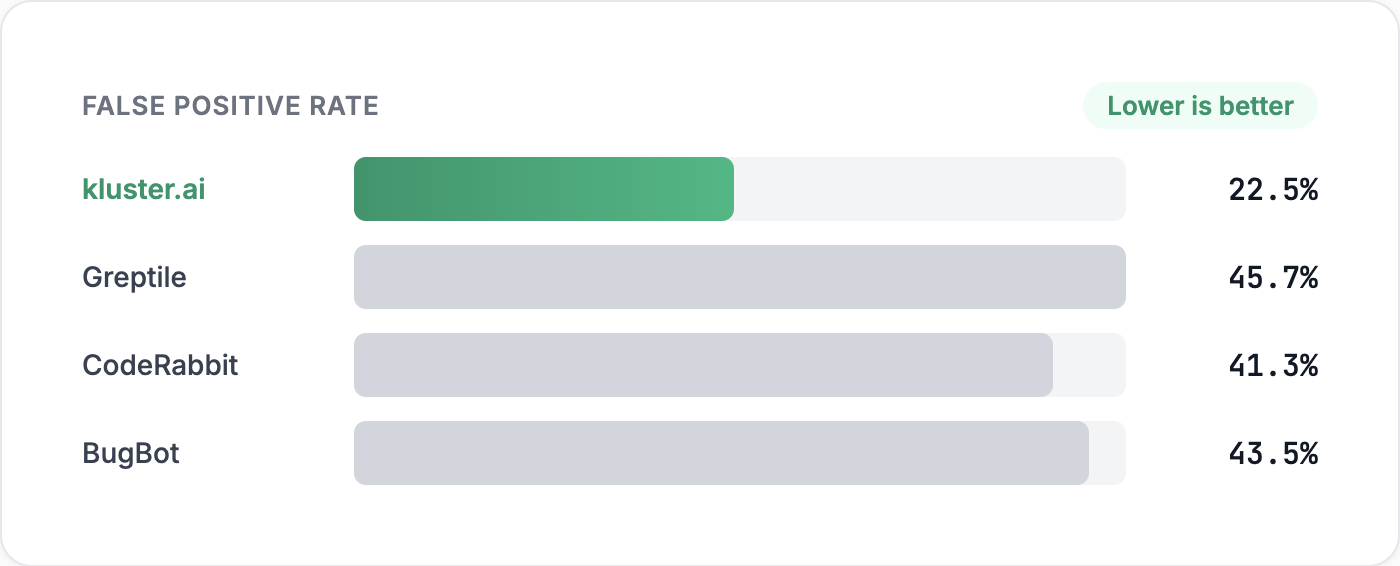
The headline: kluster.ai matches top-tier accuracy while producing significantly fewer false positives.
False positives on clean code are pure noise. Nothing is wrong, yet the developer still has to stop and check. False positives on buggy code are often worse because they divert attention away from the real issue.
kluster.ai’s default behavior is intentionally precise. It trades some recall to reduce the two kinds of false positives that cause teams to disengage, while maintaining top-tier accuracy.
Speed
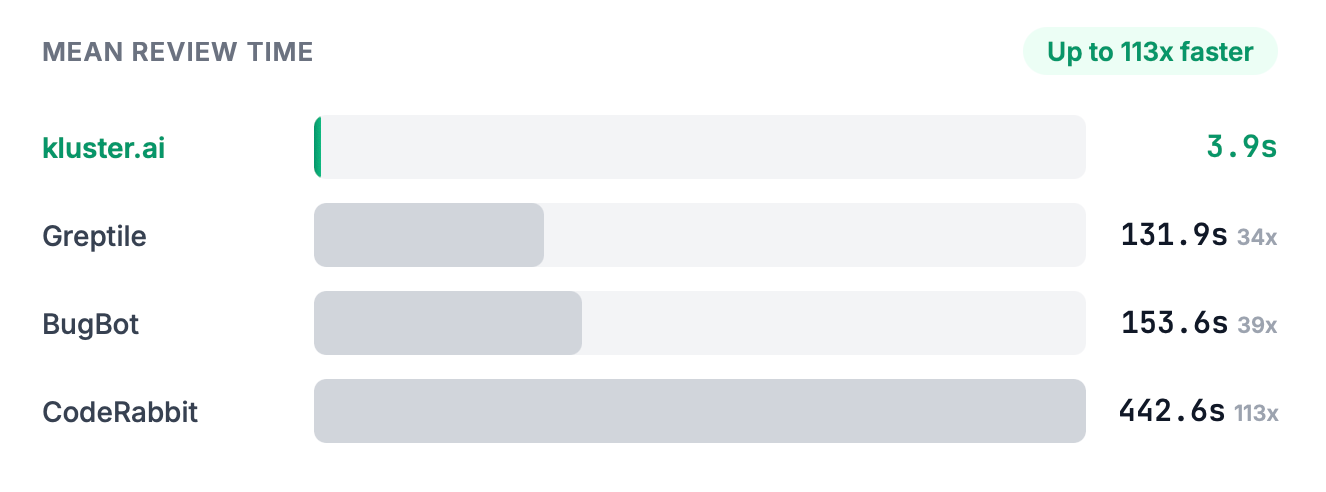
The takeaway: kluster.ai achieves similar accuracy and higher trust, but with seconds-level latency instead of minutes.
Speed matters because feedback loses value over time. If a reviewer responds while the developer is still editing, the fix can happen immediately. If it takes minutes or hours, the context is gone.
Examples: What We Mean by "Wrong Issue"
The real benchmark cases include full diffs and surrounding code. Below are simplified examples with enough context to show how correctness and noise were judged.
Example 1: Correct Bug Found (True Positive)
Context: A function paginates through results and is expected to fetch all pages including the last one.
function fetchAllPages(totalPages) {
 let page = 1;
 const results = [];


- while (page <= totalPages) {
+ while (page < totalPages) {
   results.push(...fetchPage(page));
   page++;
 }


 return results;
}
A correct finding says the loop condition change skips the last page and drops results.
Example 2: Clean Code, Invented Issue (False Positive on Clean Code)
Context: A field is optional. The change adds a guard so the function stops throwing when data is missing.
function displayName(user) {
- return user.profile.name.toLowerCase();
+ if (!user?.profile?.name) return "";
+ return user.profile.name.toLowerCase();
}
A false positive finding treats returning an empty string as a bug, or invents a security issue, when the intended behavior is to avoid crashing and return a safe default.
Example 3: Buggy Change, Wrong Issue (False Positive on Buggy)
Context: Saving must be awaited so callers only continue after persistence completes.
async function createRecord(store, record) {
- await store.save(record);
 return record.id;
+ store.save(record);
+ return record.id;
}
A correct finding flags the missing await as a race or durability bug. A wrong-issue finding complains about record.id possibly being undefined while missing the real problem. Under our scoring, wrong-issue findings count as false positives because they still consume reviewer attention without helping fix the bug that actually exists.
How the Ground Truth Match Worked
Each sample in the benchmark comes with a ground-truth description of the bug, or a statement that the code is clean after the change.
For each tool’s output, we used an LLM as a judge to decide whether the reported finding matched the ground truth at the level that matters in review: the same underlying bug or issue, even if described differently. This was not a word-for-word comparison. Different wording counted as correct if it referred to the same root cause and impact. If the tool identified a different issue, it was scored as a false positive. For bug-fix or clean samples, the only passing outcome was that the tool reported no bug.
Benchmark Notes
- Source: SweSynth with reconstructed pre and post code states drawn from large-scale real-world repositories.
- Reconstruction: materialize file contents from patches, seed a staging repo for consistent diffs.
- PR-based tools: create PRs, trigger review with each tool’s normal command, detect completion via GitHub Checks/Status APIs and tool markers.
- kluster.ai: submit IDE-style review request via API against the same diff and code state, measure request-to-response latency.
- Metrics: precision, recall, F1, accuracy. Wrong-issue findings count as false positives.
- Time measurement: PR tools measure PR creation to latest reviewer comment; kluster.ai measures request-to-response latency on its API.
Summary
This benchmark was designed to approximate real-world usage: large, multi-language codebases, realistic bugs and fixes, and tools run in their default modes.
Three results stand out:
- Accuracy: kluster.ai has the accuracy you expect from the best tools in the category.
- Trust: kluster.ai reports significantly fewer false positives.
- Speed: kluster.ai delivers reviews in seconds, not minutes.
If you want an AI reviewer that is accurate, low-noise, and fast enough to stay in the developer’s working context, try kluster.ai in your IDE. If you want to evaluate it with your team, let us know and we would be happy to help.